CheckoutDonate
This document provides a detailed guide to implementing the CheckoutDonate component, a flexible solution for adding donation functionality to your application. By following these steps, you will learn how to configure the component, set up the required providers, and utilize its various display modes to create a seamless donation experience.
The CheckoutDonate component is designed to be highly customizable, supporting everything from a simple donation button to a fully bespoke user interface. It must be wrapped within both a PaymentProvider and a DonateProvider to manage state and connect to the payment backend.
Provider Setup#
Correctly setting up the PaymentProvider and DonateProvider is a prerequisite for using CheckoutDonate. The PaymentProvider handles the connection to the payment service, while the DonateProvider manages the configuration and state for donation instances within a specific part of your application.
The following diagram illustrates how these providers wrap the CheckoutDonate component and interact with the payment backend and your application's session context.
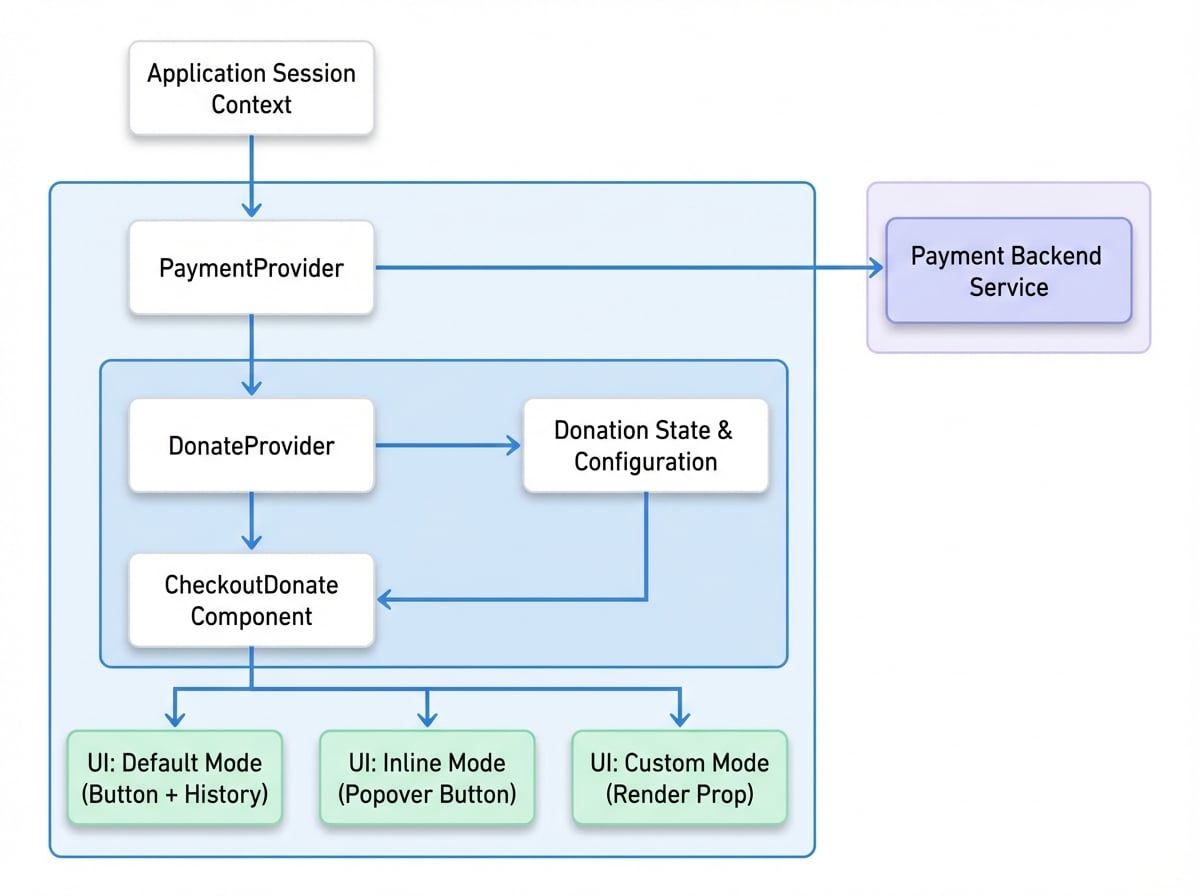
The example below demonstrates the required provider structure. The DonateProvider is configured with a unique mountLocation to distinguish this donation context from others in your application.
ProviderSetup.jsx
import {
  PaymentProvider,
  DonateProvider,
  CheckoutDonate,
} from '@blocklet/payment-react';
import { useSessionContext } from '../hooks/session-context'; // This is your app's session context hook

function DonationSection() {
  const { session, connectApi } = useSessionContext();

  if (!session) {
    return <div>Loading session...</div>;
  }

  return (
    <PaymentProvider session={session} connectApi={connectApi}>
      <DonateProvider
        mountLocation="blog-post-donations"
        description="Handles all donations for blog posts"
        defaultSettings={{
          btnText: 'Support Me',
          historyType: 'avatar',
        }}>
        <CheckoutDonate
          settings={{
See all 16 lines
For a more in-depth explanation of its props and functionality, please refer to the DonateProvider documentation.
Component Props#
The CheckoutDonate component accepts several props to control its behavior and appearance.
Configuration object for this specific donation instance. See the CheckoutDonateSettings section below for details.
Callback function executed after a successful donation. It receives the checkout session details as an argument.
Callback function executed if an error occurs during the payment process.
Specifies the rendering mode. 'default' shows a button and supporter list. 'inline' shows a button that opens a popover. 'custom' uses a render prop for a completely custom UI.
Configuration options specific to the 'inline' mode.
Overrides the livemode setting from PaymentProvider. Set to true for live transactions or false for test transactions.
The delay in milliseconds before the donation dialog closes automatically after a successful payment.
A render prop function used only when mode is set to 'custom'. See the Custom UI Mode example for the function signature.
CheckoutDonateSettings#
This object is passed to the settings prop and defines the core details of the donation target.
A unique identifier for the donation target, such as a post ID or project name. This is used to group donations.
The title displayed at the top of the donation dialog.
A brief description of the donation's purpose, shown in the dialog.
A URL related to the donation target, used for record-keeping and context.
An array of objects defining the fund recipients. Each object must include an address (recipient's DID) and a share (percentage).
Configures the donation amounts. If not provided, it falls back to settings from DonateProvider or a system default.
Customizes the component's visual elements.
Usage Examples#
Default Mode#
The default mode is the most straightforward implementation. It renders a donation button and a list of recent supporters. Clicking the button opens a dialog where the user can complete the donation.
DefaultMode.jsx
import {
  PaymentProvider,
  DonateProvider,
  CheckoutDonate,
} from '@blocklet/payment-react';
import { useSessionContext } from '../hooks/session-context';

function App() {
  const { session, connectApi } = useSessionContext();

  if (!session) {
    return <div>Loading session...</div>;
  }

  return (
    <PaymentProvider session={session} connectApi={connectApi}>
      <DonateProvider
        mountLocation="blog-post-donations"
        description="Donations for the main blog"
        defaultSettings={{
          btnText: 'Buy me a coffee',
          historyType: 'avatar',
        }}>
        <CheckoutDonate
          settings={{
See all 19 lines
Custom UI Mode#
For complete control over the layout and presentation, use mode="custom". This mode utilizes a render prop passed as the component's children. The function provides access to the donation state and methods, allowing you to build a unique user experience.
CustomMode.jsx
import {
  PaymentProvider,
  DonateProvider,
  CheckoutDonate,
} from '@blocklet/payment-react';
import { useSessionContext } from '../hooks/session-context';
import { CircularProgress, Button, Avatar, Box, Typography } from '@mui/material';

function CustomDonationDisplay() {
  const { session, connectApi } = useSessionContext();

  if (!session) {
    return <div>Loading session...</div>;
  }

  const donateSettings = {
    target: 'project-alpha',
    title: 'Support Project Alpha',
    description: 'Help us build the next generation of tools.',
    reference: 'https://example.com/projects/alpha',
    beneficiaries: [
      {
        address: 'z2qa...gCLd',
        share: '100',
      },
See all 36 lines
Custom Render Prop Arguments#
The children function provides the following arguments:
openDonate(): A function to programmatically open the donation dialog.donateTotalAmount: A formatted string representing the total amount donated (e.g.,"125.00 T").supporters: ADonateHistoryobject containing thesupportersarray, total amount, currency, and method details.loading: A boolean that istruewhile supporter data is being fetched.donateSettings: The final, resolved donation settings, merged fromDonateProviderand the component'ssettingsprop.