OverdueInvoicePayment
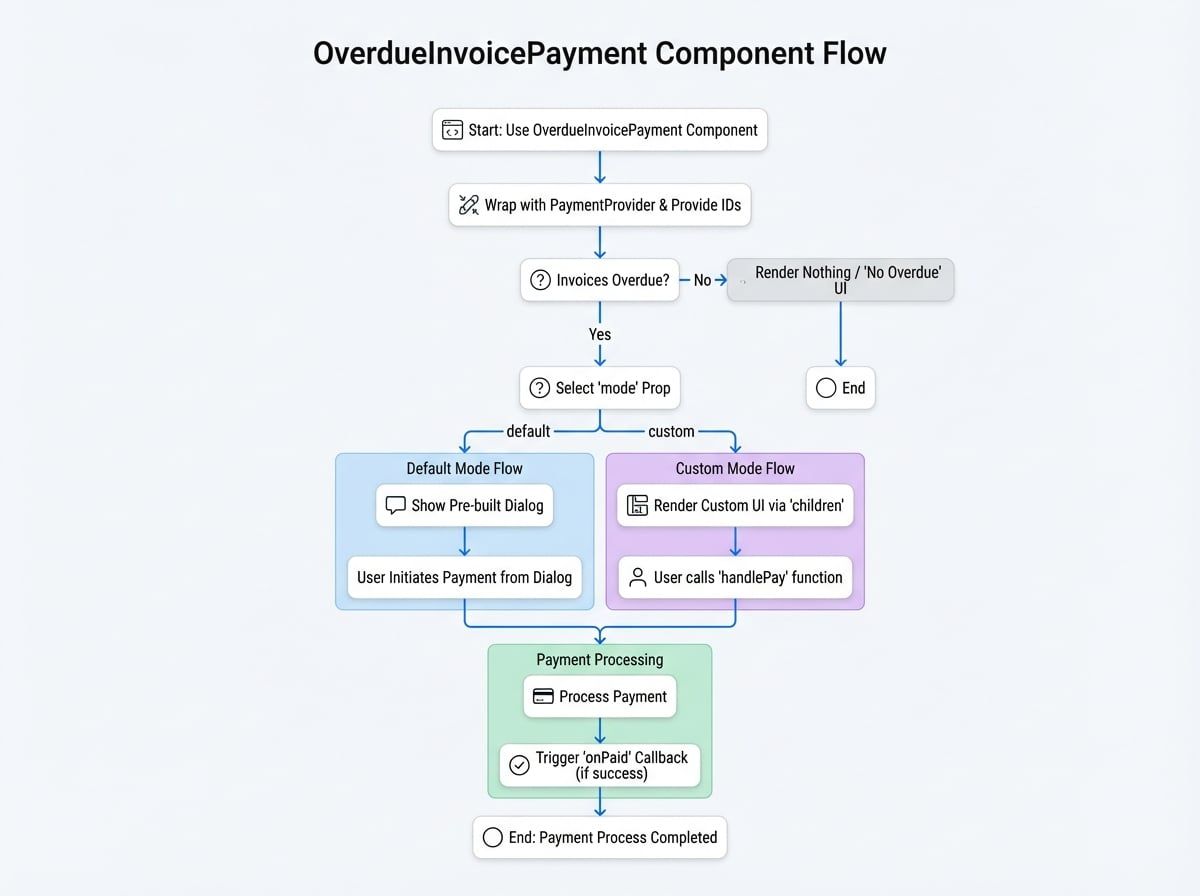
The OverdueInvoicePayment component is a specialized tool designed to handle the payment of overdue invoices for a specific customer or subscription. It simplifies the process by automatically fetching overdue invoices and presenting users with a clear interface to settle their outstanding payments.
This component can operate in two modes: a default mode that displays a pre-built dialog for quick integration, and a custom mode that provides the flexibility to build a unique user interface using a render prop. It must be wrapped within a PaymentProvider to function correctly.
Props#
The OverdueInvoicePayment component accepts the following props to customize its behavior:
The ID of the subscription to check for overdue invoices. Either subscriptionId or customerId must be provided.
The ID or DID of the customer. Use this to handle all overdue invoices for a specific customer.
The rendering mode. 'default' shows a pre-built dialog. 'custom' uses the children render prop for a custom UI.
An optional callback function that is triggered after payment for a specific currency is successfully completed. It receives (id, currencyId, type), where id is the subscriptionId or customerId, and type is 'subscription' or 'customer'.
Optional props to pass to the underlying Material-UI Dialog component in default mode. For example, { open: true, title: 'Custom Title', onClose: handleClose }.
Optional settings for the "View Details" link. Can be used to disable the link, change its text, or provide a custom onClick handler.
If true, a success toast notification is shown upon successful payment.
An optional message to append to the default title text when in customer mode.
A render prop function used only when mode is 'custom'. It receives a handlePay function and a data object.
An optional authentication token for API requests, useful for server-to-server or cross-origin scenarios.
children Render Prop Data#
When using mode="custom", the data object passed to the children function contains the following fields:
The subscription details, if subscriptionId was provided.
An object where each key is a currency ID. The value contains the total amount, currency details, and payment method for that currency.
An array of all overdue invoice objects.
The number of subscriptions with overdue invoices (for customer mode).
The URL to view detailed invoice information.
Usage Examples#
All examples assume you have PaymentProvider set up in your application as detailed in the PaymentProvider documentation.
1. Default Mode for a Subscription#
This is the simplest way to handle overdue payments for a specific subscription. The component will automatically render a dialog if any overdue invoices are found.
SubscriptionOverdue.jsx
import { OverdueInvoicePayment, PaymentProvider } from '@blocklet/payment-react';
import { useSessionContext } from '../hooks/session'; // Your custom session hook

function SubscriptionPage({ subscriptionId }) {
  const { session, connect } = useSessionContext();

  const handlePaymentSuccess = (id, currencyId, type) => {
    console.log(`Payment successful for ${type} ${id} with currency ${currencyId}`);
    // You can refetch subscription data here to update its status
  };

  return (
    <PaymentProvider session={session} connect={connect}>
      {/* This component will be null if there are no overdue invoices */}
      <OverdueInvoicePayment subscriptionId={subscriptionId} onPaid={handlePaymentSuccess} />
      {/* Other subscription details can be rendered here */}
    </PaymentProvider>
  );
}
2. Default Mode for a Customer#
Use this to create a centralized place for a customer to pay all their overdue invoices across multiple subscriptions.
CustomerDashboard.jsx
import { OverdueInvoicePayment, PaymentProvider } from '@blocklet/payment-react';
import { useSessionContext } from '../hooks/session'; // Your custom session hook

function CustomerDashboard() {
  const { session, connect } = useSessionContext();

  return (
    <PaymentProvider session={session} connect={connect}>
      <h2>Payment Center</h2>
      <p>Please settle any outstanding payments to ensure uninterrupted service.</p>
      <OverdueInvoicePayment
        customerId={session.user.did}
        onPaid={() => {
          console.log('All customer overdue invoices paid for a currency!');
          // Refresh customer account status
        }}
      />
      {/* The rest of the customer dashboard */}
    </PaymentProvider>
  );
}
3. Custom UI Mode#
For full control over the user experience, use mode="custom". This allows you to integrate the payment functionality directly into your existing UI instead of using a dialog.
CustomOverdueUI.jsx
import { OverdueInvoicePayment, PaymentProvider } from '@blocklet/payment-react';
import { useSessionContext } from '../hooks/session'; // Your custom session hook
import { Card, CardContent, Typography, Button, Stack } from '@mui/material';

function CustomOverdueUI({ subscriptionId }) {
  const { session, connect } = useSessionContext();

  // A simple Amount component for formatting
  const Amount = ({ amount, decimal, symbol }) => {
    const formattedAmount = (parseInt(amount, 10) / 10 ** (decimal || 0)).toFixed(2);
    return (
      <strong>
        {formattedAmount} {symbol}
      </strong>
    );
  };

  return (
    <PaymentProvider session={session} connect={connect}>
      <OverdueInvoicePayment
        subscriptionId={subscriptionId}
        mode="custom"
        onPaid={() => console.log('Custom UI payment successful!')}>
        {(handlePay, { summary, invoices }) => {
          const summaryList = Object.values(summary);
See all 35 lines