This document provides a high-level overview of the @blocklet/payment-react library. By the end of this guide, you will understand its core features, architecture, and the types of payment functionalities you can build with it. This library is designed to simplify the integration of payment flows, subscriptions, and donation systems into React applications by interfacing with the Blocklet Payment Kit.
Key Features
The library offers a comprehensive set of tools to accelerate the development of payment-related features.
Pre-built UI Components
A suite of ready-to-use components, including checkout forms, pricing tables, and donation widgets, to handle common payment workflows.
Customizable Themes
Leverages Material-UI for theming, allowing for extensive customization to match your application's design system.
Comprehensive Payment Operations
Supports a wide range of payment operations such as subscriptions, invoice management, refunds, and metered billing.
Internationalization (i18n)
Includes built-in support for multiple languages, enabling you to create a localized experience for a global user base.
How It Works
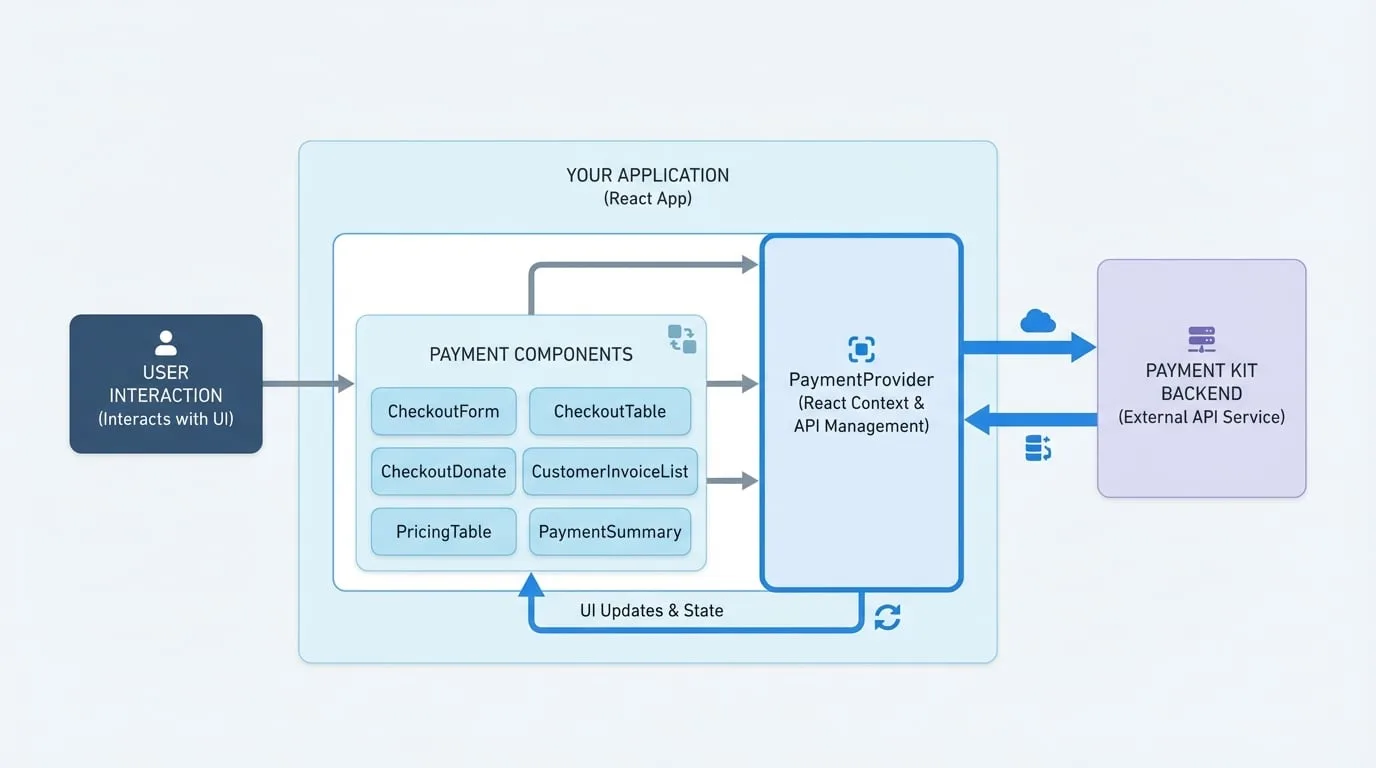
@blocklet/payment-react operates on a provider-component model. The PaymentProvider component is central to the library's functionality. It establishes a React context that manages API communication, state, and session information. All other payment-related components must be nested within a PaymentProvider to function correctly. This architecture centralizes critical logic, ensuring that components are decoupled and focused on their specific UI tasks.
The diagram below illustrates the high-level data flow. User interactions with payment components trigger API calls handled by the PaymentProvider, which communicates with the Payment Kit backend and updates the UI with the response.
Available Components
The library is organized into several categories of components and utilities to address different aspects of building a payment system.
| Category | Description | Key Components |
|---|---|---|
| Providers | Context providers that wrap your application to enable payment features. | PaymentProvider, DonateProvider |
| Checkout Components | High-level components for complete payment and donation flows. | CheckoutForm, CheckoutTable, CheckoutDonate |
| UI Components | Granular components for building custom payment user interfaces. | PricingTable, PaymentSummary, AddressForm |
| History Components | Components for displaying historical data like invoices and payments. | CustomerInvoiceList, CustomerPaymentList |
| Business Logic | Specialized components for managing subscriptions and overdue payments. | ResumeSubscription, OverdueInvoicePayment |
| Hooks & Utilities | Custom hooks and utility functions for interacting with the payment service. | useSubscription, api, dayjs |
Next Steps
To begin implementing payment features, proceed to the Getting Started guide, which provides step-by-step instructions for installation and building a basic payment form.