Running Remote Agents
labels: ["Reference"]#
labels: ["Reference"]#
The AIGNE CLI is not limited to running projects from your local filesystem. It also provides a powerful feature to execute agents directly from a remote URL. This is incredibly useful for testing, sharing, and running agents without needing to clone a repository or manually download files.
This guide will walk you through how to run agents from a remote source and explain the underlying caching mechanism.
How It Works#
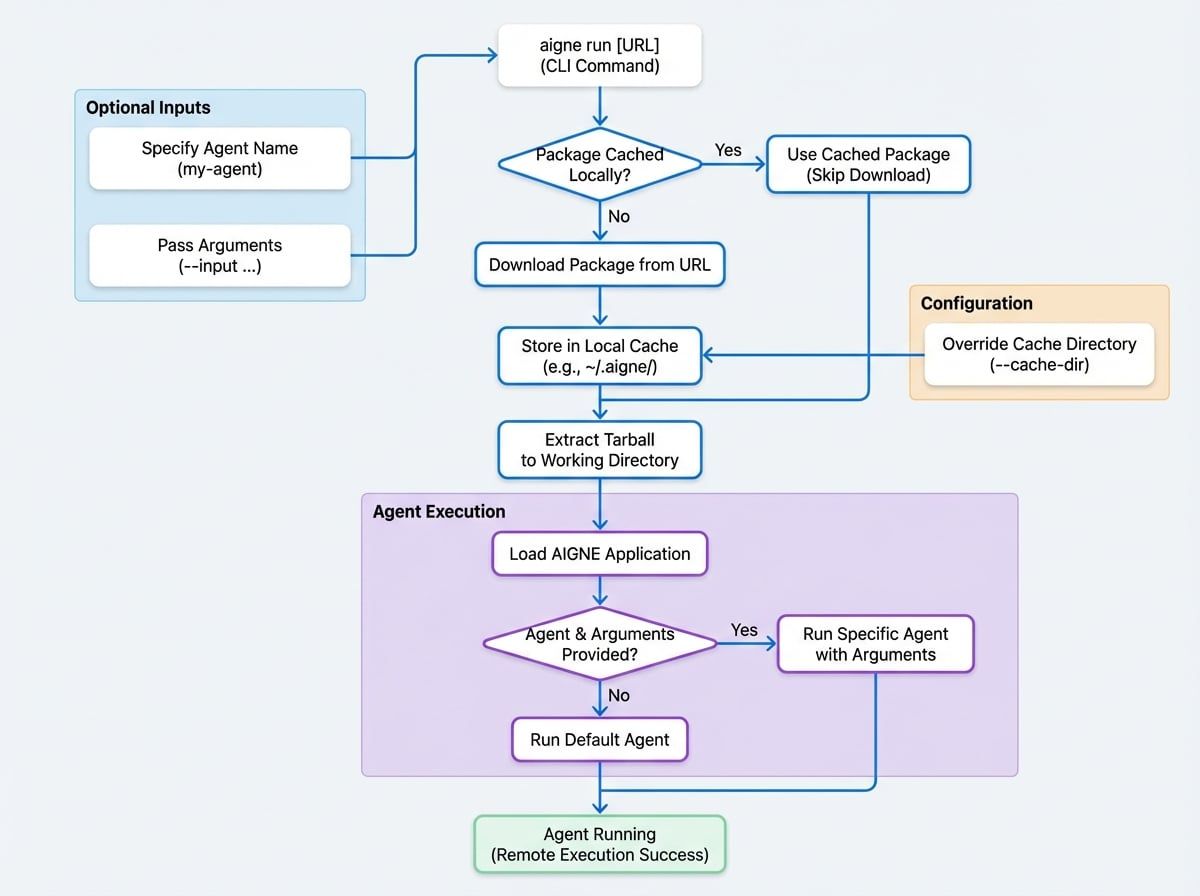
When you provide a URL to the aigne run command, the CLI performs the following steps automatically:
- Download: It fetches the package from the provided HTTP/HTTPS URL.
- Cache: The downloaded package is stored in a local cache directory (
~/.aigne/by default). This speeds up subsequent runs of the same remote agent, as the CLI will use the cached version if it already exists. - Extract: The CLI extracts the contents of the package (which is expected to be a tarball) into a working directory within the cache.
- Execute: Finally, it loads the AIGNE application from the extracted files and runs the specified agent just as it would with a local project.
The entire process is streamlined to provide a seamless experience, making a remote agent feel as accessible as a local one.
Usage#
To run a remote agent, simply pass the URL pointing to a tarball (.tar.gz, .tgz) of an AIGNE project to the aigne run command.
Basic Command#
AIGNE CLI
# Run the default agent from a remote AIGNE project
aigne run https://example.com/path/to/your/aigne-project.tar.gz
Running a Specific Agent#
If the remote project contains multiple agents, you can specify which one to run by adding its name after the URL.
AIGNE CLI
# Run a specific agent named 'my-agent' from the remote project
aigne run https://example.com/path/to/your/aigne-project.tar.gz my-agent
Any additional arguments or options you provide will be passed directly to the remote agent.
AIGNE CLI
# Run a specific agent with additional options
aigne run https://example.com/path/to/your/aigne-project.tar.gz my-agent --input "Hello, world!"Caching#
AIGNE CLI automatically caches the downloaded remote agents to avoid re-downloading them on every run.
- Default Location: The cache is stored in the
.aignedirectory within your home directory (e.g.,~/.aigne/). The exact path within the cache is determined by the URL's hostname and path, ensuring that different remote agents are stored separately. - Overriding the Cache Directory: While the default location is suitable for most cases, you can specify a custom cache directory using the
--cache-diroption. This can be useful for CI/CD environments or for managing different sets of cached agents.
AIGNE CLI
# Use a custom directory for caching the downloaded package
aigne run https://example.com/path/to/your/aigne-project.tar.gz --cache-dir /tmp/aigne-cache
This powerful feature simplifies collaboration and distribution of AIGNE agents. You can now move on to learn how to deploy your agents for production use.