Deploying Agents
labels: ["Reference"]#
Deploying your AIGNE project transforms it from a local development setup into a self-contained, distributable application known as a Blocklet. This allows your agent to run in a production environment, be shared with others, and integrate seamlessly into the broader Blocklet ecosystem. The aigne deploy command automates this entire packaging and deployment process.
This guide will walk you through the deployment workflow. For a detailed breakdown of all available command options, please see the aigne deploy command reference.
The Deployment Process#
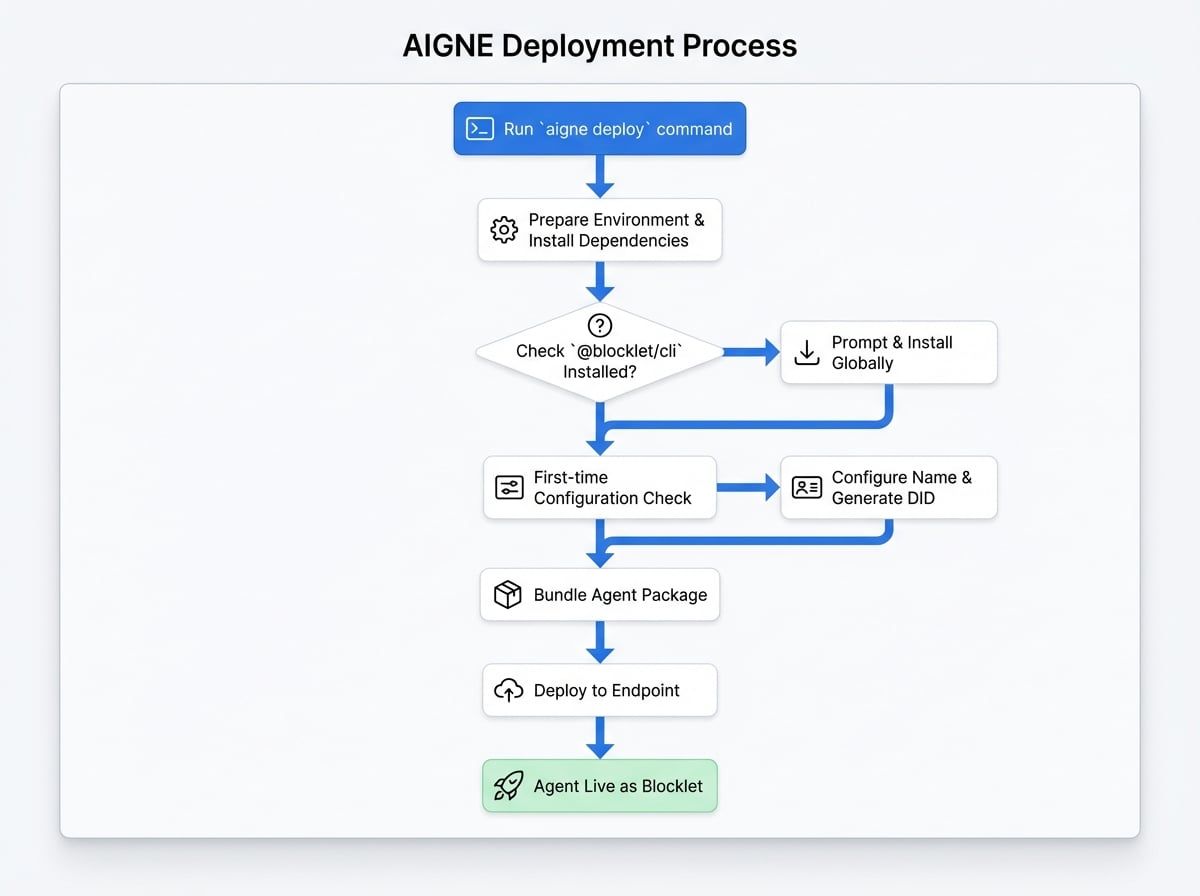
The aigne deploy command orchestrates a series of steps to prepare, configure, bundle, and deploy your agent. It leverages the @blocklet/cli under the hood to handle the complexities of Blocklet creation.
Here is a high-level overview of the deployment flow:
Step-by-Step Walkthrough#
To deploy your project, navigate to your project's root directory and run the deployment command, specifying the path to your project and the target endpoint.
Command
aigne deploy --path . --endpoint <your-endpoint-url>Let's break down what happens when you execute this command:
- Environment Preparation: The CLI first creates a temporary
.deploydirectory. It copies your project files into it, along with a standard Blocklet template. It then runsnpm installinside this directory to fetch any necessary dependencies. - Blocklet CLI Check: The process verifies if
@blocklet/cliis installed on your system. If not, it will prompt you for permission to install it globally. This is a one-time setup.? Install Blocklet CLI? › ❯ yes no - Blocklet Configuration (First-time Deployment): If this is the first time you're deploying this project, the CLI will ask you for a name for your Blocklet. It suggests a default based on your agent's name in
aigne.yamlor the project's folder name.? Please input agent blocklet name: › my-awesome-agent
After you provide a name, it automatically generates a new Decentralized Identifier (DID) for your Blocklet. This name and DID are saved locally in~/.aigne/deployed.yaml, so you won't be prompted for them on subsequent deployments of the same project. - Bundling: The CLI then invokes
blocklet bundle --create-release, which packages your agent, its dependencies, and all necessary configuration into a single, deployable.blocklet/bundlefile. - Deployment: Finally, the bundled application is pushed to your specified
--endpointusing theblocklet deploycommand.
Once the process is complete, you'll see a confirmation message in your terminal.
✅ Deploy completed: /path/to/your/project -> <your-endpoint-url>Your AIGNE agent is now live as a Blocklet, ready to be run in a production environment.