Core Concepts
labels: ["Reference"]#
An AIGNE project provides a structured environment for developing, testing, and deploying AI agents. At its heart, a project is a directory containing configuration files that define your agents, the skills they can use, and the language models they connect to. This section breaks down these fundamental building blocks.
Project Structure#
When you create a new project using aigne create, it scaffolds a standard directory structure to keep your components organized. A typical project looks like this:
Project Structure
my-agent-project/
├── aigne.yaml        # The main project configuration file.
├── agents/           # Directory for agent definition files.
│   └── chat.yaml     # Example agent definition.
└── skills/           # Directory for skill implementation files.
    └── sandbox.js    # Example skill implementation.
This structure separates configuration (aigne.yaml, agents/) from implementation (skills/), making your project modular and easy to manage.
How It All Fits Together#
The following diagram illustrates the relationship between the core components of an AIGNE project. The central aigne.yaml file orchestrates everything, defining which agents exist, what skills they can use, and which AI model powers their intelligence.
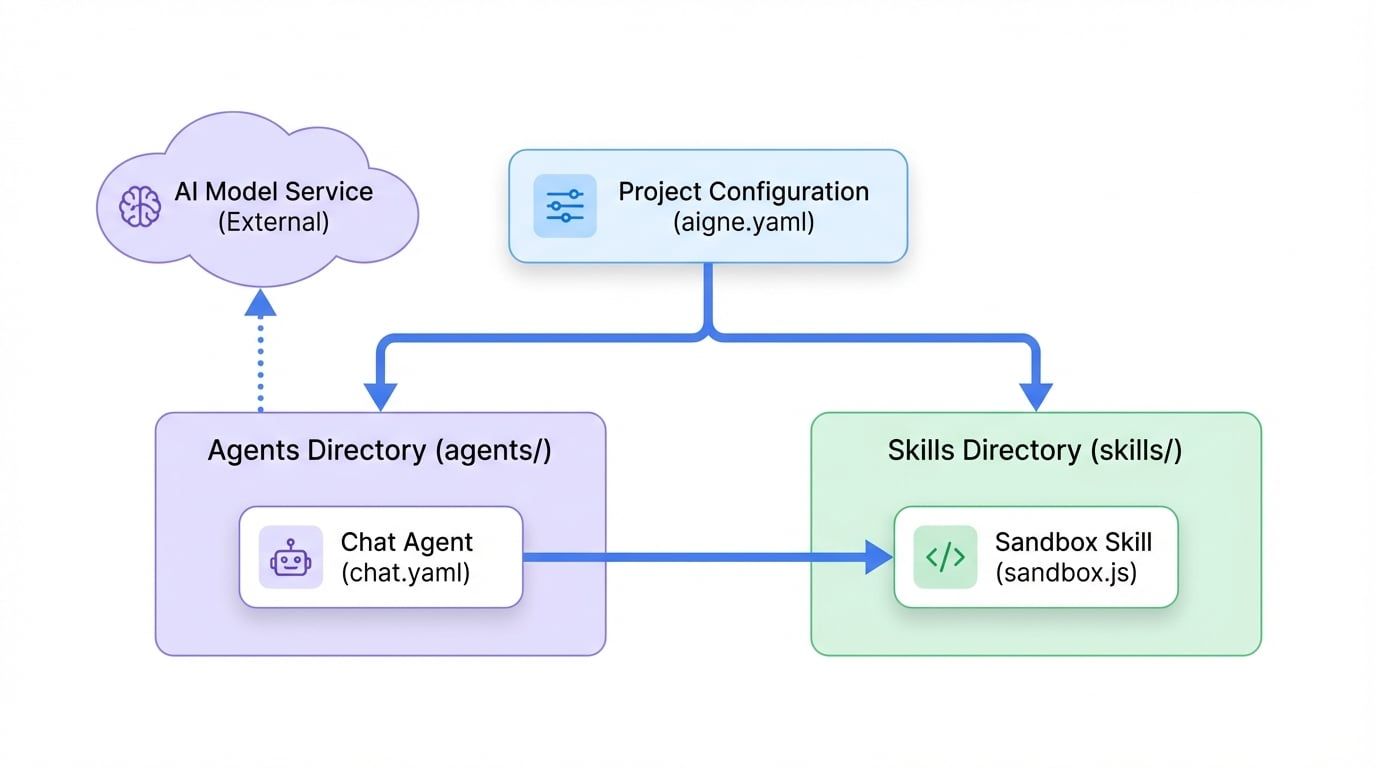
To understand how an AIGNE project works, it's essential to grasp its two primary components: the central project configuration and the executable agents and skills. Explore them in more detail below.
With this foundational understanding, you're ready to dive deeper into how to configure your project.
Next: Learn more about the main configuration file in the Project Configuration (aigne.yaml) guide.