基於點數的計費是一種彈性的、按用量付費的模型,非常適合使用量會變動的服務,例如 API 呼叫、資料儲存或計算時間。客戶不是支付固定的週期性費用,而是消耗他們已購買或被授予的點數。
本指南將引導您完成使用 PaymentKit SDK 設定和管理基於點數的計費系統的端到端流程。您將使用的核心元件包括:
- 計量器 (Meters):定義並追蹤特定功能的使用情況。
- 點數授予 (Credit Grants):向您的客戶發放點數。
- 計量事件 (Meter Events):在客戶使用時回報其用量。
- 點數交易 (Credit Transactions):所有點數活動的分類帳,包括授予和消耗。
點數計費工作流程
下圖說明了基於點數的計費的完整生命週期,從設定到用量回報和餘額監控。
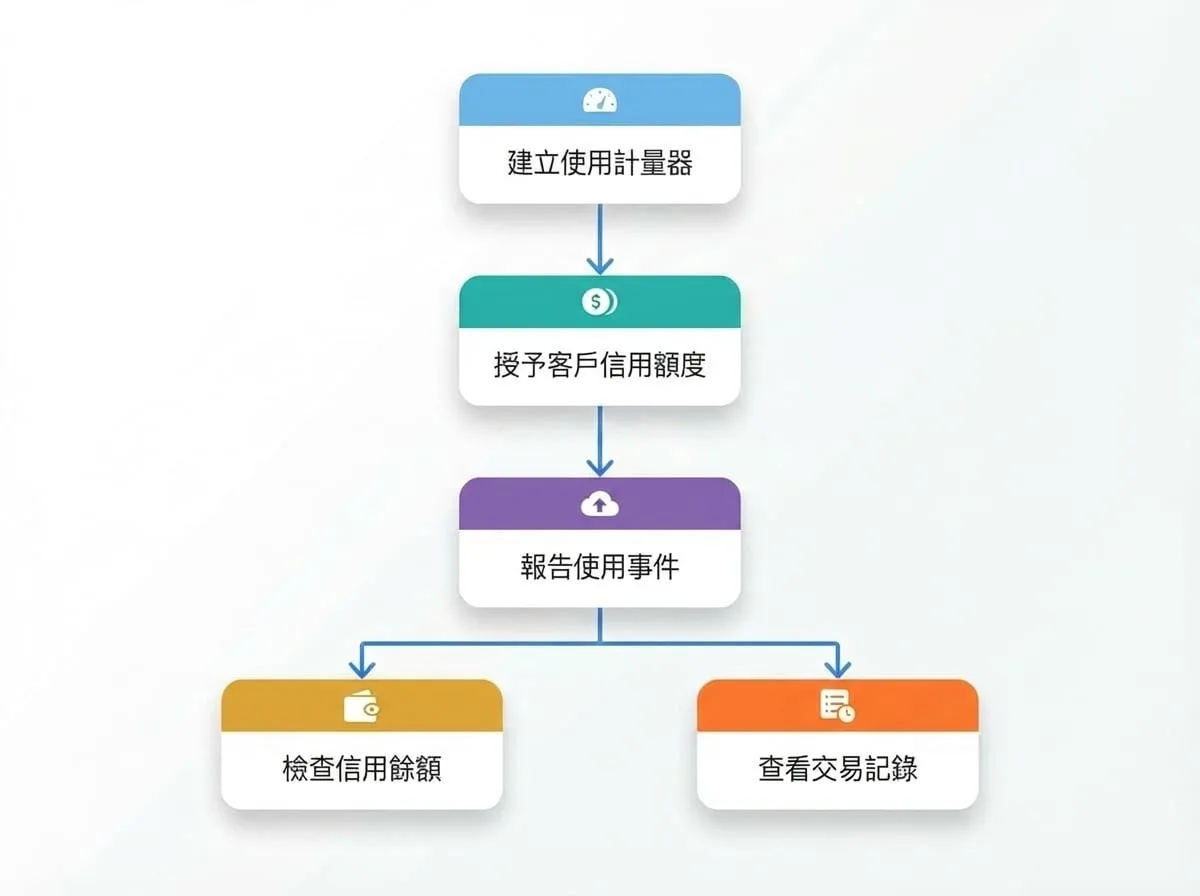
步驟 1:建立計量器以追蹤用量
計量器 (Meter) 是一種追蹤特定功能消耗的資源。您需要定義要追蹤的事件、如何匯總用量 (例如,所有值的總和),以及計量單位。
建立計量器
import payment from '@blocklet/payment-js';

async function setupMeter() {
  try {
    const meter = await payment.meters.create({
      name: 'API Calls',
      event_name: 'api.calls.v1',
      aggregation_method: 'sum',
      unit: 'calls',
      description: 'Tracks the number of API calls made by a customer.'
    });
    console.log('Meter created:', meter.id);
    return meter;
  } catch (error) {
    console.error('Error creating meter:', error.message);
  }
}

setupMeter();
在此範例中,我們建立了一個名為「API Calls」的計量器,它會監聽名為 api.calls.v1 的事件。aggregation_method: 'sum' 會告知 PaymentKit 將所有回報事件的 value 加總以計算總用量。
步驟 2:向客戶授予點數
有了計量器後,您需要給客戶點數來消費。您可以將點數作為促銷獎勵或在他們購買後授予。每次點數授予都會指定金額、貨幣以及其所屬的客戶。
授予促銷點數
import payment from '@blocklet/payment-js';

async function grantNewUserBonus(customerId, currencyId) {
  try {
    const thirtyDaysFromNow = Math.floor(Date.now() / 1000) + (30 * 24 * 60 * 60);
    const creditGrant = await payment.creditGrants.create({
      customer_id: customerId, // e.g., 'cus_xxx'
      currency_id: currencyId, // e.g., 'pc_xxx'
      amount: '1000',
      name: 'New User Bonus',
      category: 'promotional', // Can be 'paid' or 'promotional'
      expires_at: thirtyDaysFromNow
    });
    console.log('Credit grant created:', creditGrant.id);
    return creditGrant;
  } catch (error) {
    console.error('Error creating credit grant:', error.message);
  }
}

// grantNewUserBonus('cus_xxx', 'pc_xxx');
此程式碼授予客戶 1,000 點促銷點數,並將在 30 天後到期。分類為 paid 的點數通常會在 promotional 的點數之前使用。
步驟 3:使用計量事件回報用量
當客戶使用計量功能時,您的應用程式必須透過建立計量事件 (Meter Event) 將其回報給 PaymentKit。此事件應與您建立的計量器的 event_name 相符。
為防止因網路問題或重試而導致重複的用量回報,請務必為每個事件包含一個唯一的 identifier。PaymentKit 只會處理收到的第一個具有給定識別碼的事件。
回報用量事件
import payment from '@blocklet/payment-js';

async function reportApiCall(customerId, subscriptionId) {
  try {
    const meterEvent = await payment.meterEvents.create({
      event_name: 'api.calls.v1', // Must match the meter's event_name
      payload: {
        customer_id: customerId, // 'cus_xxx'
        value: '10', // The amount of usage to report
        subscription_id: subscriptionId, // Optional: associate with a subscription
      },
      identifier: `unique_api_call_${Date.now()}` // Idempotency key
    });
    console.log('Meter event reported:', meterEvent.id);
    return meterEvent;
  } catch (error) {
    console.error('Error reporting meter event:', error.message);
  }
}

// reportApiCall('cus_xxx', 'sub_xxx');
當此事件被處理時,PaymentKit 會自動找到客戶有效的點數授予,並從其餘額中扣除 10 點點數。
步驟 4:檢查點數餘額
您隨時可以使用 summary 方法檢查客戶的剩餘點數餘額。這對於在您的應用程式使用者介面中顯示餘額很有用。
檢查點數摘要
import payment from '@blocklet/payment-js';

async function checkCreditBalance(customerId) {
  try {
    const creditSummary = await payment.creditGrants.summary({
      customer_id: customerId, // 'cus_xxx'
    });
    console.log('Credit Summary:', creditSummary);
    return creditSummary;
  } catch (error) {
    console.error('Error fetching credit summary:', error.message);
  }
}

// checkCreditBalance('cus_xxx');
回應範例
{
  "pc_xxx": { // currency_id
    "paymentCurrency": {
      "id": "pc_xxx",
      "name": "Credit",
      "symbol": "C",
      "decimal": 2,
      "type": "credit"
    },
    "totalAmount": "1000.00",
    "remainingAmount": "990.00",
    "grantCount": 1
  }
}
回應按貨幣分組,顯示授予的總點數以及指定客戶的剩餘金額。
步驟 5:查看交易歷史記錄
要查看客戶所有點數活動的詳細稽核日誌——包括授予、消耗和到期——您可以列出他們的點數交易。
列出點數交易
import payment from '@blocklet/payment-js';

async function getTransactionHistory(customerId) {
  try {
    const transactions = await payment.creditTransactions.list({
      customer_id: customerId, // 'cus_xxx'
      pageSize: 10
    });
    console.log(`Found ${transactions.total} transactions.`);
    transactions.data.forEach(tx => {
      console.log(`- ID: ${tx.id}, Type: ${tx.type}, Amount: ${tx.amount}, Balance: ${tx.running_balance}`);
    });
    return transactions;
  } catch (error) {
    console.error('Error listing credit transactions:', error.message);
  }
}

// getTransactionHistory('cus_xxx');
這提供了完整的歷史記錄,讓您可以追蹤客戶點數餘額的每一次變動。
後續步驟
您現在對基於點數的計費工作流程有了全面的了解。有關每個元件的更多詳細資訊,包括所有可用的參數和方法,請參閱 API 參考文件。
計量器 API 參考
探索所有用於建立和管理計量器的方法。
計量事件 API 參考
了解更多關於回報用量和獲取統計資訊的資訊。
點數授予 API 參考
查看如何管理點數授予和餘額。
點數交易 API 參考
取得有關擷取交易歷史記錄的詳細資訊。
要了解客戶如何購買點數或設定自動儲值,請參閱 點數儲值 指南。