ComponentInstaller 是一個實用工具元件,對於依賴其他 blocklet 的功能扮演著守門員的角色。它會驗證指定的元件相依性是否已安裝。如果尚未安裝,它會為管理員(預設為 owner 或 admin 角色)提供一個使用者友善的介面,讓他們可以直接安裝。如果使用者缺乏必要的權限,它會顯示一則訊息,建議他們聯絡管理員。
此元件對於建立穩健的應用程式至關重要,能夠優雅地處理缺失的選用相依性,並透過引導管理員完成安裝過程來改善使用者體驗。
運作方式
該元件的邏輯遵循一個清晰的順序流程,以確保在渲染其子元件之前滿足所有相依性。
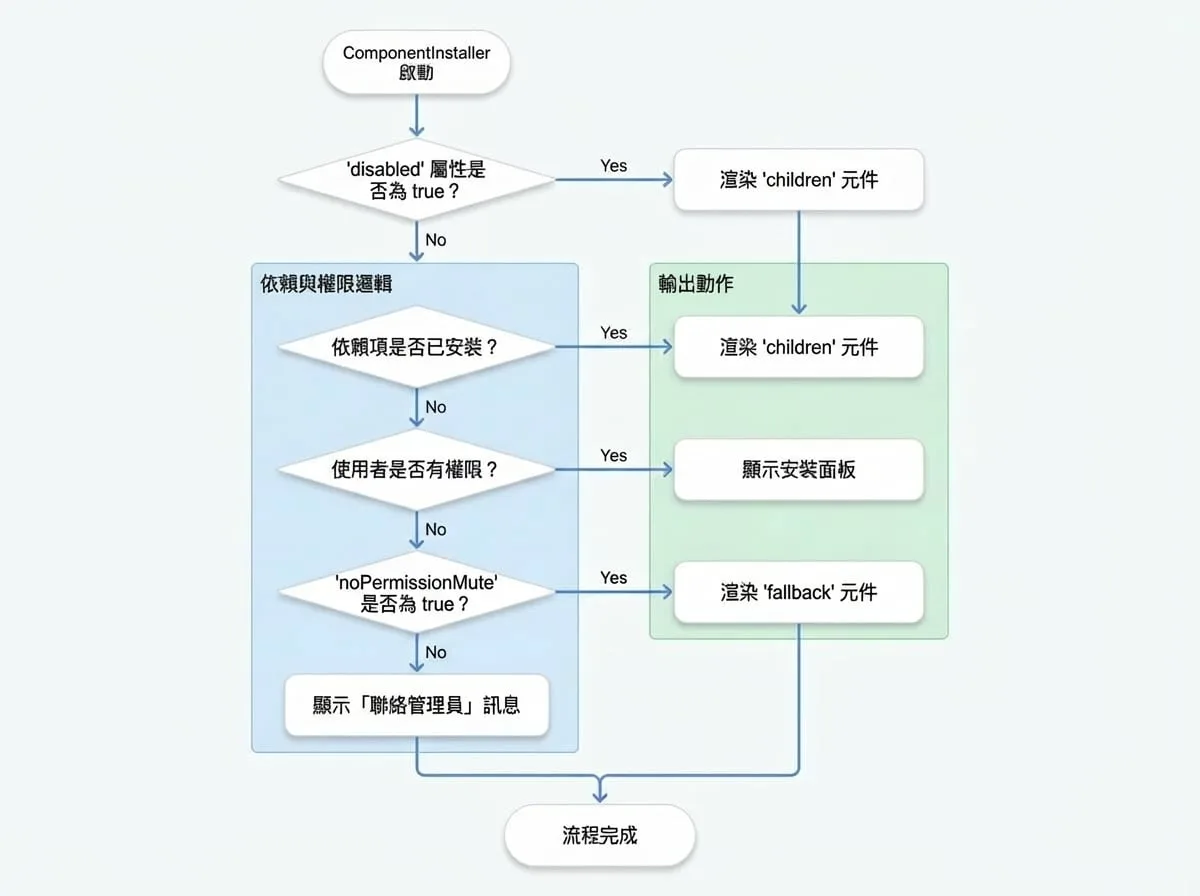
- 相依性檢查:它會讀取
didprop,並對照 blocklet 的元資料(window.blocklet.optionalComponents)進行檢查,以確定所需元件是否已安裝。 - 權限檢查:如果有任何元件缺失,它會使用
SessionPermission元件來驗證目前使用者的角色是否與rolesprop 中指定的角色相符。 - 條件式渲染:
- 如果所有相依性都已安裝,它會渲染其
children。 - 如果相依性缺失且使用者擁有權限,它會顯示一個彈出式安裝面板。
- 如果相依性缺失且使用者缺乏權限,它會顯示聯絡管理員的建議,或者在啟用
noPermissionMute的情況下渲染一個fallback元件。
基本用法
將任何依賴選用 blocklet 的元件或功能用 ComponentInstaller 包裹起來。提供所需元件的 DID。
"MyFeature.jsx"
import ComponentInstaller from '@arcblock/blocklet-ui-react/lib/ComponentInstaller';
import MyDependentComponent from './MyDependentComponent';

export default function MyFeature() {
  // 請替換為所需元件的實際 DID
  const requiredComponentDid = 'z8ia2427634f1e909a304e2b963715a18';

  return (
    <ComponentInstaller did={requiredComponentDid}>
      {/* 只有在滿足相依性條件時,此元件才會被渲染 */}
      <MyDependentComponent />
    </ComponentInstaller>
  );
}
屬性 (Props)
ComponentInstaller 接受以下屬性 (props) 來自訂其行為。
- did
string | string[](required) — 要檢查的元件相依性的 DID (或 DID 陣列)。這是您所需 blocklet 的主要識別碼。 - children
any(required) — 一旦確認所有相依性都已安裝,要渲染的內容。可以是標準的 React 節點或渲染函數。 - roles
string[](default:["owner", "admin"]) — 允許查看安裝 UI 並安裝缺失元件的使用者角色陣列。 - fallback
React.ReactNode— 一個備用元件,用於在檢查相依性期間,或當 noPermissionMute 對於沒有安裝權限的使用者啟用時顯示。 - noPermissionMute
boolean(default:false) — 如果為 true,沒有權限的使用者將看到 fallback 元件(或什麼都不顯示),而不是「聯絡管理員」的訊息。 - disabled
boolean(default:false) — 如果為 true,該元件會繞過所有檢查並立即渲染其 children。 - onInstalled
function— 在相依性檢查完成後觸發的回呼函數。它會接收已安裝元件的列表。 - onError
function— 如果在相依性檢查期間發生錯誤時觸發的回呼函數。它會接收導致錯誤的元件列表。 - onClose
function— 當安裝彈出視窗關閉時調用的回呼函數。 - closeByOutSize
boolean(default:false) — 如果為 true,當使用者點擊安裝彈出視窗外部時,該視窗將會關閉。 - warnIcon
React.ReactNode— 一個自訂的 React 節點,用於替換安裝彈出視窗中的預設警告圖示。
進階用法
檢查多個元件
您可以將一個 DID 陣列傳遞給 did prop,以一次性檢查多個相依性。只有在所有指定的元件都已安裝的情況下,子元件才會被渲染。
"MyDashboard.jsx"
import ComponentInstaller from '@arcblock/blocklet-ui-react/lib/ComponentInstaller';
import AnalyticsWidget from './AnalyticsWidget';
import CmsWidget from './CmsWidget';

export default function MyDashboard() {
  const requiredDids = [
    'z8ia2427634f1e909a304e2b963715a18', // 分析服務
    'z8ia3c1f2e4b8e6a1b2c3d4e5f6a7b8c9', // 內容管理系統服務
  ];

  return (
    <ComponentInstaller did={requiredDids}>
      <AnalyticsWidget />
      <CmsWidget />
    </ComponentInstaller>
  );
}
使用備用元件處理載入狀態
提供一個 fallback 元件,以在相依性檢查進行中時改善使用者體驗。這對於搭配 noPermissionMute 為未經授權的使用者顯示佔位符也很有用。
"FeatureWithLoading.jsx"
import ComponentInstaller from '@arcblock/blocklet-ui-react/lib/ComponentInstaller';
import CircularProgress from '@mui/material/CircularProgress';
import Box from '@mui/material/Box';
import MyDependentComponent from './MyDependentComponent';

export default function FeatureWithLoading() {
  const LoadingSpinner = (
    <Box sx={{ display: 'flex', justifyContent: 'center', p: 4 }}>
      <CircularProgress />
    </Box>
  );

  return (
    <ComponentInstaller
      did="z8ia2427634f1e909a304e2b963715a18"
      fallback={LoadingSpinner}
      noPermissionMute={true}
    >
      <MyDependentComponent />
    </ComponentInstaller>
  );
}
使用渲染屬性 (Render Props) 自訂 UI
為了完全控制 UI,您可以傳遞一個函數作為 children。此函數會接收一個包含 hasPermission、optComponents 和 installStatus 的物件,讓您可以建立完全自訂的安裝介面。
"CustomInstallerButton.jsx"
import ComponentInstaller from '@arcblock/blocklet-ui-react/lib/ComponentInstaller';
import Button from '@mui/material/Button';

export default function CustomInstallerButton() {
  const requiredDid = 'z8ia2427634f1e909a304e2b963715a18';

  return (
    <ComponentInstaller did={requiredDid}>
      {({ hasPermission, optComponents, installStatus }) => {
        const isMissing = optComponents.length > 0;
        const status = installStatus[requiredDid] || 'not_installed';

        if (!isMissing) {
          return <p>功能已準備就緒!</p>;
        }

        if (!hasPermission) {
          return <p>請要求管理員安裝所需元件。</p>;
        }

        return (
          <Button
            variant="contained"
            disabled={status !== 'not_installed'}
            onClick={() => window.open(optComponents[0].installUrl, '_blank')}
          >
            {status === 'not_installed' ? `安裝 ${optComponents[0].meta.title}` : `安裝中... (${status})`}
          </Button>
        );
      }}
    </ComponentInstaller>
  );
}
總結
ComponentInstaller 是一個強大的元件,用於管理 blocklet 應用程式中的選用相依性。它提供了一種結構化且使用者友善的方式,以確保所需元件可用,並在必要時引導管理員完成安裝過程。透過使用此元件,您可以建立更具彈性、功能更豐富且能適應使用者環境的應用程式。
有關管理元件的更多詳細資訊,您可能也會對 BlockletStudio 元件感興趣,它為資源和元件管理提供了更全面的介面。