DID Connect is a comprehensive user and identity management center designed for administrators. It provides a centralized suite of tools for managing members, handling digital passports, and configuring all authentication-related settings for your application. This service is fundamental for controlling user access, customizing the login experience, and ensuring application security.
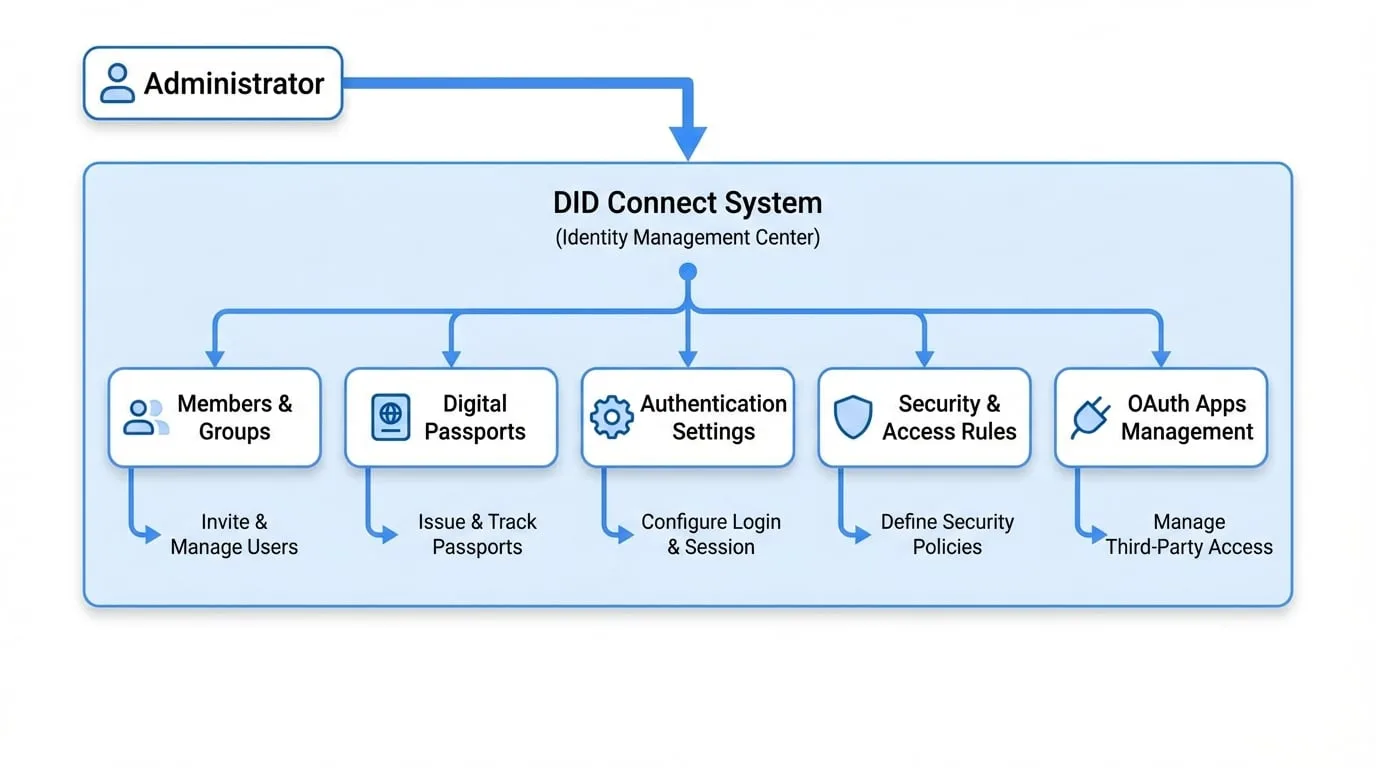
The following diagram illustrates the key components of DID Connect and how an administrator interacts with the system:
Features Overview
DID Connect is organized into several distinct sections, each tailored to a specific aspect of identity and access management. Below is an overview of the key components. For detailed information, please refer to the specific sub-document for each feature.
Members
View, search, and manage user profiles and groups. You can also invite new members to your application.
Passports
Manage the complete lifecycle of user passports, including issuing new passports, managing templates, and tracking usage history.
Settings
Configure various authentication settings, such as login session duration, KYC requirements, and federated login options.
Security
Define advanced security rules, access control policies, and response handling to enhance your application's security.
OAuth Apps
Manage third-party applications that use your service as an OAuth provider for authentication and authorization.
Summary
DID Connect centralizes all the necessary tools for robust user and identity management. By exploring the sections linked above, you can effectively manage your user base, secure your application, and customize the authentication processes to fit your specific needs.