Understanding AI model consumption is crucial for managing costs, monitoring performance, and ensuring fair resource allocation. This document provides a detailed guide on how to query usage statistics, track costs, and interpret the data models AIGNE Hub uses for analytics and reporting.
Overview
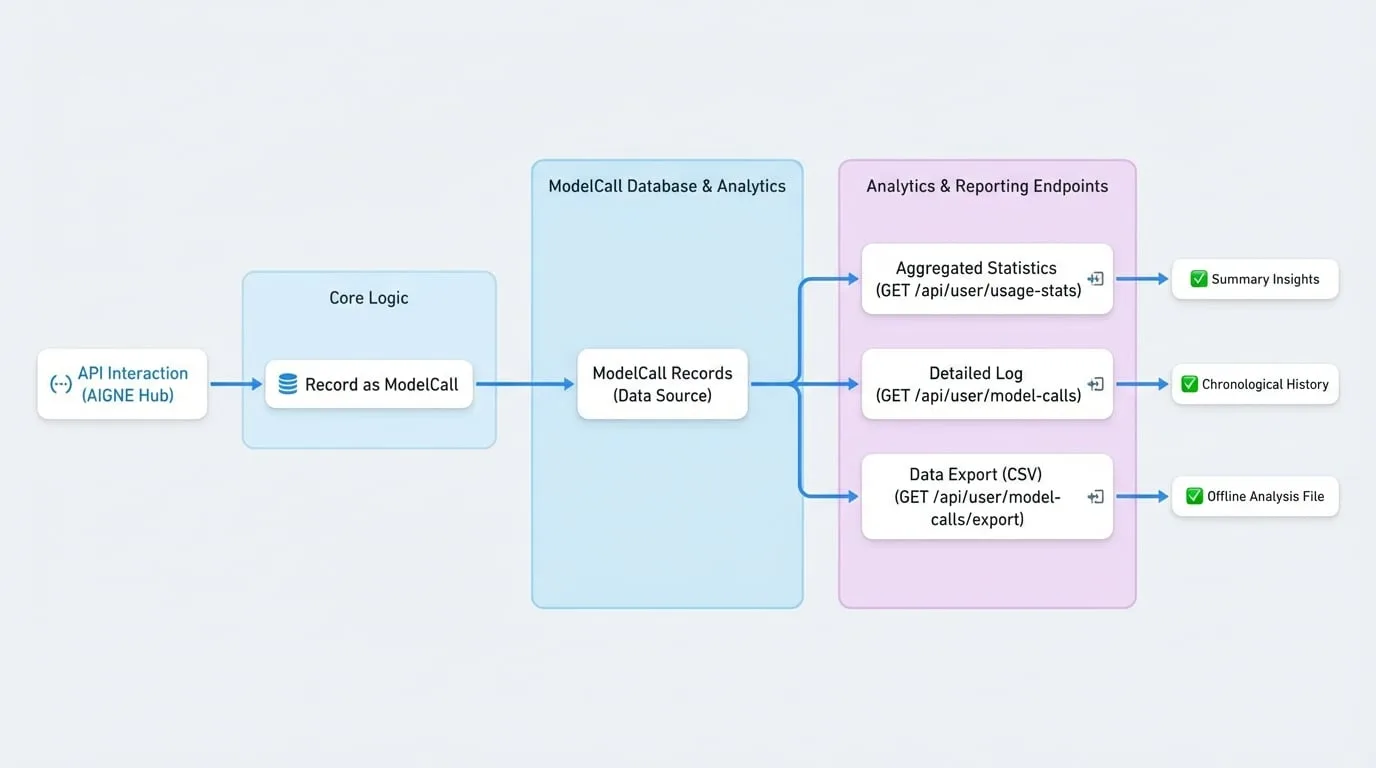
AIGNE Hub records every API interaction as a ModelCall entry. These records form the basis for all usage analytics. The system provides several API endpoints to query and aggregate this data, allowing you to monitor consumption for the entire system or on a per-user basis. This enables detailed tracking of token usage, credit consumption, and overall API call volume.
Data Models
Understanding the underlying data structures is essential for effectively querying and interpreting analytics data. The following diagram illustrates how a ModelCall record is generated and used by the analytics endpoints.
The ModelCall Object
Every request made to an AI provider through the hub is logged as a ModelCall. This object contains detailed information about the request, its execution, and the associated costs.
- id
string(required) — A unique identifier for the model call record. - providerId
string(required) — The identifier of the AI provider used for the call. - model
string(required) — The specific model that was called (e.g., 'gpt-4o-mini'). - credentialId
string(required) — The ID of the credential used for authentication with the provider. - type
string(required) — The type of the API call. Possible values include 'chatCompletion', 'embedding', 'imageGeneration', 'audioGeneration', 'video', or 'custom'. - totalUsage
number(required) — A normalized usage metric. For text models, this is typically the total number of tokens (input + output). - usageMetrics
object— A detailed breakdown of usage, such as input and output tokens.- inputTokens
number— The number of tokens in the input prompt. - outputTokens
number— The number of tokens in the generated response.
- inputTokens
- credits
number(required) — The number of credits consumed by the call, based on the configured model rates. - status
string(required) — The final status of the call. Can be 'success' or 'failed'. - duration
number— The duration of the API call in seconds. - errorReason
string— If the call failed, this field contains the reason for the failure. - appDid
string— The DID of the application that initiated the call. - userDid
string(required) — The DID of the user who made the call. - requestId
string— An optional client-side request identifier for tracing. - callTime
number(required) — The Unix timestamp when the call was made. - createdAt
string(required) — The timestamp when the record was created in the database.
Querying Usage Data
You can retrieve analytics data through several REST API endpoints. These endpoints require authentication.
Fetching Usage Statistics
To get a summarized and aggregated view of usage over a specific period, use the GET /api/user/usage-stats endpoint. For system-wide analytics, administrators can use GET /api/user/admin/user-stats.
Request Parameters
- startTime
string(required) — The start of the time range as a Unix timestamp. - endTime
string(required) — The end of the time range as a Unix timestamp. - allUsers
boolean— When using /api/user/model-calls, set to true to fetch data for all users. This is restricted to admin users.
Example Request
Requesting user stats
curl -X GET 'https://your-aigne-hub-url/api/user/usage-stats?startTime=1672531200&endTime=1675228799' \
--header 'Authorization: Bearer <YOUR_ACCESS_TOKEN>'
Response Body
The endpoint returns a comprehensive object containing a summary, daily breakdowns, model statistics, and trend comparisons.
- summary
object— An object containing aggregated totals for the specified period.- totalCredits
number— Total credits consumed. - totalCalls
number— Total number of API calls. - modelCount
number— Total number of unique models used. - byType
object— An object with usage statistics broken down by call type (e.g., 'chatCompletion').- [callType]
object- totalUsage
number— Total usage (e.g., tokens) for this type. - totalCredits
number— Total credits consumed by this type. - totalCalls
number— Total calls of this type. - successCalls
number— Number of successful calls of this type.
- totalUsage
- [callType]
- totalCredits
- dailyStats
array— An array of objects, each representing a day's usage statistics.- date
string— The date in 'YYYY-MM-DD' format. - credits
number— Total credits consumed on this day. - tokens
number— Total tokens processed on this day. - requests
number— Total API calls made on this day.
- date
- modelStats
array— An array listing the most frequently used models.- providerId
string— The ID of the provider for the model. - model
string— The name of the model. - totalCalls
number— Total number of calls made to this model.
- providerId
- trendComparison
object— Comparison of usage between the current and previous period.- current
object— Statistics for the current period. - previous
object— Statistics for the equivalent previous period. - growth
object— Growth rates between the two periods.
- current
Listing Model Calls
For a detailed, chronological log of individual API requests, use the GET /api/user/model-calls endpoint. This provides access to the raw ModelCall records with pagination and filtering.
Request Parameters
- page
number(default:1) — The page number for pagination. - pageSize
number(default:50) — The number of items to return per page. Maximum is 100. - startTime
string— The start of the time range as a Unix timestamp. - endTime
string— The end of the time range as a Unix timestamp. - search
string— A search term to filter results by model name, application DID, or user DID. - status
string— Filter by call status. Can be 'success', 'failed', or 'all'. - model
string— Filter by a specific model name. - providerId
string— Filter by a specific provider ID. - appDid
string— Filter by a specific application DID. - allUsers
boolean— If true, returns model calls for all users (admin only).
Example Request
Listing model calls
curl -X GET 'https://your-aigne-hub-url/api/user/model-calls?page=1&pageSize=10&status=failed' \
--header 'Authorization: Bearer <YOUR_ACCESS_TOKEN>'
Response Body
The response is a paginated list of ModelCall objects.
response.json
{
  "count": 1,
  "list": [
    {
      "id": "z8VwXGf6k3qN...",
      "providerId": "openai",
      "model": "gpt-4o-mini",
      "credentialId": "z3tXy..._default",
      "type": "chatCompletion",
      "totalUsage": 150,
      "usageMetrics": {
        "inputTokens": 100,
        "outputTokens": 50
      },
      "credits": 0.0002,
      "status": "failed",
      "duration": 2,
      "errorReason": "API key is invalid.",
      "appDid": "z2qa9sD2tFAP...",
      "userDid": "z1...",
      "requestId": null,
      "callTime": 1675228799,
      "createdAt": "2023-01-31T23:59:59.000Z",
      "updatedAt": "2023-01-31T23:59:59.000Z",
      "traceId": null,
      "provider": {
        "id": "openai",
        "name": "openai",
        "displayName": "OpenAI",
        "baseUrl": "https://api.openai.com/v1",
        "region": null,
        "enabled": true
      },
      "appInfo": {
        "appName": "My AI App",
        "appDid": "z2qa9sD2tFAP...",
        "appLogo": "...",
        "appUrl": "..."
      },
      "userInfo": {
        "did": "z1...",
        "fullName": "John Doe",
        "email": "john.doe@example.com",
        "avatar": "..."
      }
    }
  ],
  "paging": {
    "page": 1,
    "pageSize": 10
  }
}
Exporting Model Calls
You can export the model call history to a CSV file for offline analysis or reporting using the GET /api/user/model-calls/export endpoint. This endpoint accepts the same filtering parameters as the listing endpoint.
Example Request
Exporting model calls
curl -X GET 'https://your-aigne-hub-url/api/user/model-calls/export?startTime=1672531200&endTime=1675228799' \
--header 'Authorization: Bearer <YOUR_ACCESS_TOKEN>' \
-o model-calls-export.csv
The server will respond with a text/csv file containing the requested data.
Summary
The analytics features in AIGNE Hub provide powerful tools for monitoring and understanding AI model usage. By leveraging the ModelCall data model and the associated API endpoints, you can build dashboards, generate reports, and gain critical insights into your operational costs and performance.
For details on how credits are configured and billed, refer to the Service Provider Mode documentation.