This document provides a detailed specification for the Chat Completions API endpoint. By following this guide, you will learn how to generate conversational AI responses, manage streaming, and utilize model-specific parameters for building robust applications. This endpoint is central to creating interactive, text-based experiences.
The Chat Completions API enables you to build applications that leverage large language models for a variety of conversational tasks. You provide a series of messages as input, and the model returns a text-based response.
For related functionalities, refer to the Image Generation and Embeddings API documentation.
Create Chat Completion
Creates a model response for the given chat conversation.
POST /api/chat/completions
Request Body
- model
string(required) (default:gpt-3.5-turbo) — ID of the model to use. See the model endpoint compatibility table for details on which models work with the Chat API. - messages
array(required) — A list of messages comprising the conversation so far. See below for the message object structure.- message
object— Each message object must have a role and content.- role
string(required) — The role of the message's author. Can be system, user, assistant, or tool. - content
string or array(required) — The content of the message. This can be a string or an array of content parts for multimodal models (e.g., text and image URLs). - name
string— An optional name for the participant. Provides the model with context about the author of the message. - tool_calls
array— The tool calls generated by the model, such as function calls. - tool_call_id
string— Required if the role is tool. The ID of the tool call that this message is responding to.
- role
- message
- temperature
number(default:1) — Controls randomness. Lowering results in less random completions. As the temperature approaches zero, the model will become deterministic and repetitive. Range: 0 to 2. - top_p
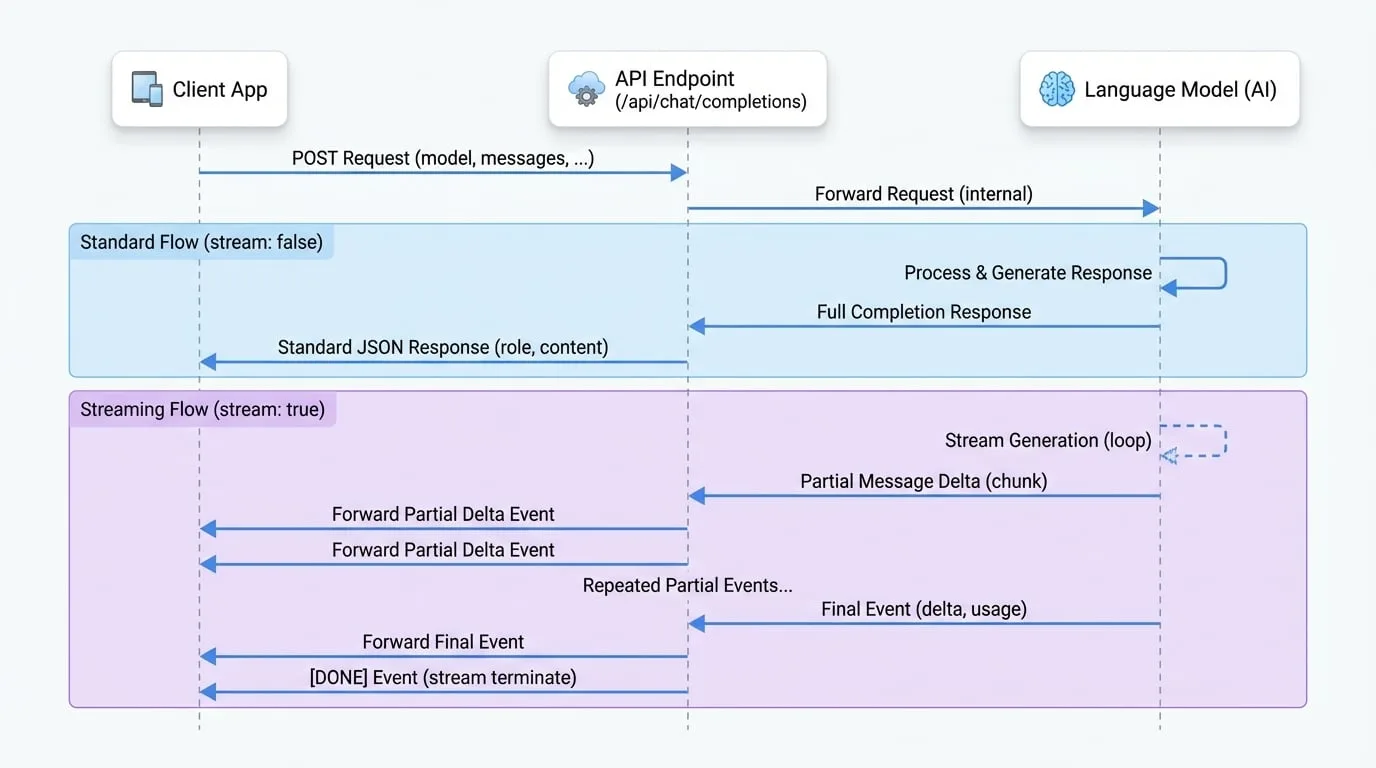
number(default:1) — Controls diversity via nucleus sampling. 0.5 means half of all likelihood-weighted options are considered. Range: 0.1 to 1. - stream
boolean(default:false) — If set to true, partial message deltas will be sent as server-sent events. The stream terminates with a data: [DONE] message. - max_tokens
integer— The maximum number of tokens to generate. The total length of input tokens and generated tokens is limited by the model's context length. - presence_penalty
number(default:0) — Number between -2.0 and 2.0. Positive values penalize new tokens based on whether they appear in the text so far, increasing the model's likelihood to talk about new topics. - frequency_penalty
number(default:0) — Number between -2.0 and 2.0. Positive values penalize new tokens based on their existing frequency in the text so far, decreasing the model's likelihood to repeat the same line verbatim. - tools
array— A list of tools the model may call. Currently, only functions are supported as a tool. - tool_choice
string or object— Controls which (if any) tool is called by the model. Can be 'none', 'auto', 'required', or an object specifying a function to call. - response_format
object— An object specifying the format that the model must output. Setting to { "type": "json_object" } enables JSON mode.
Examples
Basic Request
This example demonstrates a simple conversation with the model.
cURL Request
curl --location 'https://your-aigne-hub-instance.com/api/chat/completions' \
--header 'Authorization: Bearer YOUR_API_KEY' \
--header 'Content-Type: application/json' \
--data '{
    "model": "gpt-3.5-turbo",
    "messages": [
        {
            "role": "system",
            "content": "You are a helpful assistant."
        },
        {
            "role": "user",
            "content": "Hello! Can you explain what AIGNE Hub is in simple terms?"
        }
    ]
}'
Streaming Request
To receive the response as a stream of events, set the stream parameter to true.
cURL Stream Request
curl --location 'https://your-aigne-hub-instance.com/api/chat/completions' \
--header 'Authorization: Bearer YOUR_API_KEY' \
--header 'Content-Type: application/json' \
--header 'Accept: text/event-stream' \
--data '{
    "model": "gpt-3.5-turbo",
    "messages": [
        {
            "role": "user",
            "content": "Write a short story about a robot who discovers music."
        }
    ],
    "stream": true
}'
Response Body
Standard Response
A standard JSON object is returned when stream is false or not set.
- role
string— The role of the author of this message, always 'assistant'. - content
string— The content of the message generated by the model. - tool_calls
array— The tool calls generated by the model, if any.
Example Standard Response
Response Body
{
  "role": "assistant",
  "content": "AIGNE Hub is a centralized gateway that manages interactions with various AI models from different providers. It simplifies API access, handles billing and credits, and provides analytics on usage and costs, acting as a single point of control for an organization's AI services."
}
Streaming Response
When stream is true, the API returns a stream of text/event-stream chunks. Each chunk is a JSON object.
- delta
object— A chunk of the message delta.- role
string— The role of the author, typically 'assistant'. - content
string— A partial content of the message. - tool_calls
array— Partial tool call information.
- role
- usage
object— Present in the final chunk, contains token usage statistics.- prompt_tokens
integer— Number of tokens in the prompt. - completion_tokens
integer— Number of tokens in the generated completion. - total_tokens
integer— Total number of tokens used in the request.
- prompt_tokens
Example Stream Chunks
Event Stream
data: {"delta":{"role":"assistant","content":"Unit "}}

data: {"delta":{"content":"734,"}}

data: {"delta":{"content":" a sanitation "}}

data: {"delta":{"content":"and maintenance "}}

data: {"delta":{"content":"robot, hummed..."}}

data: {"usage":{"promptTokens":15,"completionTokens":100,"totalTokens":115}}

data: [DONE]
Summary
The Chat Completions endpoint is a powerful tool for integrating conversational AI into your applications. It offers flexibility through various parameters, including streaming and tool use, to support a wide range of use cases.
For more information on other available API endpoints, please refer to the following documents: