labels: ["Reference"]
labels: ["Reference"]
The AIGNE CLI is not limited to running projects from your local filesystem. It also provides a powerful feature to execute agents directly from a remote URL. This is incredibly useful for testing, sharing, and running agents without needing to clone a repository or manually download files.
This guide will walk you through how to run agents from a remote source and explain the underlying caching mechanism.
How It Works
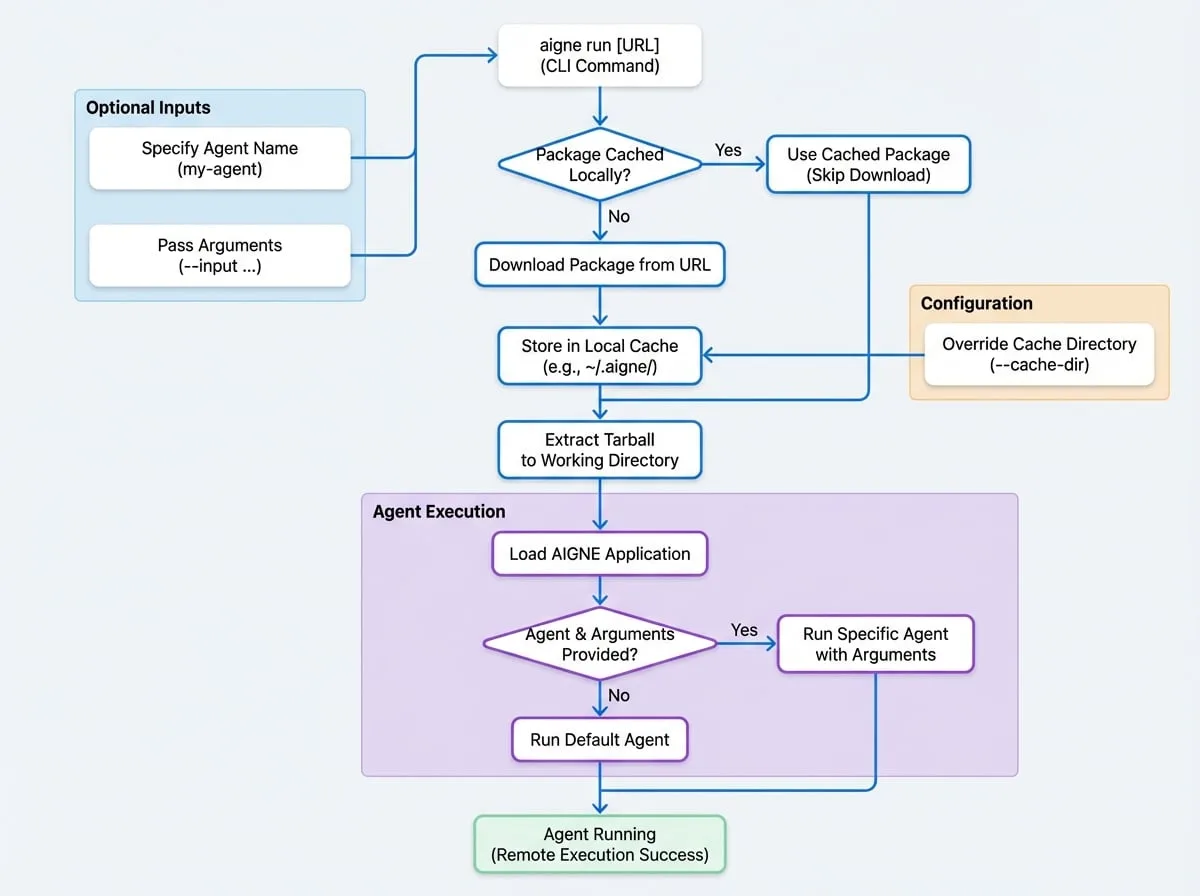
When you provide a URL to the aigne run command, the CLI performs the following steps automatically:
Download
It fetches the package from the provided HTTP/HTTPS URL.
Cache
The downloaded package is stored in a local cache directory (
~/.aigne/by default). This speeds up subsequent runs of the same remote agent, as the CLI will use the cached version if it already exists.Extract
The CLI extracts the contents of the package (which is expected to be a tarball) into a working directory within the cache.
Execute
Finally, it loads the AIGNE application from the extracted files and runs the specified agent just as it would with a local project.
The entire process is streamlined to provide a seamless experience, making a remote agent feel as accessible as a local one.
Usage
To run a remote agent, simply pass the URL pointing to a tarball (.tar.gz, .tgz) of an AIGNE project to the aigne run command.
Basic Command
AIGNE CLI
# Run the default agent from a remote AIGNE project
aigne run https://example.com/path/to/your/aigne-project.tar.gz
Running a Specific Agent
If the remote project contains multiple agents, you can specify which one to run by adding its name after the URL.
AIGNE CLI
# Run a specific agent named 'my-agent' from the remote project
aigne run https://example.com/path/to/your/aigne-project.tar.gz my-agent
Any additional arguments or options you provide will be passed directly to the remote agent.
AIGNE CLI
# Run a specific agent with additional options
aigne run https://example.com/path/to/your/aigne-project.tar.gz my-agent --input "Hello, world!"
Caching
AIGNE CLI automatically caches the downloaded remote agents to avoid re-downloading them on every run.
- Default Location: The cache is stored in the
.aignedirectory within your home directory (e.g.,~/.aigne/). The exact path within the cache is determined by the URL's hostname and path, ensuring that different remote agents are stored separately. - Overriding the Cache Directory: While the default location is suitable for most cases, you can specify a custom cache directory using the
--cache-diroption. This can be useful for CI/CD environments or for managing different sets of cached agents.
AIGNE CLI
# Use a custom directory for caching the downloaded package
aigne run https://example.com/path/to/your/aigne-project.tar.gz --cache-dir /tmp/aigne-cache
This powerful feature simplifies collaboration and distribution of AIGNE agents. You can now move on to learn how to deploy your agents for production use.