The aigne run command is the primary way to execute an AIGNE agent. It can run agents from a local project directory or directly from a remote URL. It offers a flexible set of options for providing input, configuring the AI model, and handling output, including an interactive chat mode for conversational agents.
Usage
Basic Syntax
aigne run [path] [agent_name] [options]Arguments
[path](Optional): The path to the AIGNE project directory or a remote URL (e.g., a Git repository). If omitted, it defaults to the current directory (.).[agent_name](Optional): The specific agent to run from the project. If not specified, the CLI will use theentry-agentor the defaultchatagent defined inaigne.yaml, falling back to the first agent listed.
How It Works
The run command first loads the AIGNE application. If a remote URL is provided, it downloads and caches the project locally before proceeding. It then parses the command-line arguments and executes the specified agent with the given inputs and model configurations.
Remote Execution Flow
direction: down

User: {
  shape: c4-person
}

CLI: {
  label: "@aigne/cli"

  Download: {
    label: "Download Package"
  }

  Extract: {
    label: "Extract Package"
  }

  Load: {
    label: "Load Application"
  }

  Execute: {
    label: "Execute Agent"
  }
}

Remote-URL: {
  label: "Remote URL\n(e.g., GitHub)"
  shape: cylinder
}

Cache-Dir: {
  label: "Cache Directory\n(~/.aigne/.download)"
  shape: cylinder
}

Local-Dir: {
  label: "Local Directory\n(~/.aigne/<hostname>/...)"
  shape: cylinder
}

User -> CLI: "aigne run <url>"
CLI.Download -> Remote-URL: "1. Fetch project"
Remote-URL -> CLI.Download: "2. Return tarball"
CLI.Download -> Cache-Dir: "3. Save tarball"
CLI.Extract -> Cache-Dir: "4. Read tarball"
CLI.Extract -> Local-Dir: "5. Unpack project files"
CLI.Load -> Local-Dir: "6. Load aigne.yaml & .env"
CLI.Execute -> CLI.Load: "7. Run agent"
CLI.Execute -> User: "8. Display output"
Examples
Running a Local Agent
Execute an agent from a project on your local filesystem.
Run from current directory
# Run the default agent in the current directory
aigne run
Run a specific agent
# Run the 'translator' agent located in a specific project path
aigne run path/to/my-project translator
Running a Remote Agent
You can run an agent directly from a Git repository or a tarball URL. The CLI handles downloading and caching the project in your home directory (~/.aigne).
Run from a GitHub repository
aigne run https://github.com/AIGNE-io/aigne-framework/tree/main/examples/defaultRunning in Interactive Chat Mode
For conversational agents, use the --interactive flag to start an interactive terminal session.
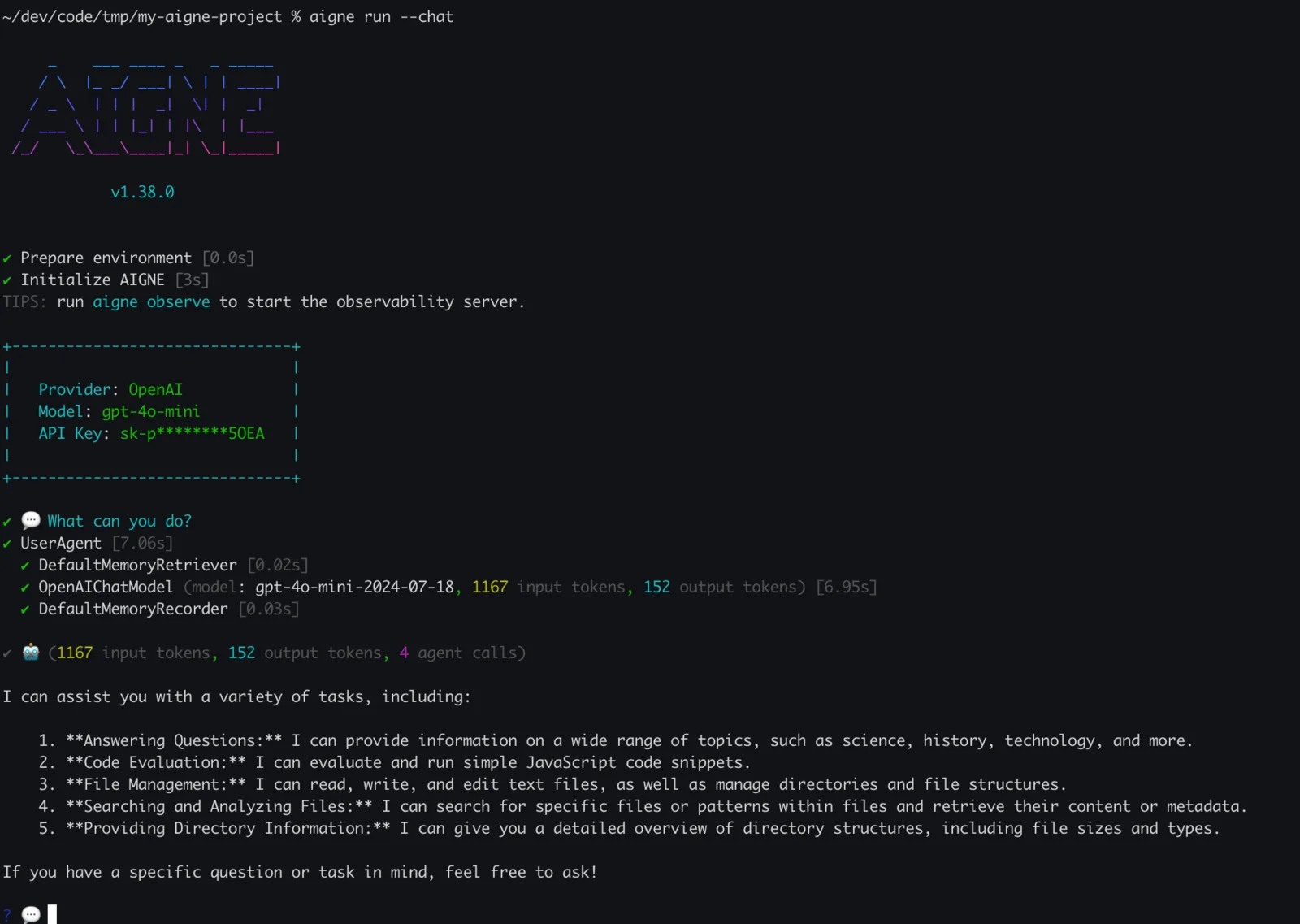
Start a chat session
aigne run --interactiveInside the chat loop, you can use commands like /exit to quit and /help for assistance. You can also attach local files to your message by prefixing the path with @.
💬 Tell me about this file: @/path/to/my-document.pdfProviding Input to Agents
There are multiple ways to provide input to your agents, depending on their defined input schema in aigne.yaml.
As Command-Line Options
If an agent's input schema defines specific parameters (e.g., text, targetLanguage), you can pass them as command-line options.
Pass agent-specific parameters
# Assuming 'translator' agent has 'text' and 'targetLanguage' inputs
aigne run translator --text "Hello, world!" --targetLanguage "Spanish"
From Standard Input (stdin)
You can pipe content directly to the run command. This is useful for chaining commands.
Pipe input to an agent
echo "Summarize this important update." | aigne run summarizerFrom Files
Use the @ prefix to read content from a file and pass it as input.
--input @<file>: Reads the entire file content as the primary input.--<param> @<file>: Reads file content for a specific agent parameter.
Read input from a file
# Use content of document.txt as the main input
aigne run summarizer --input @document.txt

# Provide structured JSON input for multiple parameters
aigne run translator --input @request-data.json --format json
Multimedia File Inputs
For agents that process files like images or documents (e.g., vision models), use the --input-file option.
Attach a file for a vision agent
aigne run image-describer --input-file cat.png --input "What is in this image?"Options Reference
General Options
| Option | Description |
|---|---|
--interactive | Run the agent in an interactive chat loop in the terminal. |
--log-level <level> | Set the logging level. Available levels: debug, info, warn, error, silent. Default: silent. |
Model Options
These options allow you to override the model configurations defined in aigne.yaml.
| Option | Description |
|---|---|
--model <provider[:model]> | Specify the AI model to use (e.g., 'openai' or 'openai'). |
--temperature <value> | Model temperature (0.0-2.0). Higher values increase randomness. |
--top-p <value> | Model top-p / nucleus sampling (0.0-1.0). Controls response diversity. |
--presence-penalty <value> | Presence penalty (-2.0 to 2.0). Penalizes repeating tokens. |
--frequency-penalty <value> | Frequency penalty (-2.0 to 2.0). Penalizes frequent tokens. |
--aigne-hub-url <url> | Custom AIGNE Hub service URL for fetching remote models or agents. |
Input & Output Options
| Option | Alias | Description |
|---|---|---|
--input <value> | -i | Input to the agent. Can be specified multiple times. Use @<file> to read from a file. |
--input-file <path> | Path to an input file for the agent (e.g., for vision models). Can be specified multiple times. | |
--format <format> | Input format when using --input @<file>. Choices: text, json, yaml. | |
--output <file> | -o | Path to a file to save the result. Defaults to printing to standard output. |
--output-key <key> | The key in the agent's result object to save to the output file. Defaults to output. | |
--force | Overwrite the output file if it already exists. Creates parent directories if they don't exist. |
Next Steps
aigne observe
Learn how to start the observability server to view detailed traces of your agent runs.
Running Remote Agents
Dive deeper into the specifics of executing agents directly from remote URLs.
Creating a Custom Agent
Get started with building your own agents and skills to use with the AIGNE CLI.