Author
Assignee
Label
Relevance
Search the site
Try searching for keywords or filtering in discussions, docs, blogs, bookmarks and more...
Welcome to DID Connect, a protocol designed for seamless and secure authentication using Decentralized Identifiers (DIDs). This library, @arcblock/did-connect-js, provides the tools you need to integrate DID Connect into your Node.js applications, enabling users to log in, prove ownership of assets, sign transactions, and more, all from the security of their DID Wallet.
DID Connect empowers users by giving them control over their digital identity, while offering developers a straightforward way to build next-generation applications. For more information on the protocol itself, visit the official website at https://www.didconnect.io.
This library is designed to work in tandem with the DID Connect UX package, which provides the frontend components necessary for a complete user experience.
At the heart of the library are two primary classes that manage the entire DID Connect session:
This class is responsible for the application's side of the cryptographic exchange. It configures your application's identity (name, description, icon), defines the blockchain it interacts with, and handles the signing and verification of all messages sent to and from the user's wallet.
This class acts as a middleware for your web server (e.g., Express.js). It manages the lifecycle of a DID Connect session, from creating the initial QR code to handling the final wallet response. You use it to define what information you need from the user (Claims) and what business logic to execute upon successful authentication.
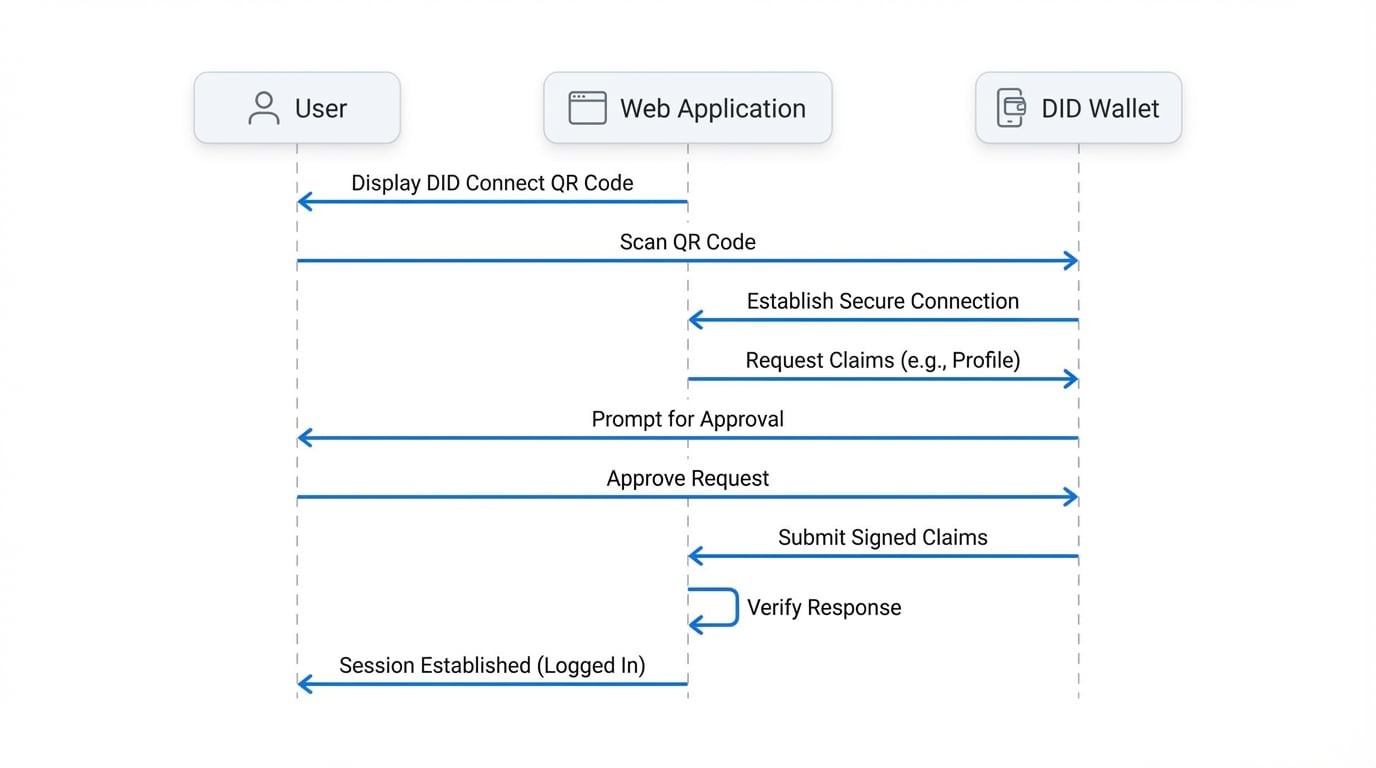
A typical DID Connect session involves a secure, QR-code-based interaction between your application and the user's DID Wallet. The process ensures that the user is always in control and must explicitly consent to any requested actions or data sharing.
The following diagram illustrates the end-to-end flow:
The central concept in a DID Connect session is the Claim. A claim is a piece of information that your application requests from the user. This could be anything from basic profile data to a cryptographic signature.
For example, you can request:
The library supports a wide variety of claim types, each designed for a specific use case. You can explore them in detail in the Claims Reference section.
Now that you have an overview of DID Connect, you're ready to dive deeper. Where you go next depends on your goal.