UserSessions
The UserSessions component renders a comprehensive data table for displaying and managing a user's login sessions. It provides a clear overview of all active, expired, and offline sessions across various devices, giving users control over their account security.
The component is designed to be a plug-and-play solution for developers needing to implement session management features. It handles data fetching, pagination, UI rendering, and actions like logging out of specific sessions.
Features#
- Session Filtering: Users can easily filter sessions by their status:
online,expired, oroffline. - Detailed Information: Each session entry displays parsed user-agent data, including the operating system, device type (browser), and wallet OS.
- IP Geolocation: Automatically resolves and displays the geographical region based on the last login IP address.
- Session Termination: Allows users to terminate any session except the current one.
- Bulk Actions: Includes a "Logout All" feature to terminate all sessions of a specific status.
- Responsive Design: Adapts to different screen sizes, ensuring a consistent user experience on both desktop and mobile devices.
How It Works#
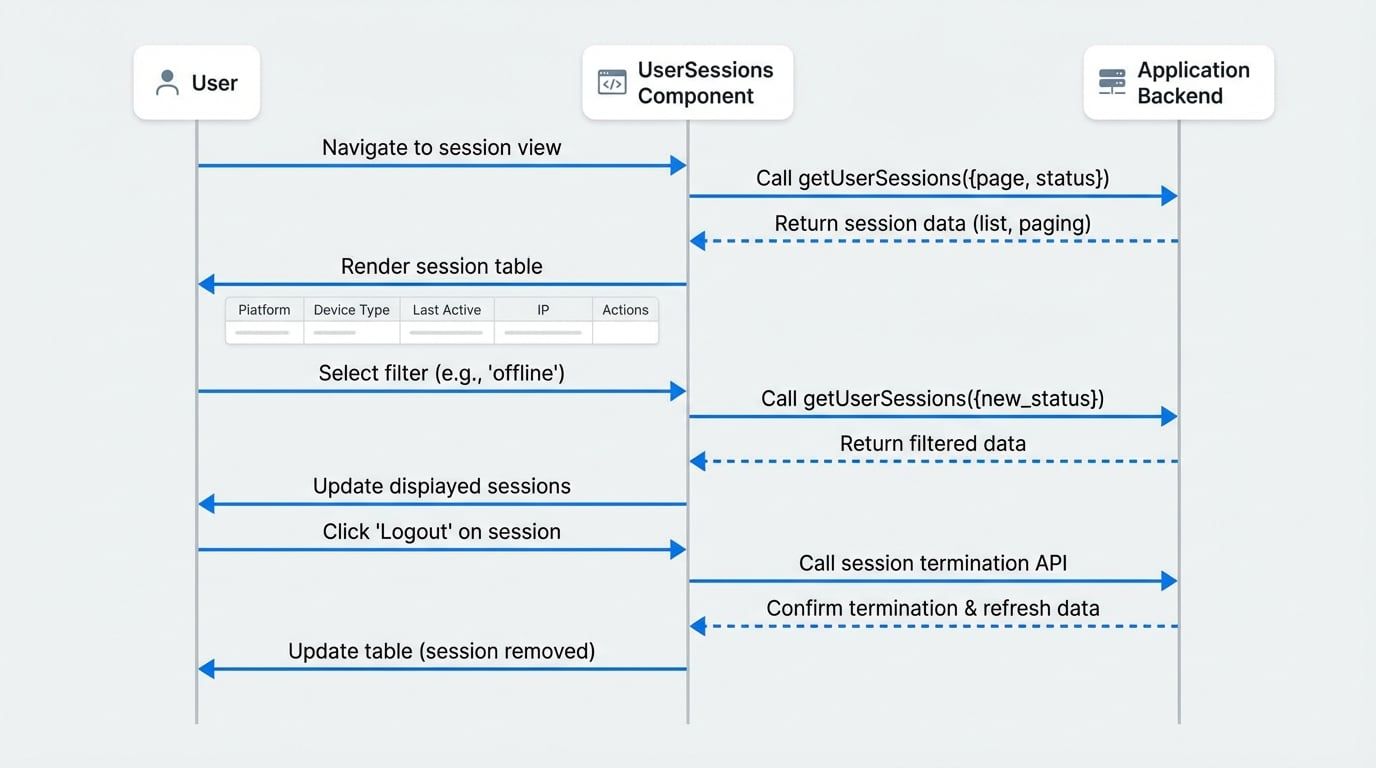
The UserSessions component operates by requesting session data from a developer-provided function. This design decouples the component from any specific backend implementation, offering greater flexibility.
The following diagram illustrates the interaction between the user, the component, and the application backend:
Usage#
To use the UserSessions component, you must provide a user object and a getUserSessions function. The getUserSessions function is responsible for fetching the session data from your backend service.
Integration Example
import { UserSessions } from '@arcblock/blocklet-ui-react';
import { client } from './libs/client'; // Your API client instance

// The user object for whom sessions are being displayed.
const currentUser = {
  did: 'z1...',
  name: 'Alice',
  // other user properties
};

/**
 * This function fetches session data from your backend.
 * The UserSessions component will call this function whenever it needs new data.
 *
 * @param {object} params - The query parameters.
 * @param {number} params.page - The current page number.
 * @param {number} params.pageSize - The number of items per page.
 * @param {string} params.status - The session status to filter by ('online', 'expired', 'offline').
 * @returns {Promise<{ list: UserSession[], paging: { total: number } }>} A promise that resolves to the session data.
 */
const fetchUserSessions = async ({ page, pageSize, status }) => {
  const response = await client.user.getSessions({
    page,
    pageSize,
    status,
See all 22 lines
Props#
The UserSessions component accepts the following props to customize its behavior and appearance.
The user object for whom the sessions are being displayed. The component requires this to provide context for the session list.
An asynchronous function responsible for fetching paginated session data from your backend. It receives an object with page, pageSize, and status and must return a Promise that resolves to an object with the shape { list: UserSession[], paging: { total: number } }.
Controls the visibility of the "Actions" column, which contains the logout buttons. Set to false to create a read-only view.
Controls the visibility of the "User" column. This is useful in multi-user or administrative contexts where identifying the user for each session is necessary.
Determines whether the "Offline" filter option is available in the UI. Offline sessions typically represent long-lived sessions that are not currently active.
Controls the visibility of the "App Pid" column, which can display a Blocklet's Program ID associated with the session.
Displayed Information#
The component renders the following information for each session in the data table:
Column | Description |
|---|---|
Platform | The operating system and version derived from the session's user-agent string (e.g., |
Device Type | The browser or application used for the session (e.g., |
Wallet OS | The operating system of the connected DID wallet, if available. |
App Pid | The Program ID of the Blocklet that created the session. (Visible if |
User | The user associated with the session. (Visible if |
Created At | The timestamp when the session was initially created. |
Last Active | The timestamp of the last activity. For expired sessions, this column shows "Expired". |
Last Login IP | The last known IP address for the session, along with its resolved geographical region. |
Actions | Provides a button to log out of the session. (Visible if |
For a complete user management interface, consider using the UserSessions component within the UserCenter component.