Notifications
This section provides a detailed guide to the components and utilities available for implementing a real-time user notification system. The system is designed to deliver timely updates to users through a dedicated UI component and toast messages.
The core of the notification system is built around a WebSocket connection, enabling the server to push updates to the client instantly. This ensures that users are always informed of important events without needing to refresh the application.
Architecture Overview#
The notification system follows a straightforward, event-driven architecture. When a notable event occurs in the backend, a notification is generated and broadcasted through a WebSocket channel. The frontend client listens on this channel, receives the notification, and updates the UI accordingly.
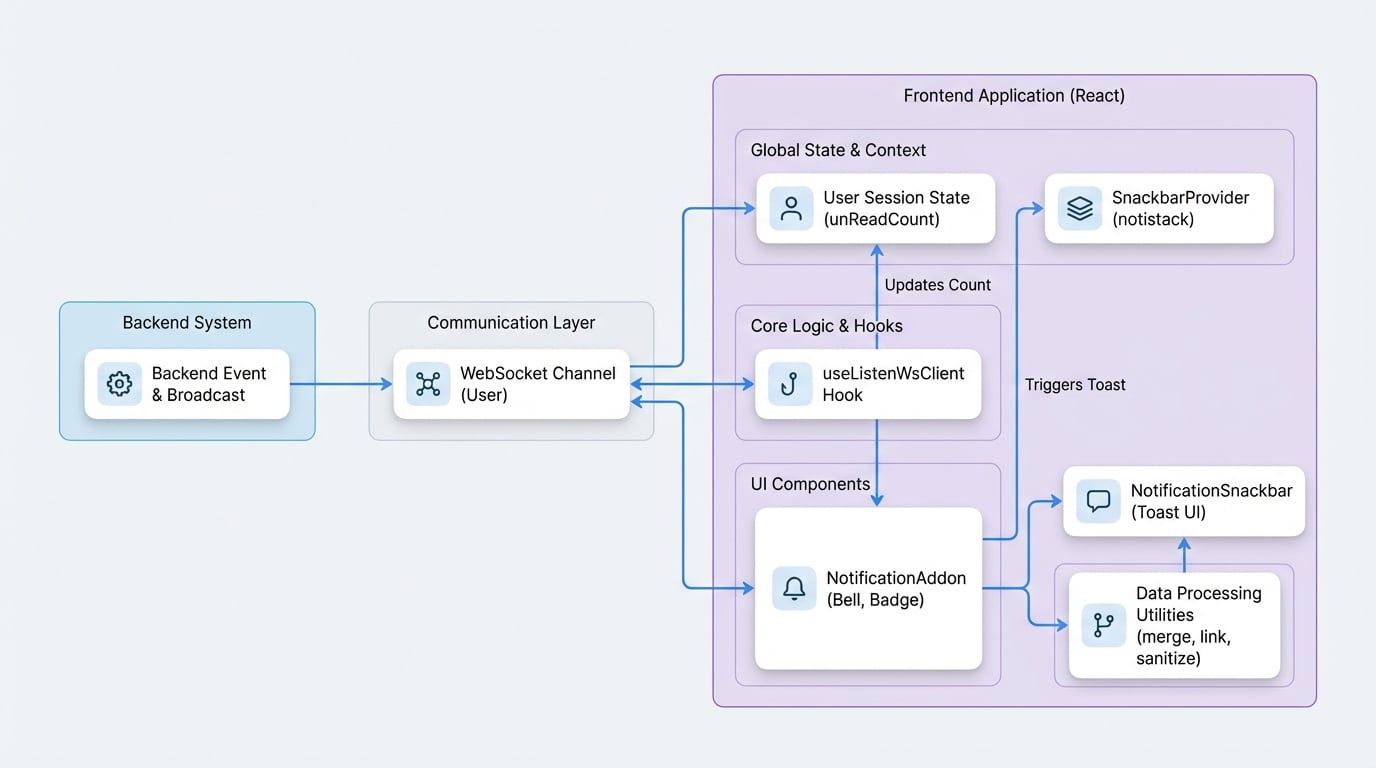
Core Components#
The notification system is primarily composed of two React components: NotificationAddon and NotificationSnackbar.
NotificationAddon#
The NotificationAddon component serves as the main user interface element for notifications. It renders a bell icon that displays a badge indicating the number of unread notifications.
Features#
- Unread Count: Displays a real-time count of unread notifications.
- WebSocket Integration: Automatically connects to the notification WebSocket channel and listens for incoming messages.
- Toast Notifications: Triggers toast messages for new component-level notifications.
- Direct Navigation: Functions as a link to the main notifications page.
Usage#
To use this component, import it and place it within a layout component, such as an application header. It requires a session object, typically obtained from a session context, to function correctly.
Example:
import NotificationAddon from '@arcblock/ux/lib/common/notification-addon';
import { useSessionContext } from '@arcblock/did-connect-react';

export default function AppHeader() {
  const { session } = useSessionContext();

  return (
    <header>
      {/* Other header content */}
      <NotificationAddon session={session} />
    </header>
  );
}Important: For the toast notifications to work, your application must be wrapped in a SnackbarProvider from the notistack library.
Example:
import { SnackbarProvider } from 'notistack';
import App from './App';

function Root() {
  return (
    <SnackbarProvider maxSnack={3}>
      <App />
    </SnackbarProvider>
  );
}Props#
The session object containing user and notification data. The component relies on session.user, session.unReadCount, and session.setUnReadCount.
NotificationSnackbar#
This component provides a rich, standardized UI for toast notifications. It is used internally by NotificationAddon via notistack's enqueueSnackbar function and is not intended for direct use.
Features#
- Severity-Based Styling: The appearance of the snackbar changes based on the notification's severity level (
success,info,warning,error). - Rich Content Display: Capable of displaying structured activity notifications (e.g., "User X liked your post") in addition to simple titles and descriptions.
- Interactive Links: Automatically converts recognized patterns in the description (like user DIDs or DApp addresses) into clickable links.
- Click-to-Open: Clicking the snackbar navigates the user to the detailed notification view.
WebSocket Integration#
Real-time functionality is powered by a WebSocket client managed by the useListenWsClient hook. This hook establishes a connection for the logged-in user and listens for specific events.
useListenWsClient Hook#
This hook abstracts the complexity of creating and managing the WebSocket connection. It retrieves the current user session and initializes a client connected to a specified endpoint.
Hook
const wsClient = useListenWsClient('user');Events#
The NotificationAddon component subscribes to the following events on the user channel:
Event Name | Description |
|---|---|
| Fired when a new notification is created for the user. The component increments the unread count and may display a toast message. |
| Fired when one or more notifications have been read. The component decrements the unread count by the number of notifications that were read. |
The full event name is dynamically constructed using the blocklet's DID and the user's DID, for example: {blocklet.did}/{user.did}/notification:blocklet:create.
Key Utilities#
Several utility functions support the notification system by processing and formatting notification data.
mergeAdjacentNotifications#
This function groups consecutive, similar notifications into a single, aggregated entry. For example, if a user receives multiple "like" notifications in a row from different users, this function can merge them into a single notification like "Alice, Bob, and 2 others liked your post."
toClickableSpan#
This utility is responsible for enhancing notification descriptions by converting plain text into rich, interactive content. It parses the input string, identifies special entities like user DIDs or DApp addresses, and transforms them into clickable HTML <a> tags. This allows users to navigate directly to a user's profile or a DApp's page from within a notification.
sanitize#
A wrapper around DOMPurify that cleans and sanitizes HTML content before it is rendered. This is a security measure to prevent cross-site scripting (XSS) attacks when displaying notification content that may contain user-generated data.
Summary#
The notification system provides a robust and real-time solution for keeping users informed. By leveraging the NotificationAddon component and ensuring your application is configured with the SnackbarProvider, you can easily integrate a full-featured notification center into your blocklet. The underlying WebSocket architecture ensures that updates are delivered instantly, creating a dynamic and responsive user experience.