UserCenter
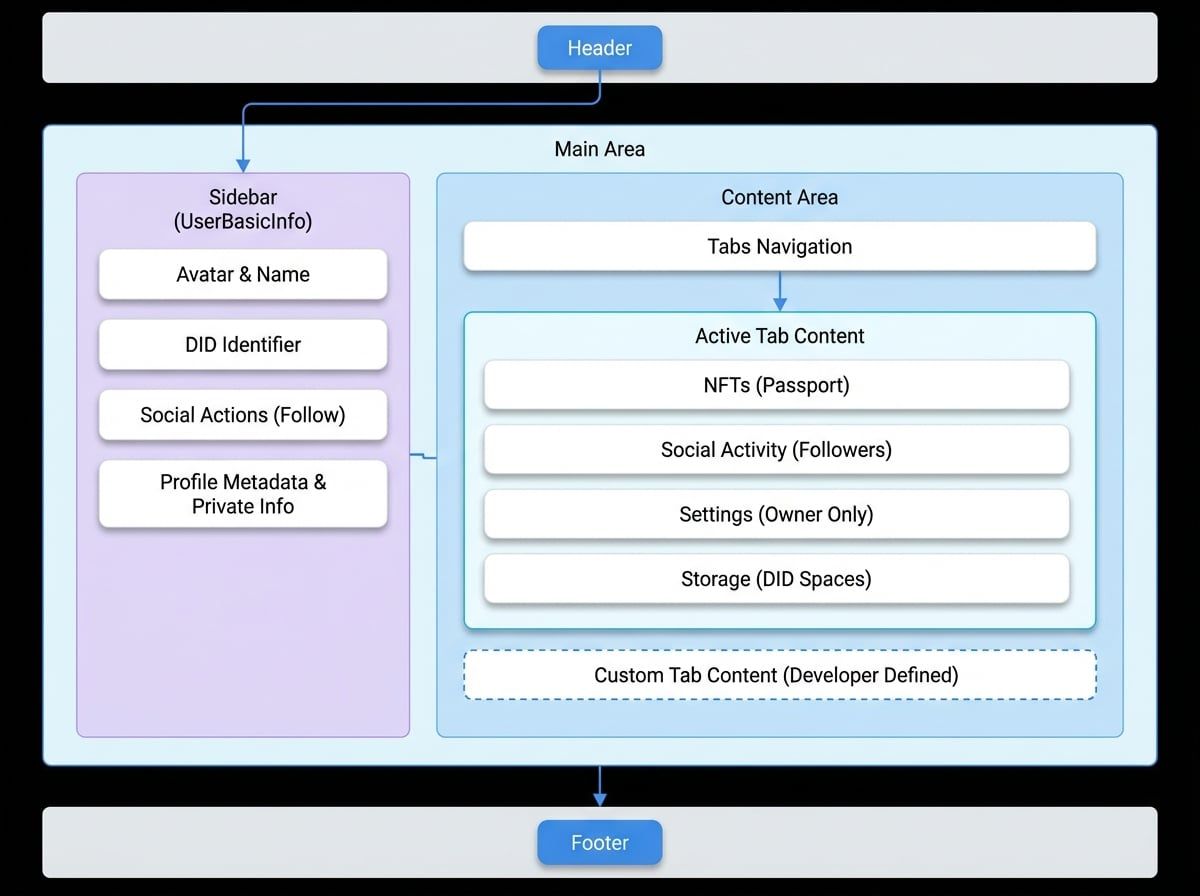
The UserCenter component is a comprehensive, pre-built interface that provides a complete user profile and settings management page. It integrates various functionalities, including user information display, passport management, privacy controls, notification settings, and DID storage management, offering a centralized hub for users.
This component is designed to be highly extensible, allowing developers to add custom tabs and content through the blocklet's metadata, ensuring a consistent user experience across different applications.
Basic Usage#
To use the UserCenter, you need to provide the currentTab prop, which determines which section is active. This is typically derived from the application's router.
UserCenter Example
import React from 'react';
import { UserCenter } from '@blocklet/ui-react';

export default function ProfilePage() {
  // In a real application, you would get this value from your router.
  // For example, if the URL is /profile/settings, currentTab would be '/profile/settings'.
  const currentTab = '/profile/nfts';

  return <UserCenter currentTab={currentTab} />;
}Props#
The UserCenter component accepts several props to customize its behavior and appearance.
Used to render content for custom tabs defined in the blocklet's navigation settings. The UserCenter will display the children when currentTab matches a custom tab's URL.
The value of the currently active tab. This should match the value property of one of the available tabs (either default or custom). It is used to highlight the correct tab and display its corresponding content.
The DID of the user whose profile is to be displayed. If omitted, the component will attempt to get the DID from the URL query parameter (?did=...) or default to the currently logged-in user.
If set to true, the component renders in an embedded mode without the main Header and Footer, making it suitable for integration within other layouts or pages.
If set to true, only the UserBasicInfo profile card is displayed, without any tabs or content sections. This is useful for contexts where only a compact user profile is needed.
If set to true, the Footer component will not be rendered.
Props to be passed down to the underlying Header component for customization.
Props to be passed down to the underlying Footer component for customization.
A callback function that is triggered when a non-owner user initiates the account deletion process from the "Danger Zone" in the settings.
Custom content to display when no user is logged in and no userDid is provided. If not set, a default login prompt is shown.
Core Features#
The UserCenter is composed of several key sections and components that provide a rich user experience out of the box.
Default Tabs#
By default, the UserCenter includes the following tabs for every user:
Tab | Description | Visibility |
|---|---|---|
NFTs | Displays the user's NFT collections. | Public |
Social Activity | Shows the user's followers and following lists if social features are enabled. | Public |
Settings | Access to profile, privacy, notification, and session management. | Owner Only |
Storage | Interface for managing connections to DID Spaces for decentralized storage. | Owner Only |
User Profile (UserBasicInfo)#
The UserBasicInfo component is a dedicated section (typically a sidebar on desktop) that displays essential user details:
- Avatar and Name: Shows the user's profile picture and full name. The owner can click the avatar to open the profile switcher.
- DID: Displays the user's Decentralized Identifier, with options to copy it or view its QR code.
- Social Actions: For public profiles, it shows "Follow" or "Unfollow" buttons.
- Metadata: Displays user-provided information such as bio, location, and social links.
- Private Information: For the owner, it shows private details like email and phone number.
Passport Management#
On the main profile tab (NFTs), the currently logged-in user will see a section dedicated to their DID Passports. This area lists all associated passports, indicating their status (e.g., active, revoked) and highlighting the one currently in use.
Settings#
The "Settings" tab is a comprehensive panel available only to the user who owns the profile. It is organized into several sub-sections:
- Common Settings: Allows users to update their public profile information like name, bio, and social links.
- Notification Management: Configure how to receive notifications (Wallet, Email, Push) and manage webhooks.
- Third-Party Login: Manage connections to other identity providers like Google, GitHub, or Passkeys.
- Privacy Management: Control the visibility of different tabs on the user profile, making them public or private.
- Session Management: View and revoke active login sessions across different devices.
- Danger Zone: For non-owner roles, provides an option to delete their own account.
Customization#
You can extend the UserCenter by adding new tabs through your blocklet's configuration.
- Define Custom Tabs in
blocklet.yml
Add entries to thenavigation.userCenterarray in yourblocklet.ymlfile. Each entry represents a new tab.blocklet.yml
navigation: - title: User Center role: guest userCenter: - title: My Activity link: /profile/activity icon: 'material-symbols:history' # Set to true if this tab should only be visible to the profile owner private: false - Render Content for the Custom Tab
In your component, pass a child element that will be rendered when thecurrentTabprop matches thelinkyou defined.MyActivity.js
import React from 'react';
import { UserCenter } from '@blocklet/ui-react';

function MyActivityComponent() {
  return <div>This is the custom activity content.</div>;
}

export default function ProfilePageWithActivity() {
  // This value would come from your router, e.g., '/profile/activity'
  const currentTab = '/profile/activity';

  return (
    <UserCenter currentTab={currentTab}>{currentTab === '/profile/activity' && <MyActivityComponent />}</UserCenter>
  );
}
This approach allows you to seamlessly integrate application-specific pages into the standard UserCenter layout.