Core Concepts
This document explains the fundamental principles of the Blocklet UI React library. The core design philosophy is a metadata-driven approach, where UI components such as the Header, Footer, and Dashboard are automatically configured and rendered based on the blocklet's metadata. This strategy ensures consistency, reduces boilerplate code, and enables dynamic UIs that adapt to user roles and language preferences.
The central idea is that a single configuration file, typically blocklet.yml, serves as the single source of truth for the application's overall structure and appearance. The library reads this metadata, processes it, and uses it to construct the appropriate UI elements.
The Metadata-Driven Principle#
The library's operation can be visualized as a simple data flow: the blocklet metadata is provided as input to the library, which then processes it through a pipeline to produce fully rendered UI components. This eliminates the need for developers to manually build and configure common layout elements for each application.
The following diagram illustrates this data flow:
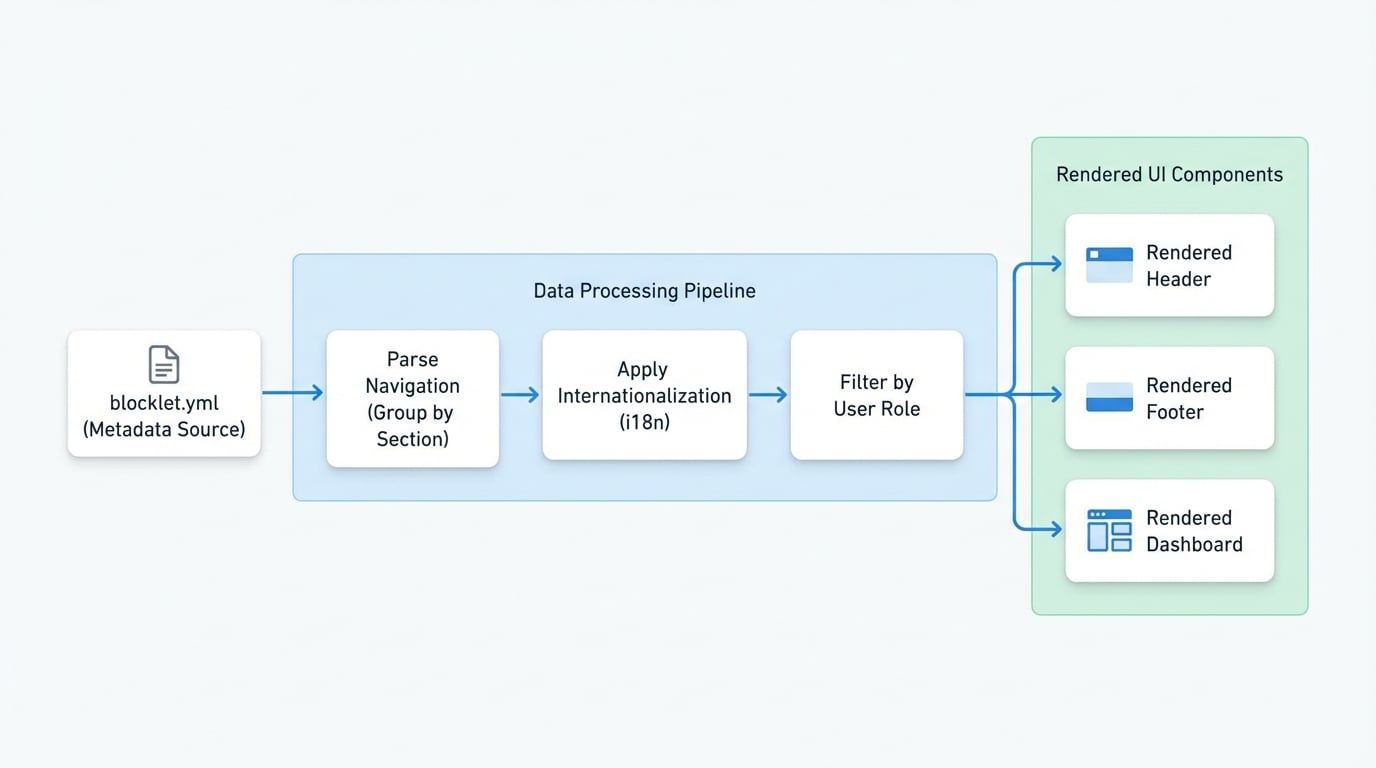
This automated process relies on a well-defined metadata structure, which is detailed in the following section.
Anatomy of Blocklet Metadata#
The library expects a specific object structure, referred to as BlockletMetaProps, which contains all the necessary information for rendering the UI. Below is a detailed breakdown of this structure.
Defines the color scheme for the application layout.
An array of navigation item objects that define the links and menus throughout the application.
Navigation Configuration Example#
The navigation array is the most critical part of the metadata. It provides a structured way to define all links, menus, and their placement.
Navigation Configuration in blocklet.yml
# blocklet.yml
navigation:
  - title: Features
    link: /features
  - title:
      en: About Us
      zh: 关于我们
    link:
      en: /about
      zh: /about-us
    section: footer
  - title: Admin Dashboard
    link: /admin
    section: dashboard
    role: admin
  - title: Social
    section: social
    items:
      - title: Twitter
        link: https://twitter.com/arcblock
        icon: mdi:twitter
      - title: GitHub
        link: https://github.com/arcblock
        icon: mdi:github
This example illustrates several key features:
- A simple header link ("Features").
- A multi-language footer link ("About Us").
- An admin-only link for the dashboard.
- A group of social media links intended for the footer.
The Data Processing Pipeline#
Before rendering, the library processes the raw metadata through a series of steps to prepare it for the UI components.
1. Parsing and Sectioning#
The first step is to parse the navigation array and group items based on their section property. A single navigation item can be assigned to multiple sections by using an array for the section value.
The parseNavigation utility categorizes each item into predefined sections:
header: For the main application header.footer: For primary links in the footer.social: For social media icons, typically in the footer.bottom: For legal or secondary links at the very bottom of the footer.dashboard: For the sidebar navigation in a dashboard layout.sessionManager: For menus within the user session component.userCenter: For tabs or links within the user profile area.
If an item has no section property, it defaults to header.
2. Internationalization (i18n)#
The library provides built-in support for multiple languages. If a title or link property in a navigation item is an object with language keys (e.g., en, zh), the getLocalizedNavigation function automatically selects the correct string based on the user's current locale.
i18n Object Example
// A navigation item with multi-language support
{
  title: {
    en: 'Home',
    zh: '首页'
  },
  link: {
    en: '/home',
    zh: '/zh/home'
  }
}
3. Role-Based Filtering#
To create a dynamic user experience, navigation items can be restricted to specific user roles. The filterNavByRole function filters the navigation list by comparing the role property of each item against the user.role from the current session.
- If an item has no
roleproperty, it is visible to everyone. - If an item has a
roleproperty (e.g.,['admin', 'editor']), it is only visible to users whose role is in that array. - The
guestrole is a special value that applies to unauthenticated users.
This mechanism allows you to define a comprehensive navigation structure in your metadata and have the UI automatically adapt based on the logged-in user's permissions.
Summary#
The core concept of the Blocklet UI React library is to leverage a centralized metadata object to drive the configuration and rendering of common UI components. This metadata-driven approach offers several advantages:
- Single Source of Truth: Application structure, branding, and navigation are defined in one place.
- Consistency: Ensures a consistent look and feel across different parts of the application.
- Reduced Boilerplate: Eliminates the need to manually code common layout elements like headers and footers.
- Dynamic UI: Natively supports internationalization and role-based access control, allowing the UI to adapt dynamically to the user and their permissions.
With a clear understanding of these principles, you can effectively utilize the library's components. For more information on specific components and their usage, please refer to the Components section.