Header
The Header component provides a responsive and customizable header for a Blocklet application. It automatically populates navigation links, the application logo, and user session controls by reading metadata directly from the blocklet's configuration (blocklet.yml). This component is designed to create a consistent and feature-rich header with minimal configuration.
Overview#
The Header component serves as a primary navigation and branding element. It is built on top of @arcblock/ux components, including ResponsiveHeader and NavMenu, and integrates seamlessly with the DID Connect session context for user authentication.
Key features include:
- Automatic Configuration: Populates the app logo, title, and navigation links from
blocklet.yml. - Responsive Design: Adapts automatically to different screen sizes, providing a mobile-friendly navigation menu.
- Session Management: Integrates with DID Connect to display user information, profile menus, and login/logout buttons.
- Customizable Addons: Allows for the injection of custom components or modification of default elements like the theme toggle and locale selector.
- Organization Switching: Automatically includes an organization switcher if the blocklet has organization support enabled.
- Domain Warnings: Notifies administrators and users when accessing the application via a temporary domain to encourage custom domain configuration for better security.
How It Works#
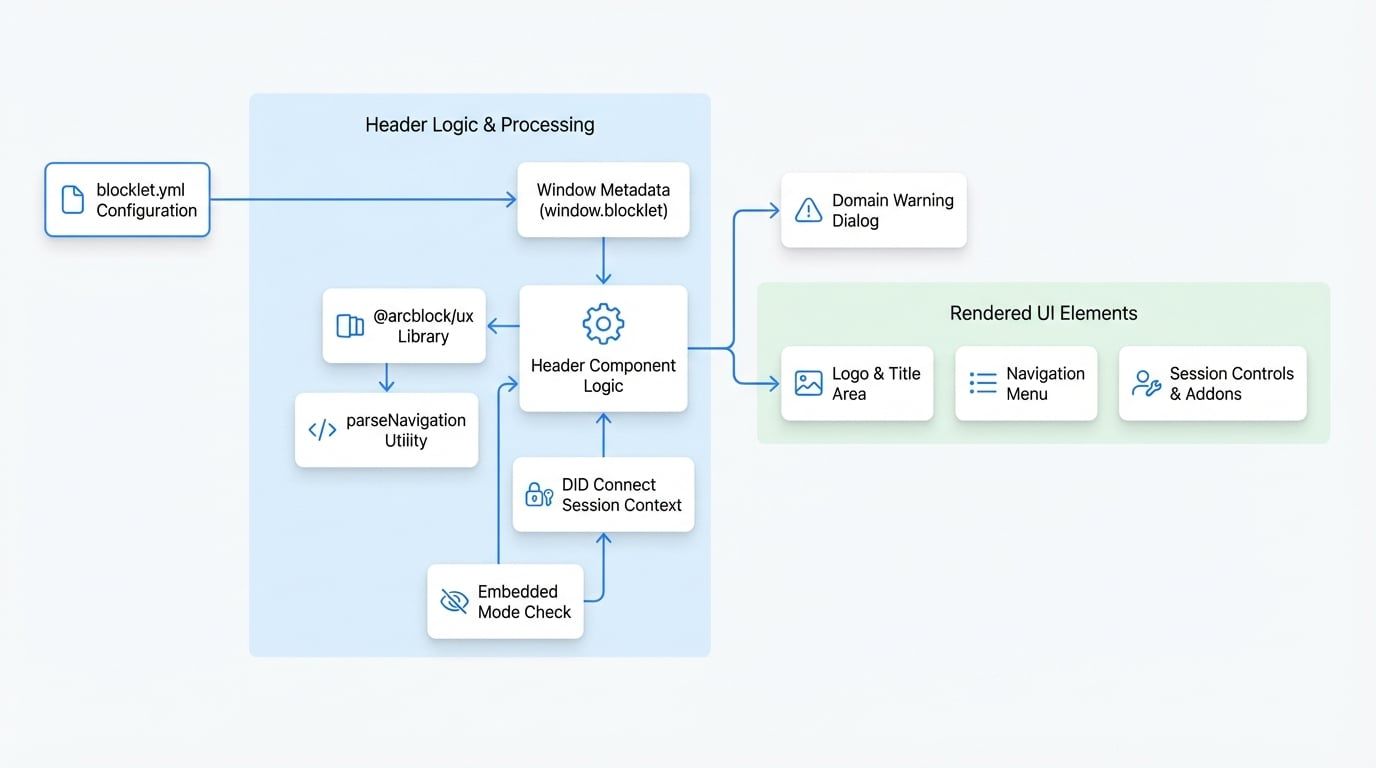
The diagram below illustrates the data flow and component composition of the Header. It reads configuration from the blocklet.yml file, processes it, and renders the appropriate UI elements, including the logo, navigation links, and user session controls.
Basic Usage#
To use the Header, import it and place it in your application's layout. It requires the blocklet's metadata, which is typically available globally via window.blocklet.
App.js
import Header from '@blocklet/ui-react/lib/Header';

function App() {
  // The meta object is usually sourced from window.blocklet
  const blockletMeta = window.blocklet || {};

  return (
    <div>
      <Header meta={blockletMeta} />
      <main>
        {/* Your application content */}
      </main>
    </div>
  );
}

export default App;Props#
The Header component accepts several props for customization.
The blocklet's metadata object, typically from window.blocklet. It contains information like name, logo, and navigation that the component uses for rendering.
Custom elements to be added to the right side of the header. If a function is provided, it receives the built-in addons as an argument, allowing you to modify, reorder, or supplement them. If a node is provided, it replaces all built-in addons.
Props passed directly to the underlying SessionUser component to control the display of user session information, such as showing the user's role.
The URL for the home link, which is typically triggered by clicking the logo or brand name. It defaults to the blocklet's public path (/). Can also be a function that returns a JSX element.
A Material-UI theme object to merge with the default theme, allowing for deep customization of colors, typography, and other styles.
If true, the navigation menu generated from blocklet.yml will be hidden, even if navigation data exists.
If true, a bottom border will be applied to the header for visual separation.
A custom logo element to override the one from the blocklet metadata.
A custom brand element (e.g., text or an image) to display next to the logo.
If false, the dialog warning about temporary domains will not be shown.
Features#
Automatic Navigation from Metadata#
The Header automatically generates its navigation menu from the navigation array in your blocklet.yml file. The component parses this configuration to create primary navigation links and nested dropdown menus.
Here is an example of a navigation configuration in blocklet.yml:
blocklet.yml
navigation:
  - title: Features
    link: /features
    icon: 'mdi:star'
  - title: Docs
    link: /docs
    icon: 'mdi:book-open'
  - title: More
    items:
      - title: About Us
        link: /about
        description: Learn more about our mission.
      - title: Community
        link: https://community.example.com
        description: Join our community forum.
The parseNavigation utility processes this structure, handles localization for title and description, and determines the active link based on the current URL path.
Session Management and Addons#
The right side of the header contains "addons," which are a collection of controls for session management and application settings. By default, these include:
- Organization Switcher: Appears if the blocklet has organization support enabled.
- Notification Center: Appears if the blocklet includes a notifications page.
- Locale Selector: Appears if multiple languages are configured.
- Theme Mode Toggle: Switches between light and dark modes.
- Session Controls: Displays the logged-in user's avatar and a menu with links for profile, settings, and logout. For guests, it shows a "Connect Wallet" button.
Customizing Addons#
You can customize these addons using the addons prop.
Example: Appending a custom button
Provide a function to the addons prop. This function receives an array of the default addon elements, allowing you to add your own.
HeaderWithCustomAddon.js
import Header from '@blocklet/ui-react/lib/Header';
import Button from '@mui/material/Button';

function HeaderWithCustomAddon() {
  return (
    <Header
      meta={window.blocklet}
      addons={(builtInAddons) => (
        <>
          {builtInAddons}
          <Button variant="contained" color="primary" sx={{ ml: 1 }}>
            Upgrade
          </Button>
        </>
      )}
    />
  );
}
Example: Replacing all addons
Provide a React node or an array of nodes to replace the default addons entirely.
HeaderWithReplacedAddons.js
import Header from '@blocklet/ui-react/lib/Header';
import Button from '@mui/material/Button';

function HeaderWithReplacedAddons() {
  return (
    <Header
      meta={window.blocklet}
      addons={[
        <Button key="feedback" variant="outlined" sx={{ ml: 1 }}>
          Feedback
        </Button>,
      ]}
    />
  );
}
Hiding in Embedded Mode#
The Header is wrapped with the withHideWhenEmbed higher-order component. It will automatically be hidden when the application is rendered in an embedded context (e.g., within an iframe where sessionStorage contains EMBED_MODE_KEY: 1). This is useful for providing a cleaner UI when your blocklet is integrated into another application.
Summary#
The Header component is a powerful tool for establishing consistent branding and navigation across a Blocklet application. By leveraging blocklet metadata, it simplifies development while offering extensive customization through props.
For related layout components, please see the documentation for the Footer.