Dashboard
The Dashboard component provides a pre-built, responsive layout for blocklet applications, typically used for administrative interfaces or user-centric views. It automatically constructs a standard dashboard with a sidebar, header, and main content area by interpreting your blocklet's metadata. This component significantly reduces boilerplate code for building common application structures.
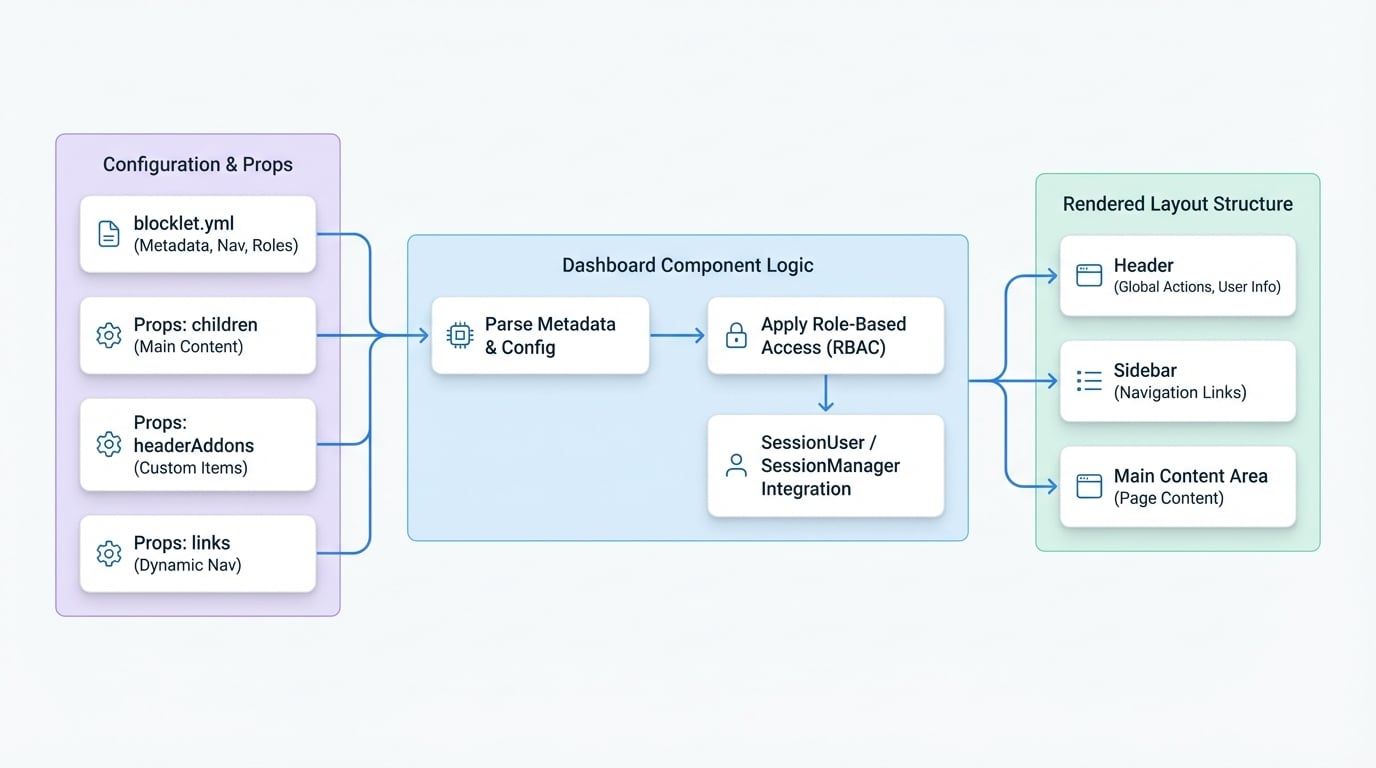
The layout is composed of three primary sections: a persistent sidebar for navigation, a header for global actions and user information, and a main content area where the page-specific content is rendered.
The following diagram illustrates the component's structure and its relationship with the blocklet metadata:
Basic Usage#
To use the Dashboard component, simply wrap your page's content with it. The component will automatically render the header and sidebar around your content.
MyDashboard.jsx
import Dashboard from '@arcblock/blocklet-ui-react/lib/Dashboard';

export default function MyDashboardPage() {
  return (
    <Dashboard>
      <h1>Welcome to the Dashboard</h1>
      <p>This is your main content area.</p>
    </Dashboard>
  );
}
The children passed to the Dashboard component will be displayed in the main content area.
Props#
The Dashboard component accepts the following props to customize its behavior and appearance.
The content to be rendered within the main content area of the dashboard layout.
A blocklet metadata object. If provided, it will be merged with and override the default window.blocklet metadata. This is useful for testing or dynamically altering blocklet information.
The URL to redirect to if the current authenticated user has no access to any navigation links based on their role. Set to null to disable this automatic redirection.
A callback function that is executed when the current URL path does not match any of the available navigation links. The default behavior is to redirect to the first available link.
Allows for customization of the header's right-side addons. If a node is provided, it replaces all default addons. If a function is provided, it receives the default addons array as an argument, allowing you to add, remove, or reorder them.
Props to be passed directly to the underlying SessionUser component in the header. This allows for customization of the user session menu, such as showRole or defining a custom onLogout handler.
Allows for programmatic modification of the sidebar navigation links. If an array is provided, its items are appended to the links generated from metadata. If a function is provided, it receives the metadata-generated links as an argument and should return a new array of links.
If true, displays a warning dialog if the application is accessed from an untrusted domain.
How It Works#
The Dashboard component is designed to be "configuration-driven," deriving its structure and content primarily from the blocklet's metadata file (blocklet.yml).
Navigation from Metadata#
The sidebar navigation is automatically generated from the navigation array in your blocklet.yml. The component specifically looks for navigation items that include dashboard in their section property.
Here is an example of how to define dashboard navigation:
blocklet.yml
navigation:
  - title: 'Home'
    link: '/'
    section: 'dashboard'
    icon: 'mdi:home'
    role: ['owner', 'admin', 'guest']
  - title: 'Analytics'
    link: '/analytics'
    section: 'dashboard'
    icon: 'mdi:chart-bar'
    role: ['owner', 'admin']
  - title: 'Settings'
    link: '/settings'
    section: 'dashboard'
    icon: 'mdi:cog'
    role: ['owner']
    items:
      - title: 'Profile'
        link: '/settings/profile'
      - title: 'Billing'
        link: '/settings/billing'
Role-Based Access Control#
The Dashboard component enforces role-based access control (RBAC) on navigation links. Each navigation item can have a role property, which is an array of roles that are permitted to see the link.
- If a navigation item does not have a
roleproperty, it is visible to everyone. - If the current user is not authenticated, they can only see items that include the
guestrole. - If the current user is authenticated, the component compares their
user.rolewith therolearray of each navigation item. The item is only displayed if there is a match. - A parent navigation item is only visible if at least one of its children is visible.
Using the blocklet.yml example above:
- A user with the
guestrole will only see the "Home" link. - A user with the
adminrole will see "Home" and "Analytics". - A user with the
ownerrole will see all links, including the nested "Profile" and "Billing" links under "Settings".
Icons#
The icon property for a navigation item should be a string that corresponds to an icon name from the Iconify library (e.g., mdi:home). You can also provide a full URL to an image file.
Customization#
While the Dashboard is designed to work out-of-the-box with metadata, it offers several props for more advanced customization.
Customizing Header Addons#
You can modify the default header addons (e.g., Theme Toggle, Locale Selector, Session Manager) using the headerAddons prop. By passing a function, you can add new elements or rearrange the existing ones.
CustomHeader.jsx
import Dashboard from '@arcblock/blocklet-ui-react/lib/Dashboard';
import Button from '@mui/material/Button';

function MyCustomButton() {
  return <Button color="inherit" onClick={() => alert('Help!')}>Help</Button>;
}

export default function CustomDashboard() {
  return (
    <Dashboard
      headerAddons={(existingAddons) => {
        const customAddon = <MyCustomButton key="custom-help" />;
        // Add the custom button before the other addons
        return [customAddon, ...existingAddons];
      }}
    >
      <p>Dashboard with a custom header button.</p>
    </Dashboard>
  );
}
Programmatically Adding Links#
The links prop allows you to add or modify sidebar navigation links dynamically from your code. This is useful for links that depend on application state.
DynamicLinks.jsx
import Dashboard from '@arcblock/blocklet-ui-react/lib/Dashboard';
import Icon from '@arcblock/ux/lib/Icon';

const useFeatureFlag = () => {
  // In a real app, this would check a feature flag service
  return true;
};

export default function DynamicDashboard() {
  const isBetaFeatureEnabled = useFeatureFlag();

  return (
    <Dashboard
      links={(existingLinks) => {
        if (isBetaFeatureEnabled) {
          const betaLink = {
            id: 'beta-feature',
            title: 'Beta Feature',
            url: '/beta',
            icon: <Icon name="mdi:test-tube" />,
            external: true, // Required for client-side routing
          };
          return [...existingLinks, betaLink];
        }
        return existingLinks;
See all 6 lines
Summary#
The Dashboard component is a powerful tool for quickly scaffolding application layouts. By leveraging blocklet metadata, it provides a structured, role-aware navigation system out of the box. For more foundational layout components, see the documentation for Header and Footer.