Usage & Cost Analytics
Understanding AI model consumption is crucial for managing costs, monitoring performance, and ensuring fair resource allocation. This document provides a detailed guide on how to query usage statistics, track costs, and interpret the data models AIGNE Hub uses for analytics and reporting.
Overview#
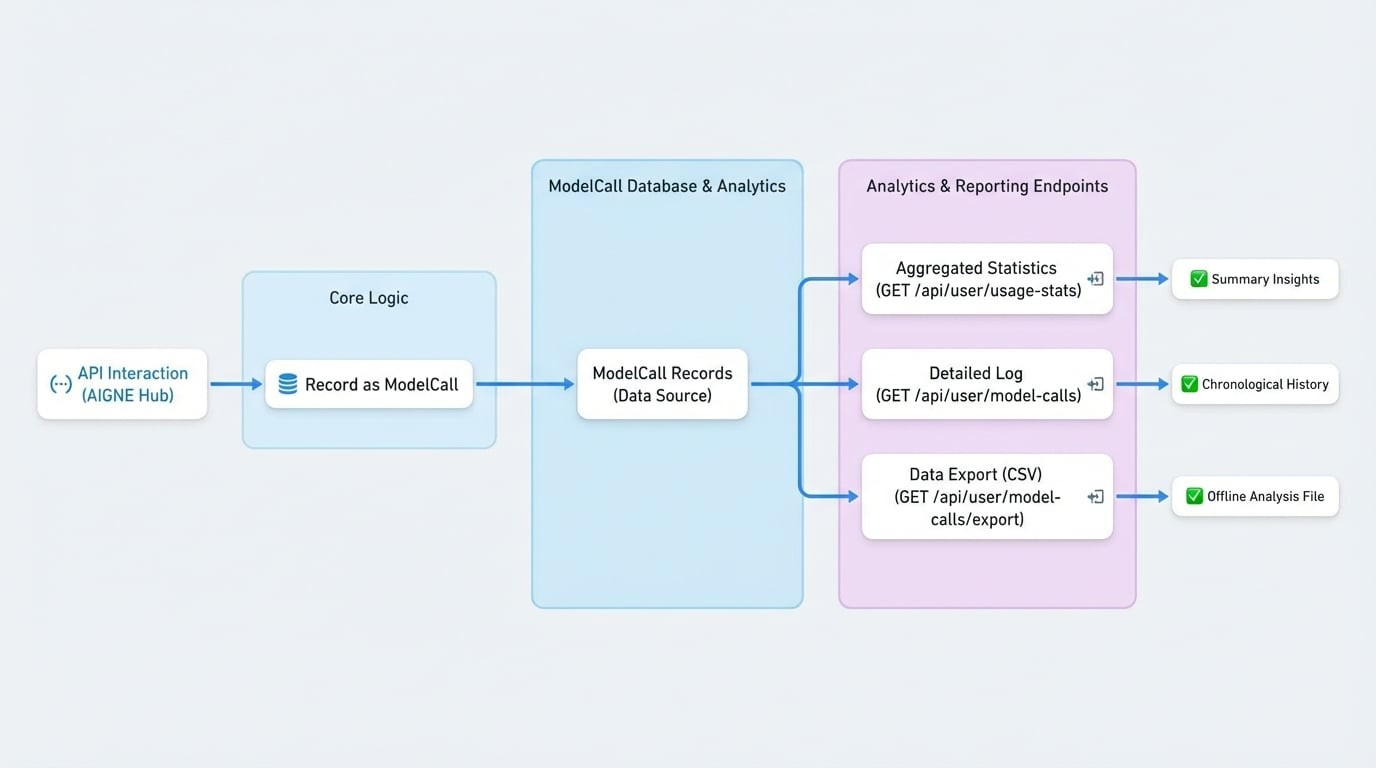
AIGNE Hub records every API interaction as a ModelCall entry. These records form the basis for all usage analytics. The system provides several API endpoints to query and aggregate this data, allowing you to monitor consumption for the entire system or on a per-user basis. This enables detailed tracking of token usage, credit consumption, and overall API call volume.
Data Models#
Understanding the underlying data structures is essential for effectively querying and interpreting analytics data. The following diagram illustrates how a ModelCall record is generated and used by the analytics endpoints.
The ModelCall Object#
Every request made to an AI provider through the hub is logged as a ModelCall. This object contains detailed information about the request, its execution, and the associated costs.
Querying Usage Data#
You can retrieve analytics data through several REST API endpoints. These endpoints require authentication.
Fetching Usage Statistics#
To get a summarized and aggregated view of usage over a specific period, use the GET /api/user/usage-stats endpoint. For system-wide analytics, administrators can use GET /api/user/admin/user-stats.
Request Parameters
When using /api/user/model-calls, set to true to fetch data for all users. This is restricted to admin users.
Example Request
Requesting user stats
curl -X GET 'https://your-aigne-hub-url/api/user/usage-stats?startTime=1672531200&endTime=1675228799' \
--header 'Authorization: Bearer <YOUR_ACCESS_TOKEN>'
Response Body
The endpoint returns a comprehensive object containing a summary, daily breakdowns, model statistics, and trend comparisons.
Listing Model Calls#
For a detailed, chronological log of individual API requests, use the GET /api/user/model-calls endpoint. This provides access to the raw ModelCall records with pagination and filtering.
Request Parameters
Example Request
Listing model calls
curl -X GET 'https://your-aigne-hub-url/api/user/model-calls?page=1&pageSize=10&status=failed' \
--header 'Authorization: Bearer <YOUR_ACCESS_TOKEN>'
Response Body
The response is a paginated list of ModelCall objects.
response.json
{
  "count": 1,
  "list": [
    {
      "id": "z8VwXGf6k3qN...",
      "providerId": "openai",
      "model": "gpt-4o-mini",
      "credentialId": "z3tXy..._default",
      "type": "chatCompletion",
      "totalUsage": 150,
      "usageMetrics": {
        "inputTokens": 100,
        "outputTokens": 50
      },
      "credits": 0.0002,
      "status": "failed",
      "duration": 2,
      "errorReason": "API key is invalid.",
      "appDid": "z2qa9sD2tFAP...",
      "userDid": "z1...",
      "requestId": null,
      "callTime": 1675228799,
      "createdAt": "2023-01-31T23:59:59.000Z",
      "updatedAt": "2023-01-31T23:59:59.000Z",
      "traceId": null,
See all 27 lines
Exporting Model Calls#
You can export the model call history to a CSV file for offline analysis or reporting using the GET /api/user/model-calls/export endpoint. This endpoint accepts the same filtering parameters as the listing endpoint.
Example Request
Exporting model calls
curl -X GET 'https://your-aigne-hub-url/api/user/model-calls/export?startTime=1672531200&endTime=1675228799' \
--header 'Authorization: Bearer <YOUR_ACCESS_TOKEN>' \
-o model-calls-export.csv
The server will respond with a text/csv file containing the requested data.
Summary#
The analytics features in AIGNE Hub provide powerful tools for monitoring and understanding AI model usage. By leveraging the ModelCall data model and the associated API endpoints, you can build dashboards, generate reports, and gain critical insights into your operational costs and performance.
For details on how credits are configured and billed, refer to the Service Provider Mode documentation.