Enterprise Self-Hosting
Deploying AIGNE Hub within your own infrastructure grants your organization complete control over AI model access, data privacy, and operational costs. This guide provides a structured approach to configuring and managing a self-hosted AIGNE Hub instance for secure, internal enterprise use.
Overview#
The enterprise self-hosting model is designed for organizations that prioritize data security and direct management of their AI resources. By deploying AIGNE Hub within your own network perimeter, you create a centralized, secure gateway for all internal teams and applications to access a variety of AI models.
This approach offers several distinct advantages:
- Enhanced Security: All data, including prompts, responses, and API credentials, remains within your corporate network, ensuring compliance with strict data privacy policies.
- Direct Billing: You maintain a direct billing relationship with each AI provider (e.g., OpenAI, Anthropic, Google). AIGNE Hub tracks usage, but all costs are paid directly to the vendors, simplifying budget allocation and eliminating third-party billing complexities.
- Full Control: Your team has complete administrative control over the instance, including which models are available, who can access them, and how they are configured.
- Internal Integration: Seamlessly connect AIGNE Hub with your existing internal authentication systems, such as your corporate OAuth provider, for unified and secure access management.
This deployment scenario is ideal for development teams, corporate AI initiatives, and any application requiring robust, private access to generative AI capabilities.
Architectural Considerations#
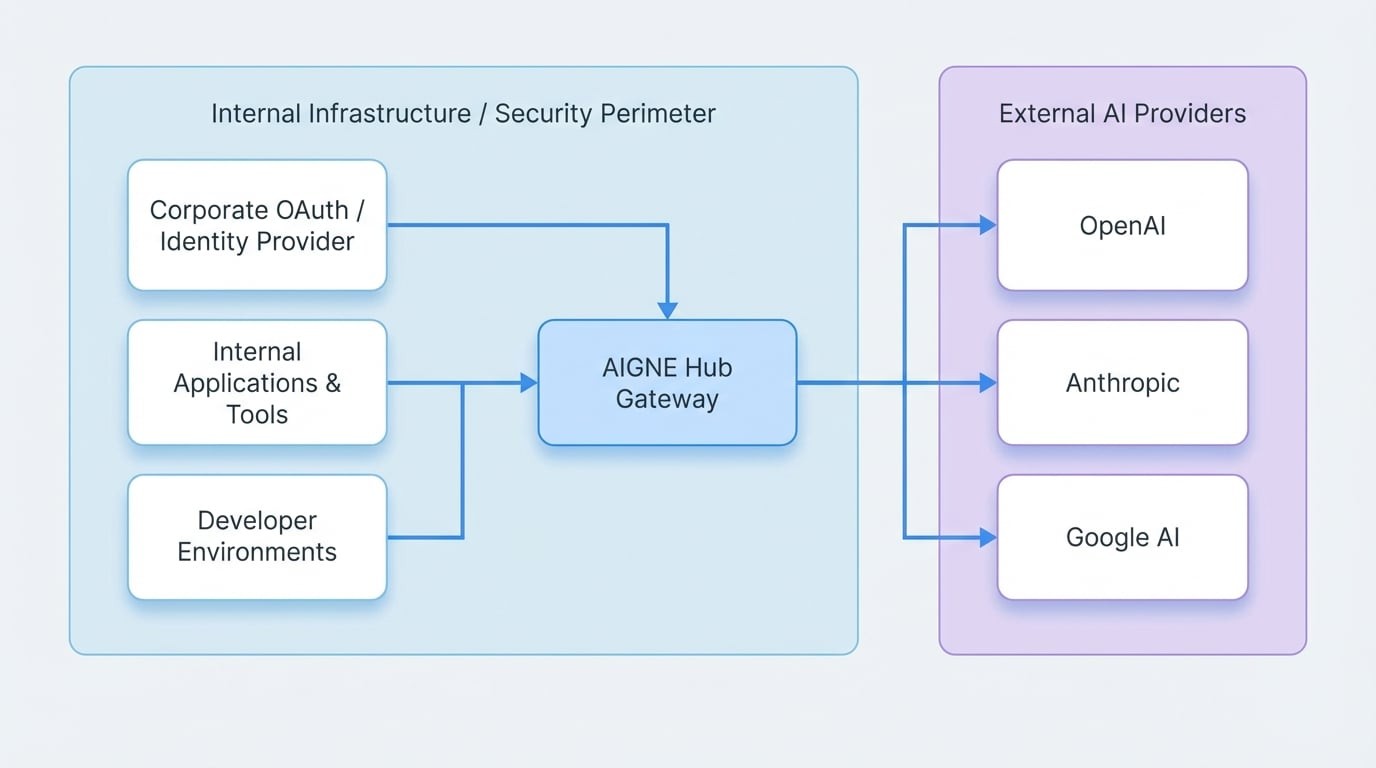
When deploying AIGNE Hub for internal enterprise use, it functions as a centralized gateway within your security perimeter. All internal applications and services route their AI requests through the Hub, which then securely communicates with the external AI providers.
Key Components#
- AIGNE Hub Instance: A dedicated Blocklet running on your internal infrastructure (e.g., a private cloud, on-premises server, or VPC).
- Internal Applications: Your services, developer environments, and internal tools that need to consume AI services.
- Authentication System: Your corporate identity provider (e.g., an internal OAuth 2.0 server) that manages user access.
- External AI Providers: The upstream LLM and AIGC services that AIGNE Hub connects to.
In this configuration, the Hub acts as the sole intermediary. Internal applications do not need direct access to provider API keys, which significantly strengthens your security posture.
Configuration Steps#
Configuring AIGNE Hub for enterprise use is a straightforward process focused on connecting providers and securing access.
1. Initial Deployment#
First, ensure you have a running instance of AIGNE Hub. If you have not yet installed it, follow the deployment instructions in our Getting Started guide. The primary method is to launch it from the Blocklet Store onto your Blocklet Server.
2. Provider Configuration#
The core of the self-hosted setup is configuring AIGNE Hub to use your organization's own API keys for each AI provider. This ensures that all usage is billed directly to your corporate accounts.
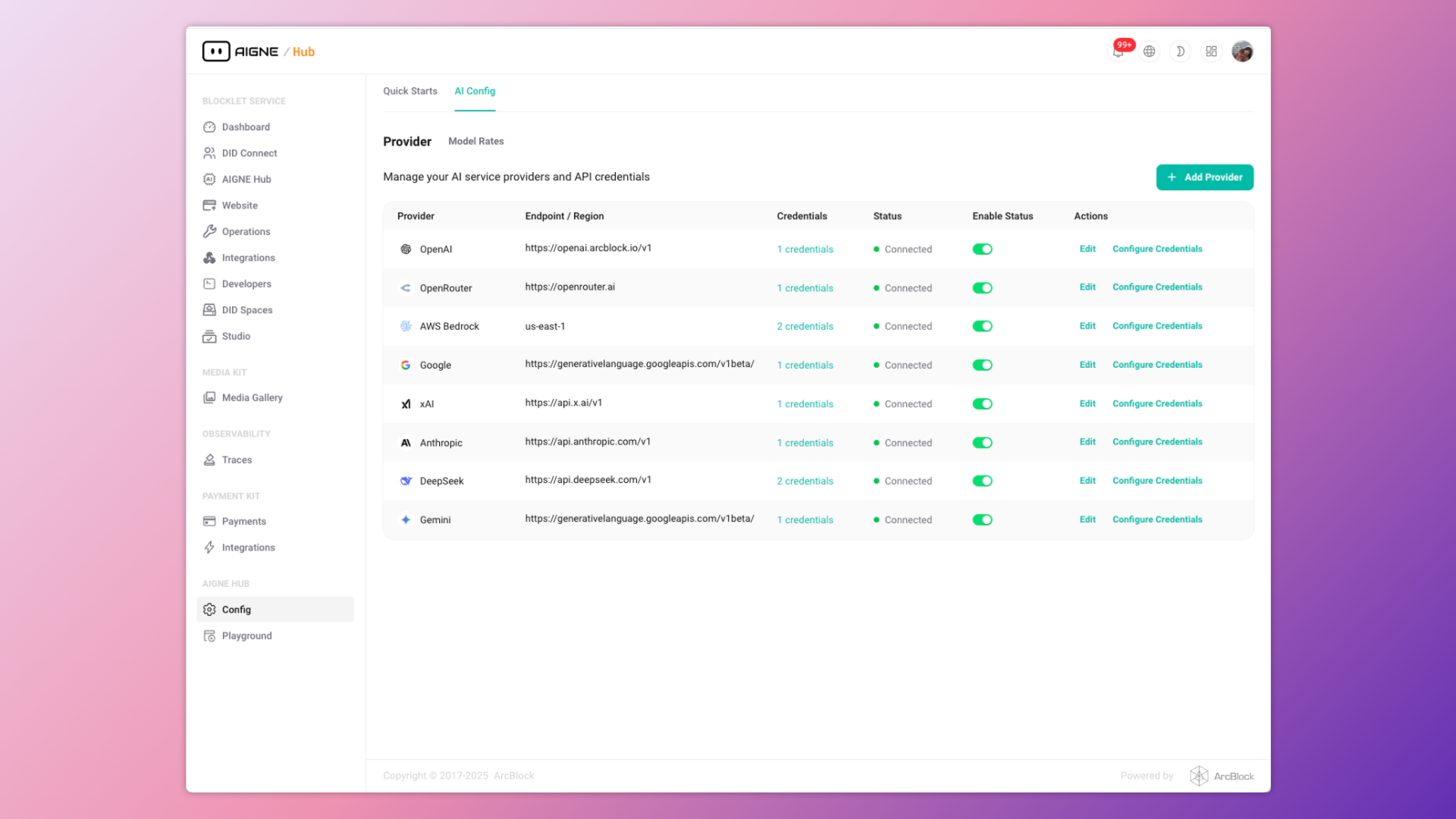
- Navigate to the admin dashboard of your AIGNE Hub instance.
- In the left-hand sidebar, go to Config > AI Providers.
- Here, you will see a list of supported AI providers. Click + Add Provider or select an existing one to configure.
- Enter your organization's API credentials for the selected provider. The system stores these credentials securely using encryption.
- Enable the providers you wish to make available to your internal users.
3. User Access and Security#
For internal use, you can manage access through your existing identity infrastructure.
Internal OAuth Integration#
AIGNE Hub supports standard OAuth 2.0 for secure, single sign-on (SSO) access. By integrating it with your internal identity provider, employees can use their corporate credentials to access the Hub and generate API tokens for their applications. This centralizes user management and access control.
To configure this, you will need to provide the client ID, client secret, and relevant endpoints from your OAuth provider in the AIGNE Hub security settings.
Direct API Access#
For services or automated workflows, administrators can generate long-lived API keys directly within AIGNE Hub. These keys can be assigned specific permissions and revoked at any time, providing a secure method for non-interactive access.
Usage and Management#
With the self-hosted instance configured, internal teams can begin using the unified API endpoint for all their AI needs.
Unified API Endpoint#
All requests to any configured AI model are sent to your AIGNE Hub instance's API endpoints. The Hub automatically routes the request to the appropriate upstream provider, using the securely stored credentials.
For example, an application can switch from using OpenAI's gpt-4 to Anthropic's claude-3-opus simply by changing the model name in the API call, without needing to manage different API keys or endpoints.
Usage Analytics#
Even though billing is handled directly with providers, AIGNE Hub provides detailed analytics on usage and costs.
- Navigate to the Usage Analytics section in the admin dashboard.
- Monitor token consumption, image generation counts, and estimated costs per user, team, or application.
- Use this data for internal chargebacks, budget tracking, and identifying high-consumption services.
This allows you to maintain visibility over AI spending across the organization without the complexity of parsing individual provider invoices.
Summary#
The enterprise self-hosting model provides a secure, controlled, and efficient way to deploy AIGNE Hub for internal use. By centralizing AI access, keeping data within your security perimeter, and maintaining direct billing relationships, you can build a robust AI infrastructure that meets strict corporate requirements.
For more advanced configurations, such as setting up a monetized service for external customers, please refer to the Service Provider Mode documentation. You can also find detailed information on securing your instance in the Security & Access guide.