Chat Completions
This document provides a detailed specification for the Chat Completions API endpoint. By following this guide, you will learn how to generate conversational AI responses, manage streaming, and utilize model-specific parameters for building robust applications. This endpoint is central to creating interactive, text-based experiences.
The Chat Completions API enables you to build applications that leverage large language models for a variety of conversational tasks. You provide a series of messages as input, and the model returns a text-based response.
For related functionalities, refer to the Image Generation and Embeddings API documentation.
Create Chat Completion#
Creates a model response for the given chat conversation.
POST /api/chat/completions
Request Body#
ID of the model to use. See the model endpoint compatibility table for details on which models work with the Chat API.
A list of messages comprising the conversation so far. See below for the message object structure.
Controls randomness. Lowering results in less random completions. As the temperature approaches zero, the model will become deterministic and repetitive. Range: 0 to 2.
Controls diversity via nucleus sampling. 0.5 means half of all likelihood-weighted options are considered. Range: 0.1 to 1.
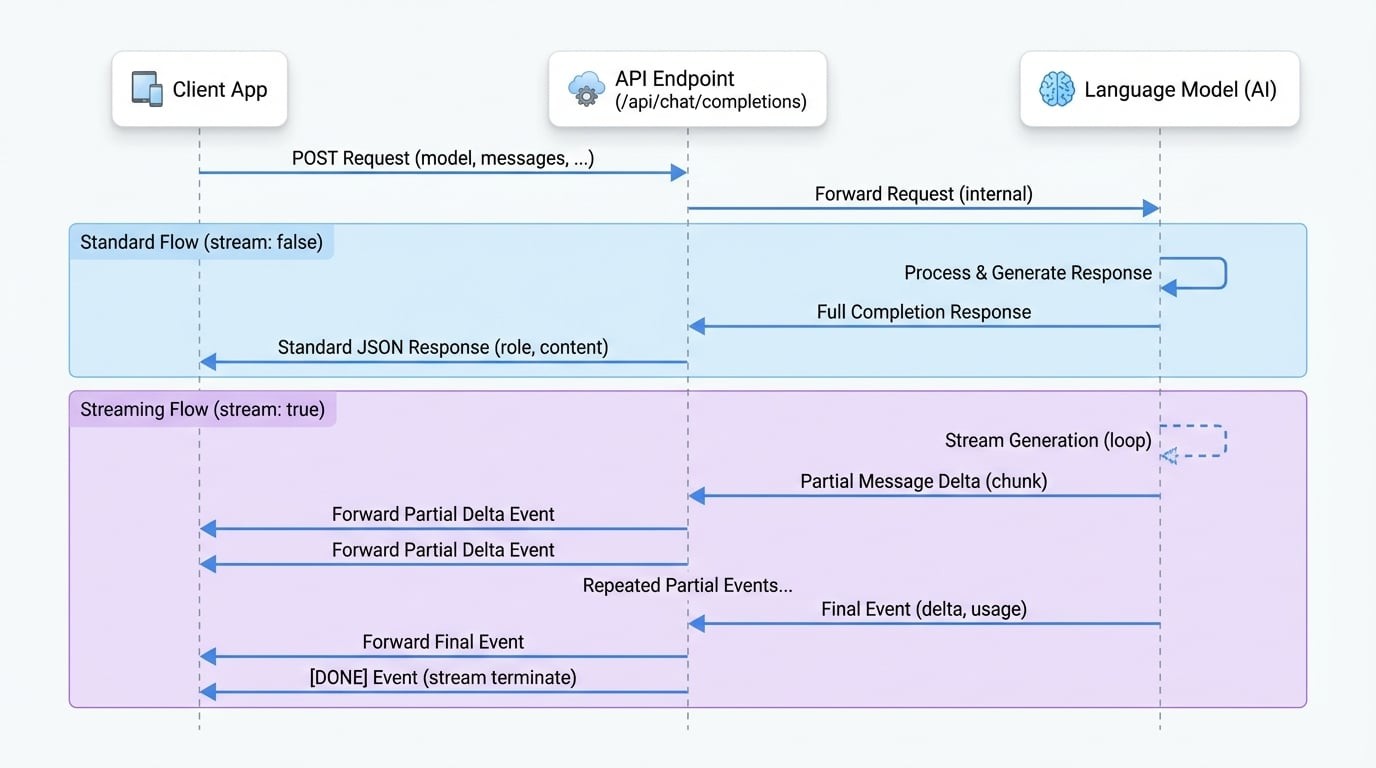
If set to true, partial message deltas will be sent as server-sent events. The stream terminates with a data: [DONE] message.
The maximum number of tokens to generate. The total length of input tokens and generated tokens is limited by the model's context length.
Number between -2.0 and 2.0. Positive values penalize new tokens based on whether they appear in the text so far, increasing the model's likelihood to talk about new topics.
Number between -2.0 and 2.0. Positive values penalize new tokens based on their existing frequency in the text so far, decreasing the model's likelihood to repeat the same line verbatim.
A list of tools the model may call. Currently, only functions are supported as a tool.
Controls which (if any) tool is called by the model. Can be 'none', 'auto', 'required', or an object specifying a function to call.
An object specifying the format that the model must output. Setting to { "type": "json_object" } enables JSON mode.
Examples#
Basic Request#
This example demonstrates a simple conversation with the model.
cURL Request
curl --location 'https://your-aigne-hub-instance.com/api/chat/completions' \
--header 'Authorization: Bearer YOUR_API_KEY' \
--header 'Content-Type: application/json' \
--data '{
    "model": "gpt-3.5-turbo",
    "messages": [
        {
            "role": "system",
            "content": "You are a helpful assistant."
        },
        {
            "role": "user",
            "content": "Hello! Can you explain what AIGNE Hub is in simple terms?"
        }
    ]
}'
Streaming Request#
To receive the response as a stream of events, set the stream parameter to true.
cURL Stream Request
curl --location 'https://your-aigne-hub-instance.com/api/chat/completions' \
--header 'Authorization: Bearer YOUR_API_KEY' \
--header 'Content-Type: application/json' \
--header 'Accept: text/event-stream' \
--data '{
    "model": "gpt-3.5-turbo",
    "messages": [
        {
            "role": "user",
            "content": "Write a short story about a robot who discovers music."
        }
    ],
    "stream": true
}'
Response Body#
Standard Response#
A standard JSON object is returned when stream is false or not set.
Example Standard Response
Response Body
{
  "role": "assistant",
  "content": "AIGNE Hub is a centralized gateway that manages interactions with various AI models from different providers. It simplifies API access, handles billing and credits, and provides analytics on usage and costs, acting as a single point of control for an organization's AI services."
}
Streaming Response#
When stream is true, the API returns a stream of text/event-stream chunks. Each chunk is a JSON object.
Example Stream Chunks
Event Stream
data: {"delta":{"role":"assistant","content":"Unit "}}

data: {"delta":{"content":"734,"}}

data: {"delta":{"content":" a sanitation "}}

data: {"delta":{"content":"and maintenance "}}

data: {"delta":{"content":"robot, hummed..."}}

data: {"usage":{"promptTokens":15,"completionTokens":100,"totalTokens":115}}

data: [DONE]Summary#
The Chat Completions endpoint is a powerful tool for integrating conversational AI into your applications. It offers flexibility through various parameters, including streaming and tool use, to support a wide range of use cases.
For more information on other available API endpoints, please refer to the following documents: