委派連線 (Delegated Connect) 是一項進階功能,它允許應用程式使用臨時或較低權限的「agent」DID 來執行 DID 連線操作,同時仍向終端使用者呈現其主要的官方 DID,從而增強安全性。這意味著應用程式的主要私鑰永遠不會在處理日常互動的熱錢包中暴露。
本指南將說明委派連線的概念,並展示如何使用 WalletAuthenticator 來實現它。
運作方式
委派連線涉及三個關鍵參與者:
- 委派人 (Delegator):擁有應用程式身份的主要 DID。這是使用者會看到並信任的 DID。委派人的錢包持有主要私鑰,應保存在安全的冷儲存中。
- Agent:一個次要的臨時 DID,被授權代表委派人執行特定的 DID 連線操作。應用程式後端使用 agent 的錢包來簽署認證請求。
- 委派憑證 (Delegation Certificate):一種可驗證憑證,格式為 JWT,由委派人 (Delegator) 簽署。此憑證以密碼學方式證明 Agent 有權限為委派人行事。它通常包含一個到期時間和允許的聲明清單。
此流程確保即使 agent 的金鑰遭洩露,損害也會受到委派憑證中定義的權限和到期日的限制。委派人的主要金鑰仍然安全。
流程
下圖說明了委派認證流程:
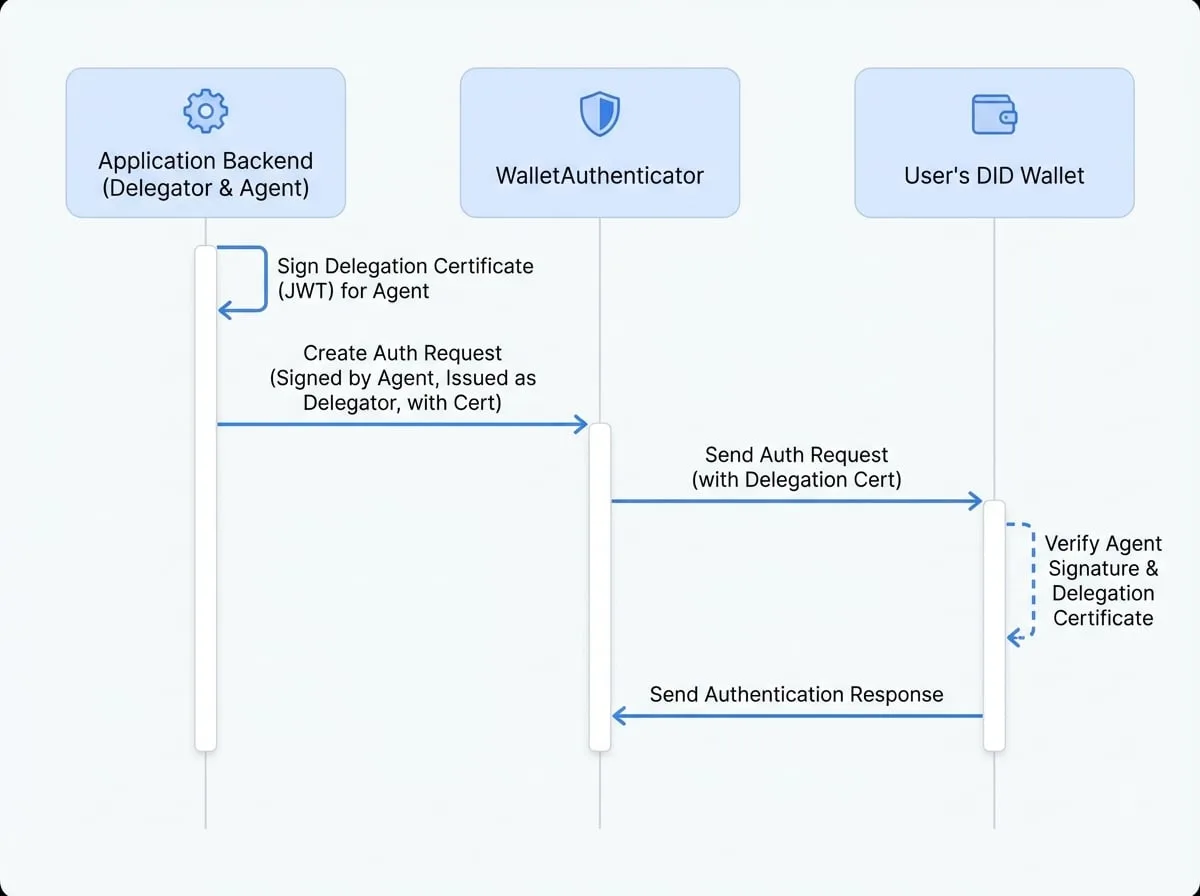
委派 (Delegation)
委派人簽署一個 JWT,授予 Agent 執行 DID 連線操作的權限。
請求 (Request)
應用程式的
WalletAuthenticator建立一個認證請求。該請求由 Agent 簽署,但iss(發行者) 欄位被設定為委派人的 DID。請求中也包含委派憑證。驗證 (Verification)
使用者的錢包收到請求。它首先使用 Agent 的公鑰驗證訊息簽章,然後使用委派人的公鑰驗證請求中包含的委派憑證。這個兩步驟的過程確認了 agent 的權限。
回應 (Response)
使用者核准該請求(請求中清楚地顯示了委派人的身份),錢包會將回應傳送回應用程式。
實作
若要實作委派連線,您需要使用委派人、agent 錢包和委派憑證來設定 WalletAuthenticator。
步驟 1:定義委派人和 Agent
首先,您需要兩個不同的錢包。一個將作為委派人(主要身份),另一個則作為 agent(實際的簽署者)。
錢包設定
const { fromRandom } = require('@ocap/wallet');

// 應用程式的主要、受信任的身份
const delegator = fromRandom();

// 將處理日常操作的 agent 錢包
const agent = fromRandom();
步驟 2:建立委派憑證
該憑證是一個由 delegator 簽署的 JWT,授予權限給 agent。
建立委派 JWT
const Jwt = require('@arcblock/jwt');
const { toDid } = require('@ocap/util');

const createDelegation = () => {
  const now = Math.floor(Date.now() / 1000);
  const claims = [
    'authPrincipal',
    'profile',
    'signature',
    'prepareTx',
    'agreement',
    'verifiableCredential',
    'asset',
    'keyPair',
    'encryptionKey',
  ];

  const payload = {
    agentDid: toDid(agent.address),
    permissions: [{
      role: 'DIDConnectAgent',
      claims: claims,
    }],
    exp: now + 3600, // 1 小時後過期
    iat: now,
    nbf: now,
  };

  return Jwt.signV2(delegator.address, delegator.secretKey, payload);
};

const delegationCert = createDelegation();
步驟 3:設定 WalletAuthenticator
透過提供 delegator、delegation 憑證和 wallet(即 agent)來實例化 WalletAuthenticator。
認證器設定
const { WalletAuthenticator, WalletHandlers } = require('@arcblock/did-connect');
const MemoryAuthStorage = require('@arcblock/did-connect-storage-memory');

const authenticator = new WalletAuthenticator({
  // 'wallet' 屬性是我們的 AGENT
  wallet: () => agent.toJSON(),

  // delegator 是主要的應用程式身份
  delegator: () => delegator.toJSON(),

  // 證明委派關係的 JWT
  delegation: () => delegationCert,

  appInfo: () => ({
    name: '委派連線示範',
    description: '委派認證示範',
    icon: 'https://arcblock.oss-cn-beijing.aliyuncs.com/images/wallet-round.png',
  }),
});

const handlers = new WalletHandlers({
  tokenStorage: new MemoryAuthStorage(),
  authenticator
});

// 附加到您的 Express 應用程式
handlers.attach({
  app: server, // 您的 express 應用程式實例
  action: 'delegatedLogin',
  claims: {
    profile: () => ({ fields: ['fullName'], description: '使用委派登入' }),
  },
  onAuth: (claims) => {
    console.log('使用者已認證:', claims);
  },
});
當 DID 連線會話開始時,WalletAuthenticator 將自動處理委派流程。QR code 將包含使用者錢包驗證從委派人到 agent 的信任鏈所需的必要資訊。使用者將看到來自您應用程式主要身份(委派人)的請求,從而提供無縫且安全的體驗。
關於建構函式選項的更多詳細資訊,請參閱 WalletAuthenticator API 參考。