Ontology, Explained Through Our Own Website

After an event, a website might hold five articles, a slide deck, several technical definitions and a research paper. Publishing them separately is easy. The useful part is helping a reader move from the event to the talk, understand its concepts and find the original material. An AI agent should also be able to follow explicit records and references through that material.
That is why I want to explain ontology through our own website. Its practical value is turning “we have some content” into “these are the things we have, and this is how they relate.”
When I started building ARC, I initially thought of building it as a Git-managed CMS. Using it changed that view. ArcBlock Site contains articles, but it also organizes products, events, terms, publications and learning paths. Web pages present those objects to people; AFS gives agents an entry point for reading them. Looking at that concrete example makes ontology easier to understand.
What Palantir brought into operations
Many readers encounter ontology through Palantir. The computing concept has a much longer history. W3C's OWL standard describes domain knowledge through classes, properties, individuals and formal semantics.[1]
In everyday terms, an ontology makes explicit what kinds of things exist in a domain, what they mean and how they relate. Patients, visits and prescriptions belong to one domain. Events, talks and papers belong to another.
Palantir Foundry connects objects, properties and links to actual data, then adds actions and functions for operational applications. People work with business objects such as flights or equipment and use governed actions to change them.[2] That connection between domain meaning and actual operations is the part that matters here.
The useful lesson is to organize around the things people need to understand and handle. Storage and interfaces serve those things. Palantir's own design guidance favors domain concepts and composition over oversized objects that try to represent everything.[3]
Where does the relational database fit?
For a conference and its articles, a relational database might use events, articles and a join table. That is a good design, and it can remain the storage model.
The next question is what the connection means. An article might announce the conference, contain the keynote or report what happened afterward. A foreign key keeps records connected. A domain model supplies the meaning. When that meaning lives only in application code or a developer's memory, the next application or agent has to reconstruct it.
| Reader's question | Storage design handles | Domain semantics makes explicit |
|---|---|---|
| What is this? | Fields and records | An event, article and term have distinct meanings |
| Why are these connected? | Keys, joins and queries | Source, prerequisite, rename and general association mean different things |
| Is the association valid? | Constraints and application logic | Whether prerequisites exist and dependencies form cycles |
| How should different users see it? | APIs, queries and formats | Meaning stays consistent across reading, learning and operations |
Tables versus graphs is the wrong dividing line. Relational databases can support ontology methods; graph databases still need careful modeling. The goal is to make domain meaning explicit, checkable and usable through different entry points.
This website is the example
Open the ASE 2026 event record. It links to articles, learning materials and terms, including the What Endures talk, our introduction to AFS-UI and the AFS glossary entry.
Each is an object with its own shape. An event has dates and places. An article has an author and publication date. The talk has content and a presentation layout. A term has a name, aliases and a definition. Readers can enter from different directions without requiring another copy of the same material for every page.
| Site object | What it expresses | Example relationships |
|---|---|---|
| Event | When, where, who organized it and how we participated | Associated articles, talks and terms |
| Article | An explanation, opinion or record with an author and date | Products, events or concepts it concerns |
| Product | Current form and lifecycle | Rename, containment or successor |
| Glossary | What a name means | Parent context and neighboring concepts |
| Publication | Stable source information for a book, paper or patent | Learning material that refers to it |
| Learning | A concept, step, path or presentation | Prerequisites, related nodes and ordered steps |
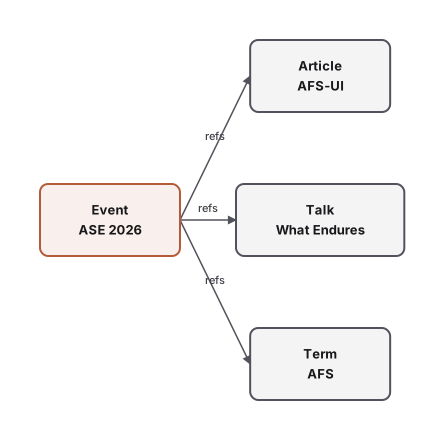
The site's refs field declares explicit associations for navigation. A learning object's buildsOn identifies prerequisites. A product's renamedTo identifies a name change. Treating all three as a generic “related” link would lose useful meaning.
For example, the talk's record includes these fields:
kind: "presentation"
buildsOn: ["afs-ui", "aup"]
refs: {"events": ["ase-2026"]}
They identify a presentation, the knowledge needed before studying it and its associated event. afs-ui and aup are object identifiers pointing to the corresponding learning records. The page can use a presentation layout while learning views use its structured relationships. These fields refer to actual objects and queries; they do more than fill a page template.
AFS, Arc Space and ARC have different jobs
It helps to separate meaning, access and execution.
Domain objects define what something is. AFS provides resource access. Arc Space holds data and its access permissions. ARC runs the applications and views.
AFS stands for Agentic File System. It gives resources such as files, content collections and services path-based interfaces, with resource adapters, called providers, connecting those interfaces to the underlying resources. Within its authorization, an agent can discover, read, query or invoke supported operations. A path gives an operation an address; a domain contract explains “this is a paper” or “this relationship is a prerequisite.”
Arc Space holds user and application data. On this site, published content lives in the blocklet's package data, while a signed-in user's saved bookmarks have a user space of their own. Ownership and access permissions are handled separately from the appearance of a page.
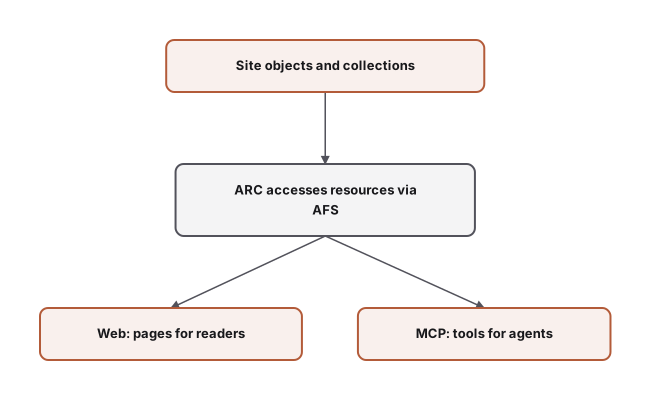
A blocklet is an application package that runs on ARC. ARC is the runtime for these packages and their declared capabilities. It processes the site's schemas, collections, layouts and content to provide lists, detail pages, search and other reading surfaces.
Here is an excerpt from the site's articles collection declaration:
articles:
  type: article
  scope: /packages
  faces:
    web: true
    sitemap: true
    jsonld: true
    mcp: [search, list, get]
This selects the outputs for one collection. Web serves readers; MCP is an interface through which agents call tools such as search, list and get. Search indexing has its own declaration. Other collections can make different choices: the documentation collection also declares text outputs for language models.
Human reading pages and agent tools can therefore work from the same source content. Each entry point has its configuration and access conditions, while the article body remains one maintained source rather than a separate copy for every output.
Why CMS no longer describes the whole workflow
A CMS handles editing, review and publishing. Mature headless systems also support custom types, relationships and APIs. Those are real capabilities.
I changed the description because publishing an article is only one result of how we work. The project environment brings together working methods, object contracts, resource access and readable results. An agent can read the rules, organize material, maintain objects and run checks before handing the result to a person. Articles, events and talks are different objects within that work.
| Starting from content publishing | Starting from an object workspace |
|---|---|
| How do we edit and publish this content? | What are we working with, and how does it relate? |
| Pages and APIs are the main delivery surfaces | Pages, structured access, operations and instructions support the same work |
| The editor holds the main workflow | Conversation, files, design tools and specialized editors can provide entry points |
| Content is maintained after publication | Materials and results produced during the work also deserve to be retained and connected |
This compares ways of organizing work, rather than setting a ceiling on CMS capabilities. ARC lets us use AFS access, runtime capabilities and object views together, without building a separate application backend for this site.
These tools are not themselves an ontology. The object and relationship contracts let the tools work with the same identifiable, checkable material.
The repository makes that concrete. Schemas describe content shapes. Writing skills explain how to check sources and develop an article. Command-line checks validate content and pages. The publishing workflow handles delivery. The author still makes the final call. Materials, guidance and tools give an agent the working environment needed to turn a request into something a person can inspect.
Rules belong near the data, with a defined scope
The site's learning checks verify that prerequisites exist and do not form cycles. Publication and learning references are checked for valid targets and consistent bilingual identity fields. These are specific data conditions: a misspelled target should be caught rather than quietly disappearing from a page.
Semantic agreements also tell us where to stop drawing conclusions. An article's product reference identifies an association; establishing a product capability calls for implementation and runtime evidence. W3C's PROV model distinguishes entities, activities and responsible agents, offering useful vocabulary for thinking about origins.[4] Knowing where material came from and deciding whether its claims are correct are separate responsibilities.
We borrow that practical discipline. A simple idea can be recorded without first defining a model of the whole world. A relationship deserves a clearer contract when reading, queries or checks repeatedly depend on it. Applying this method to our site does not require changing storage to triples or adding a general inference engine.
Follow the objects yourself
Start with the event, open its talk and follow the concepts into the learning material. Or begin with the AFS learning entry. To inspect an original source, the Everything is Context publication record keeps the paper's authors, version identifier and original link.
For a site of your own, I would start with questions a reader needs answered: which product is this? Which event does the article concern? What should I understand before reading this material? Give those things their own records, then add relationships that a view, query or check actually uses.
A few introductory pages may need nothing more than simple pages. Explicit object relationships become more valuable as the material grows, several entry points reuse it and agents help maintain it.
Return to that event. The article explains what happened. The talk preserves the full presentation. Terms explain concepts. The paper supplies the original source. Each keeps its own form while participating in one reading experience.
That is where ontology methods become useful for us: content becomes meaningful objects that can be queried, checked and used again. The website presents those objects and relationships to readers, while agents can read the same records.
References
- W3C, OWL 2 Web Ontology Language Primer, 2012.
- Palantir, Ontology overview.
- Palantir, Ontology design: Best practices.
- W3C, PROV-O: The PROV Ontology, 2013.
本頁涉及
產品
術語
- AFS
AFS(Agentic File System)把與任務有關的檔案、服務和正在進行的工作組織成可檢視的資源檢視。它不是把一整台機器或一堆 API 交給 agent,而是給任務一塊有名字、有邊界的工作範圍。
- AUP
AUP(Agentic UI Protocol)先表達應用要呈現什麼、可以做什麼;runtime 再根據裝置能力呈現合適的部分。重點不是複刻同一張螢幕,而是讓同一項應用保留自己的內容和動作。
- Web Device
在 AFS 目錄下宣告一個 .web/,這個目錄裡的資料和 AUP 就會在伺服器端被算繪成一個網站。