The Know Your Customer (KYC) Service provides a standardized way to verify user identity attributes within your application. This service enables developers to implement verification flows for credentials such as email addresses, ensuring that users are who they claim to be. Integrating this service enhances security and trust for your application.
This guide details the API endpoints and the process for integrating email verification. For administrative configurations, such as enabling KYC requirements or managing domain restrictions, please refer to the DID Connect Settings documentation.
Email Verification Flow
The email verification process is designed as a two-step flow. First, the user requests a verification code to be sent to their email address. Second, the user submits this code back to the service to confirm ownership of the email account. Upon successful verification, the service can issue a verifiable credential to the user's DID.
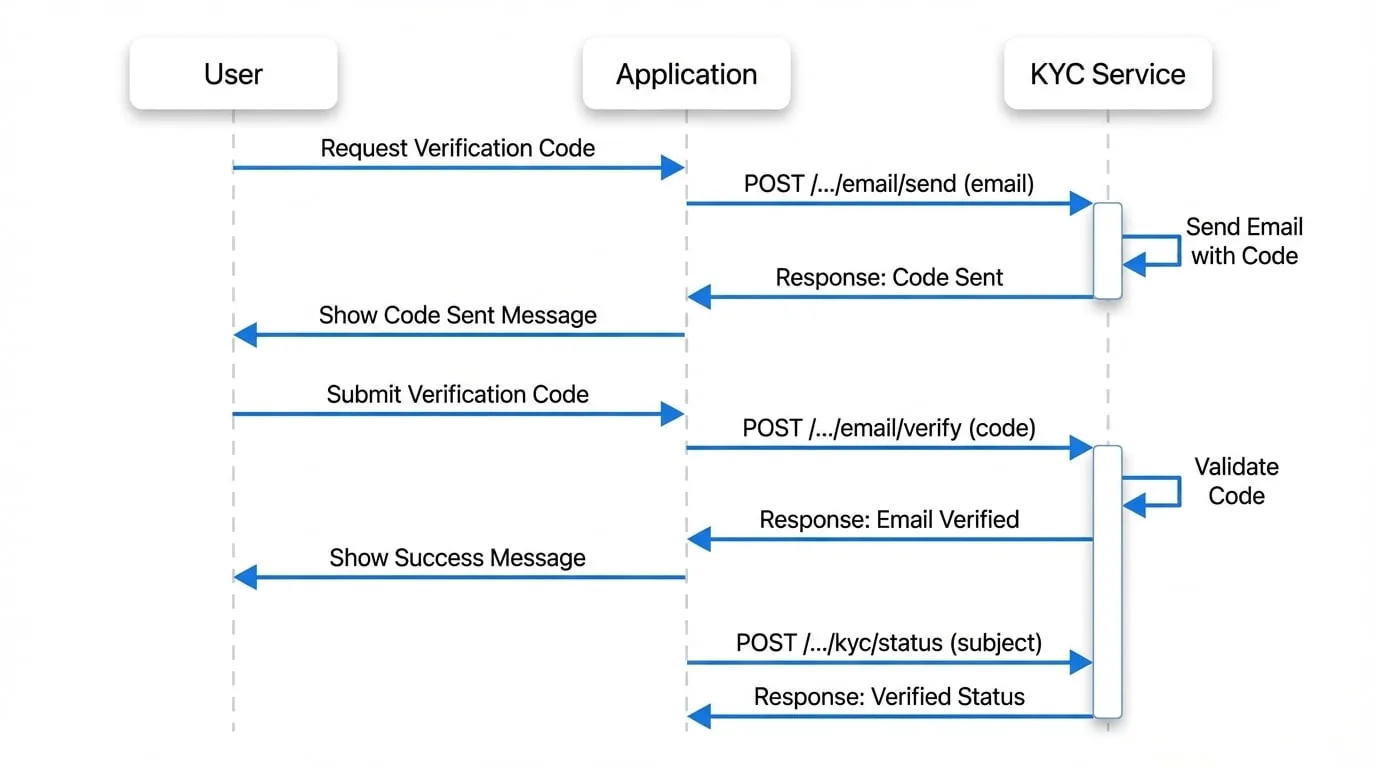
API Endpoints
The KYC service exposes a set of RESTful API endpoints for managing the verification process.
Request Verification Code
This endpoint initiates the email verification process by sending a unique code to the user's specified email address. The system enforces rate limiting based on both IP address and the target email to prevent abuse.
Endpoint
POST /.well-known/service/api/kyc/email/sendParameters
- email
string(required) — The user's email address to be verified. It must be a valid email format.
Example Request
Request to send verification code
curl -X POST \
  -H "Content-Type: application/json" \
  -d '{"email": "user@example.com"}' \
  'https://your-blocklet-url/.well-known/service/api/kyc/email/send'
Example Response (Success)
Success Response
{
  "message": "Verify code successfully sent"
}
Error Responses
The endpoint will return a 400 status code with a corresponding error message under various conditions:
| Error Code | Description |
|---|---|
email_invalid | The provided email address format is not valid. |
email_already_verified | The email address has already been verified for the current user. |
email_not_allowed | The email domain is not in the configured whitelist. |
email_blocked | The email domain is in the configured blacklist. |
email_already_sent | A verification code has recently been sent to this email. The user should check their inbox and wait before requesting another. |
Submit Verification Code
This endpoint consumes the verification code sent to the user's email to finalize the verification process.
Endpoint
POST /.well-known/service/api/kyc/email/verifyParameters
- code
string(required) — The verification code received by the user via email.
Example Request
Request to verify code
curl -X POST \
  -H "Content-Type: application/json" \
  -d '{"code": "123456"}' \
  'https://your-blocklet-url/.well-known/service/api/kyc/email/verify'
Example Response (Success)
Success Response
{
  "message": "Email is successfully verified"
}
If the provided code is incorrect or expired, the API will return a 400 Bad Request error with a descriptive message.
Check KYC Status
This endpoint allows you to check if a specific user has already completed KYC verification for a given subject (e.g., an email address). The request must be properly signed to authenticate the user's DID.
Endpoint
POST /.well-known/service/api/kyc/statusParameters
- subject
string(required) — The subject to check the verification status for, such as an email address.
Example Request
The request must include headers for signature verification, which are typically handled by a client-side library like @blocklet/did-space-js.
Check KYC Status Request
# This is a conceptual example. In practice, the signing process
# would be handled by an SDK.
curl -X POST \
  -H "Content-Type: application/json" \
  -H "x-did-wallet-type: ..." \
  -H "x-did-wallet-version: ..." \
  -H "x-did-action: ..." \
  -H "x-did-challenge: ..." \
  -H "x-did-signature: ..." \
  -d '{"subject": "user@example.com"}' \
  'https://your-blocklet-url/.well-known/service/api/kyc/status'
Example Response
KYC Status Response
{
  "verified": true
}
If the user has not been verified, the verified field will be false. If an error occurs (e.g., user not found, invalid subject), an error field will be included in the response.
KYC Status Not Verified
{
  "verified": false,
  "error": "User not found"
}
Summary
The KYC Service provides a simple yet powerful mechanism for adding an essential layer of user identity verification to your application. By integrating these endpoints, you can build a more secure and trustworthy platform.
For more information on related topics, please see the following documentation: