The Authentication Service provides a comprehensive solution for managing user identity, authentication, and session control within your blocklet. It is designed to be secure, flexible, and easy to integrate, supporting various authentication methods to cater to different user needs.
This service handles the entire user lifecycle, from registration and login to session management and profile retrieval. Developers can leverage this service to secure their applications and provide a seamless user experience without building an authentication system from scratch. It supports decentralized identity through DID Wallet, traditional email-based login, and federated login with third-party OAuth providers such as Google or GitHub.
How It Works
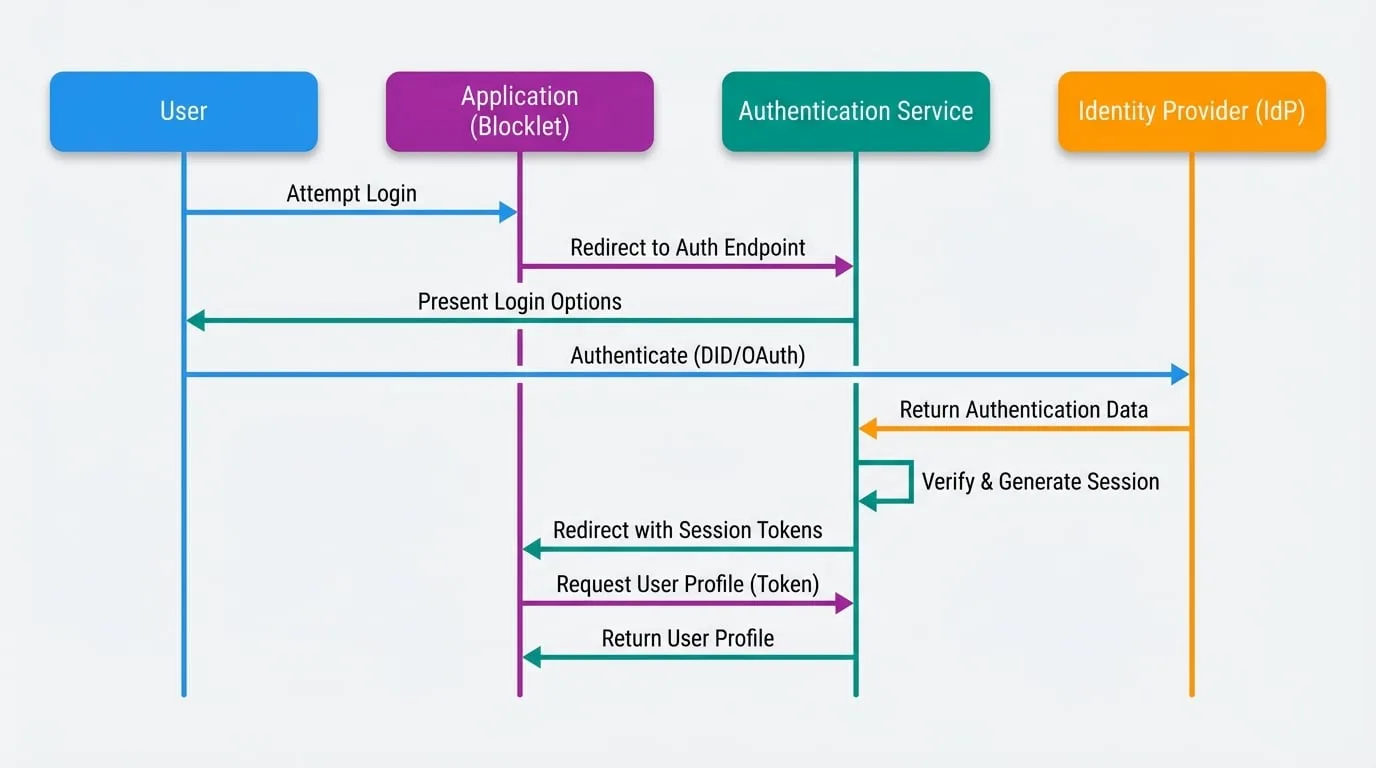
The authentication process is designed to be straightforward. When a user attempts to log in to your application, your blocklet redirects them to the Blocklet Service's authentication endpoint. The service then handles the interaction with the chosen identity provider (e.g., DID Wallet, Google). Upon successful authentication, the service generates a secure session for the user and redirects them back to your application with the necessary session tokens. Your application can then use these tokens to retrieve user profile information and manage the user's session.
The following diagram illustrates this authentication flow:
Key Features
- Multiple Authentication Methods: Supports DID-based authentication via DID Wallet, email-based sign-in, and federated login through third-party OAuth providers.
- Session Management: Securely manages user sessions using JWT-based session and refresh tokens.
- User Profile Management: Provides APIs to retrieve and update user profile information.
- Access Control: Integrates with a role-based access control (RBAC) system to enforce security policies.
- KYC Integration: Works alongside the KYC Service to ensure users are properly verified when required.
- Quick Login: Allows users to log in quickly using a previously established session on the same device.
API Reference
The Authentication Service exposes a set of RESTful API endpoints for developers to integrate into their applications.
Login and Session
These endpoints are used to initiate and manage user authentication and sessions.
Login with SDK
This endpoint is used by the Blocklet SDK to log in a user with either a DID Wallet or an OAuth provider. It authenticates the user and returns session tokens. The provider field determines the authentication method.
- Endpoint:
POST /.well-known/service/api/user/login
Parameters (Wallet Provider)
- provider
string(required) — The authentication provider. Must be set to 'wallet'. - did
string(required) — The user's Decentralized Identifier (DID). - pk
string(required) — The user's public key corresponding to the DID. - fullName
string(required) — The user's full name. - email
string— The user's email address. - avatar
string— A data URI or URL for the user's avatar image. - inviter
string— The DID of the user who invited this user.
Parameters (OAuth Provider)
- provider
string(required) — The name of the OAuth provider (e.g., 'google', 'github'). - id
string(required) — The unique identifier for the user from the OAuth provider. - fullName
string(required) — The user's full name. - email
string(required) — The user's email address. - avatar
string— A URL for the user's avatar image. - inviter
string— The DID of the user who invited this user.
Returns
- user
object(required) — Object containing basic user information.- did
string(required) — User's DID. - fullName
string(required) — User's full name. - email
string— User's email address. - avatar
string— URL path to the user's avatar.
- did
- token
string(required) — The session token (JWT) for authenticating subsequent requests. - refreshToken
string(required) — The refresh token used to obtain a new session token. - visitorId
string(required) — A unique identifier for the user's session on the device.
Login with DID Wallet
This endpoint is used for native DID Wallet login flows. It verifies a user's signature from DID Wallet and establishes a session.
- Endpoint:
POST /.well-known/service/api/user/loginByWallet
Parameters
- userDid
string(required) — The user's DID. - userPk
string(required) — The user's public key. - signature
string(required) — The JWT signature provided by the wallet. - walletOS
string(required) — The operating system of the wallet (e.g., 'iOS', 'Android'). - challenge
string(required) — A random string used to prevent replay attacks. - componentId
string(required) — The identifier of the blocklet component initiating the login. - visitorId
string— The unique session identifier for the device. - passportId
string— The ID of the passport to use for this session. - sourceAppPid
string— The PID of the source application in a federated context. - locale
string— The user's preferred language locale. - inviter
string— The DID of the user who invited this user.
Returns
- sessionToken
string(required) — The session token (JWT). - refreshToken
string(required) — The refresh token. - challenge
string(required) — The original challenge string, returned for validation. - visitorId
string(required) — The session identifier for the device.
Get Current Session
Retrieves the profile and session details for the currently authenticated user.
- Endpoint:
GET /.well-known/service/api/did/session - Authentication: Requires
Bearertoken in theAuthorizationheader.
Returns
- user
object(required) — The full user object.- did
string(required) — User's DID. - fullName
string(required) — User's full name. - email
string— User's email address. - avatar
string— URL path to the user's avatar. - role
string— The user's current role for this session. - passports
array— A list of valid passports held by the user.- id
string(required) — Passport ID. - name
string(required) — Passport name. - title
string(required) — Passport title. - role
string(required) — The role associated with the passport.
- id
- permissions
array— A list of permissions granted to the user's role.
- did
- provider
string(required) — The provider used for the current session (e.g., 'wallet'). - walletOS
string— The operating system of the wallet used for login.
Refresh Session
Allows an application to obtain a new session token using a valid refresh token.
- Endpoint:
POST /.well-known/service/api/did/refreshSession - Authentication: Requires
Bearertoken containing the refresh token in theAuthorizationheader.
Returns
- user
object(required) — The user object associated with the session. - nextToken
string(required) — A new session token. - nextRefreshToken
string(required) — A new refresh token. - provider
string(required) — The original login provider. - walletOS
string— The original wallet OS.
Logout
Logs out the current user and invalidates their session. It can target a specific session or all sessions for the user.
- Endpoint:
POST /.well-known/service/api/user/logout
Parameters
- visitorId
string— The unique identifier of the session to log out. If omitted, all sessions for the user may be targeted depending on other parameters. - refreshToken
string— The refresh token of the session to invalidate.
User Profile Management
These endpoints allow for the retrieval and modification of user data.
Get Public User Profile
Fetches publicly available information for any user. The exact data returned depends on the user's privacy settings.
- Endpoint:
GET /.well-known/service/api/user
Parameters
- did
string(required) — The DID of the user to query.
Returns
A user object containing only publicly visible fields.
Manage Private User Profile
These endpoints manage the private profile of the currently logged-in user.
- Get Profile:
GET /.well-known/service/api/user/profile - Update Profile:
PUT /.well-known/service/api/user/profile - Authentication: Requires
Bearertoken in theAuthorizationheader.
Parameters (for PUT request)
- fullName
string— The user's full name. - email
string— The user's email address. - locale
string— The user's preferred language locale. - metadata
object— An object for storing additional profile data.- bio
string— A short biography of the user. - timezone
string— The user's timezone.
- bio
Returns (for GET and PUT requests)
- did
string(required) — The user's DID. - locale
string(required) — The user's locale. - avatar
string— URL path to the user's avatar. - fullName
string(required) — The user's full name. - email
string— The user's email address. - emailVerified
boolean(required) — Indicates if the user's email has been verified. - phoneVerified
boolean(required) — Indicates if the user's phone has been verified. - metadata
object— Additional profile metadata.
Summary
The Authentication Service is a core component for building secure and user-friendly applications on the Blocklet platform. By handling the complexities of user identity and session management, it allows developers to focus on their application's core logic. For more details on integrating specific login methods, please refer to the OAuth Service guide.