Zero Compromise Against Hackers, Forgiving When You Forget: ArcSpace's Anti-Self-Lockout and Social Recovery Architecture
In the first article of this series, Spawning Private Spaces Like Blockchain Sub-Wallets: The Cryptographic Unification of ArcSpace, DID Wallet, and the Chain, we walked through how ArcSpace eliminates the traditional server-side master key using two-factor split keys and a blinded shard pool. Even if an attacker dumps the entire cloud database, object storage bucket, and server configuration at the same time, or if a system administrator or cloud provider engineer inspects the storage backend directly, all they see are unlinked, undecipherable ciphertext blocks.
Whenever we explain an encryption architecture that strict, almost every reader immediately asks the same practical question:
If the server never stores the full key and even your own backend engineers cannot reset my password for me, what happens the day I lose my phone, misplace my recovery phrase, or simply forget the independent passphrase I set for a private space? Are my most important files gone forever?
That concern is completely justified. In fact, in the real world, most people do not lose their data because a hacker cracked their cipher or lightning fried their hard drive; they lose it because they forgot a password, switched phones without migrating a key, and accidentally locked themselves out.
Many early end-to-end encrypted tools failed to earn everyday trust precisely because they treated ordinary human beings like infallible cryptographers: forget one passphrase or lose one slip of paper, and dozens of gigabytes of irreplaceable family and business records turn into a permanent brick. Traditional cloud drives swing to the opposite extreme: customer support can reset your password with an SMS code in thirty seconds, but only because the provider holds a universal backdoor key that can open every file you own at any time.
When we designed the recovery architecture for ArcSpace, we set a clear engineering rule for ourselves: zero compromise against external hackers and backend snooping, yet forgiving, unobtrusive, and multi-layered lifelines when the rightful owner forgets a password or loses a device.
Let's walk through how ArcSpace achieves this step by step, accompanied by three architecture diagrams, without leaving a single backdoor on the server.
1. Layer Zero: Don't Lock Everyday Life Inside a High-Risk Vault on Day One
Before we even touch key recovery math, the most effective defense against self-lockout is restraint in encryption granularity.
Why do so many people lock themselves out of encrypted storage tools? Because those tools force you on day one to invent a complex twenty-character master password and lock 100% of your digital life behind it, including family vacation photos, downloaded movies, and casual reading notes. To stay safe, you pick an unusual passphrase you never type anywhere else; six months later, you switch laptops, blank out on that passphrase, and lose a decade of family photos along with it.
To prevent this all-or-nothing trap from the very start, ArcSpace defaults to a Hybrid Volume and Progressive Encryption model that separates your files into two tiers based on real-world sensitivity:
- 95% Everyday Space Data (Zero Passphrase Memory Burden): Your family photo library, video footage, everyday work documents, and web bookmarks do not require you to memorize an extra standalone password. When you self-host ArcSpace on a home computer or NAS, these directories remain 100% native operating-system plaintext files that open directly in macOS Finder or your phone's photo app. When hosted in the cloud, they unlock transparently alongside your daily DID Wallet session: as long as your phone opens your wallet via Face ID or Touch ID, no extra password prompt ever gets in your way.
- 5% Mission-Critical Secrets (High-Strength Independent Protection Inside a Private Vault): Only when you explicitly place sensitive documents (such as equity nominee agreements, tax filings, family trust deeds, medical records, or estate instructions) into a dedicated Private Vault does ArcSpace engage high-strength independent envelope encryption and multi-layer emergency recovery guards.
Separating the 95% from the 5% ensures that forgetting a vault passphrase never disrupts your family's daily photo album or everyday workspace. Now, what about that critical 5% inside your Private Vault, or the scenario where you lose your phone and primary wallet recovery phrase altogether? How do we recover your space without a server backdoor?
2. Why Re-Keying a 100 GB Space Takes Under 1 Millisecond: The Four-Slot Key Envelope
A common misconception is that resetting the password or binding a new wallet to a 100 GB encrypted space requires decrypting all 100 GB of files and re-encrypting them under the new key. If that were true, recovery would take hours, and losing the old password would make step one impossible.
In modern cryptographic engineering (similar in spirit to Linux LUKS disk encryption, 1Password Family Recovery, and Apple Account Recovery Contacts), the clean solution is to decouple the key that encrypts the data from the keys you use to unlock the door. In ArcSpace, every encrypted space header uses a Four-Slot Key Envelope architecture:
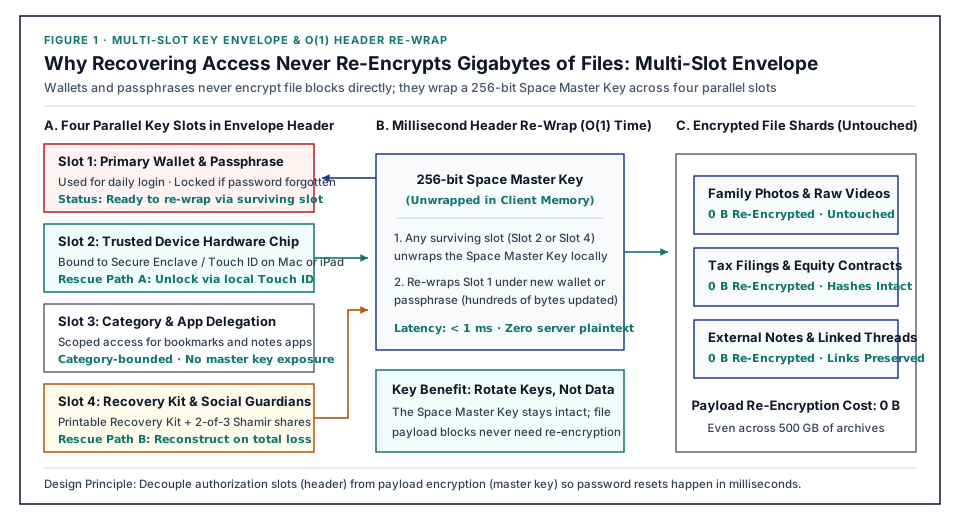
As shown above, the millions of underlying encrypted file shards are locked by a randomly generated 256-bit Space Master Key. That Space Master Key is never derived directly from your password; instead, it is sealed inside a compact envelope header of just a few hundred bytes containing four parallel, independent Key Slots. Think of the four slots as four independent locks mounted on the same vault door, where opening any single lock gives you the exact same intact Space Master Key inside:
- Slot 1 (Primary Slot): Locked by your primary DID Wallet derived key (plus an optional independent vault passphrase), used for everyday unlocking;
- Slot 2 (Trusted Device Hardware Slot): Locked by the hardware security chips (
Secure Enclave/TPM) of your authorized personal devices, such as your desk Mac Studio, your MacBook Pro, your iPad, or your always-on home Mini NAS; - Slot 3 (Scoped App & Category Slot): Used to issue least-privilege category envelopes for cross-site applications like Aside (for bookmarks and reading notes);
- Slot 4 (Emergency & Social Recovery Slot): Locked by a dedicated 256-bit Emergency Recovery Key that stays dormant during normal life and wakes up only when you forget a password or lose your devices.
Once you see how these four parallel slots work, it becomes obvious why password recovery and wallet migration in ArcSpace happen almost instantaneously:
When you forget your vault passphrase (so Slot 1 cannot be opened), you never try to brute-force Slot 1. Instead, you unlock the envelope from the side using Slot 2 (via Touch ID on your home Mac) or Slot 4 (via your Emergency Recovery Kit and guardians), retrieve the Space Master Key inside, and immediately re-wrap Slot 1 under your new passphrase or new wallet!
Because this operation only rewrites a few hundred bytes in the space envelope header, its time complexity is strictly O(1) (taking less than 1 millisecond). Whether your space holds 10 GB or 10 TB of encrypted shards, not a single byte of underlying file data ever needs to be re-encrypted.
3. Three Progressive Lifelines: From 3-Second Touch ID Self-Rescue to Zero-Knowledge Social Guardians
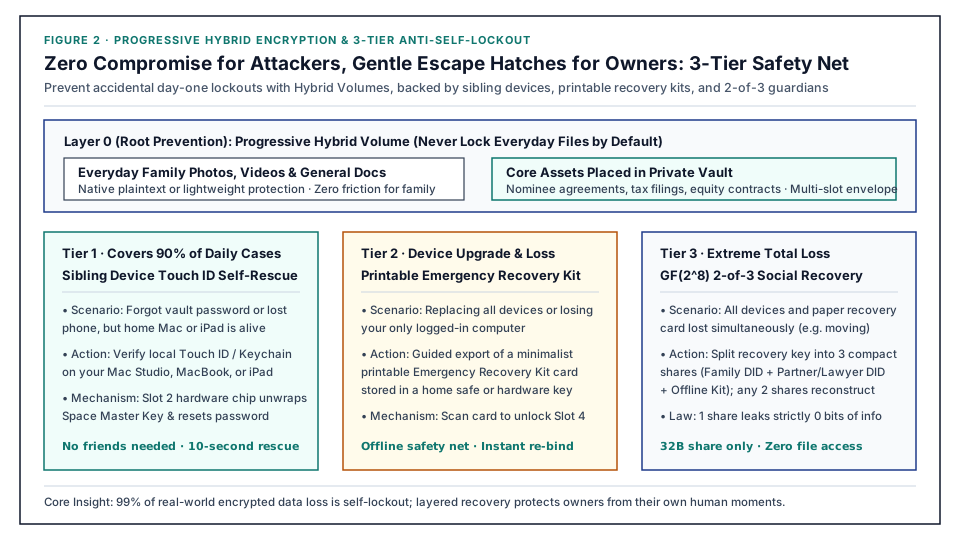
Built on top of the Four-Slot Key Envelope, ArcSpace provides three progressive layers of recovery matched to the real-world probability of each mishap:
| Real-World Mishap | Recovery Tier Triggered | Envelope Slot Used | Recovery Experience & Speed | Need to Bother Friends/Family? |
|---|---|---|---|---|
| Forgot vault passphrase, or lost phone while traveling (90% of daily cases) | Tier 1: Multi-Device Hardware Self-Rescue | Slot 2 (Mac / iPad / Home NAS Secure Enclave) | Tap Touch ID on your home computer to reset Slot 1 in under 3 seconds | Never |
| All active devices lost during a move or trip, and recovery phrase misplaced (9% of cases) | Tier 2: Printable Emergency Kit + t-of-n Shamir Guardians | Slot 4 (Shamir finite-field polynomial reconstruction) | Scan the printed Emergency Recovery Kit card at home + 1 tap on your spouse's phone to reach 2/3 | Only 1 family tap; guardians never see your files |
| Guardian devices compromised attempting takeover, or long-term family estate handover (1% extreme cases) | Tier 3: On-Chain Time-Lock Window + 1-Click Owner Veto | Slot 4 + ArcBlock Chain | Mandatory 7-day challenge window (90-180 days for estate handover); any surviving owner device can veto with 1 click | Enforced automatically by on-chain rules |
Let's look closely at how the first two tiers save the day in everyday life:
1. Tier 1 (Solves 90% of Forgotten Passwords & Lost Phones): Tap Your Fingerprint on Another Personal Device
Think about what actually happens when you forget a password or lose your phone: you might drop your phone in the water on a business trip, or blank out on the vault passphrase you created six months ago, while your MacBook Pro on your desk, your iPad on the couch, or your home Mini NAS in the living room is still sitting safely at home.
As long as you enabled "Allow this device's hardware security chip as a trusted recovery device" when setting up your space, the Secure Enclave inside your home Mac holds the hardware key for Slot 2 (bound inside the silicon chip so it cannot be exported even if someone clones the disk, requiring a physical Touch ID press in person).
When you get a replacement phone or want to reset a forgotten vault passphrase, you don't need to hunt for a paper seed phrase or call anyone for help: walk up to your Mac at home, press Touch ID, and Slot 2 unwraps the Space Master Key locally and re-wraps Slot 1 for your new phone wallet or new passphrase. In less than 3 seconds, what could have been a catastrophic lockout is resolved quietly at your desk.
2. Tier 2 (When All Devices Are Lost Together): A Printable Emergency Recovery Kit + 2-of-3 Zero-Knowledge Guardians
What if worse comes to worst? Suppose your laptop and phone were in the same backpack when it was stolen on a trip, you have no other logged-in devices at home, and you cannot find the notebook where you wrote down your recovery phrase.
That is when Slot 4 (the Emergency & Social Recovery Slot) steps in.
When you turn on recovery protection for a Private Vault, ArcSpace runs Shamir's Secret Sharing (polynomial interpolation over the finite field $GF(2^8)$) locally on your device to split Slot 4's 256-bit Emergency Recovery Key into $n$ compact 32-byte mathematical shares (most commonly configured as 2-of-3 or 3-of-5):
- Share 1 (Physical Cold Backup: Printable Emergency Recovery Kit Card): ArcSpace generates a clean, single-page PDF Emergency Recovery Kit card containing your space identifier, creation date, and a passphrase-protected high-density QR code (which can also be written to a spare YubiKey). You simply print the sheet and place it in your home document drawer or bank safe deposit box alongside your passport and property deeds.
- Share 2 (Family Guardian: e.g., Your Spouse's or Family Member's DID Wallet): Encrypted directly with your family member's DID public key and automatically stored inside their DID Wallet backup.
- Share 3 (Trusted Social Guardian: e.g., A Co-Founder's, Close Friend's, or Family Lawyer's DID Wallet): Encrypted with their DID public key and quietly backed up alongside their own wallet.
This 2-of-3 threshold architecture brings three decisive advantages in both usability and mathematics:
- Zero Burden on Your Guardians (No Paper Slips to Babysit): The share sent to your family member or partner is only
32bytes long. Sealed inside their public-key encryption envelope, it rides along automatically with their own wallet backup. Your guardians never have to write down a seed phrase or manage an extra password on your behalf. - Information-Theoretic Zero Leakage Below Threshold (
0 bits): By the mathematics of polynomial interpolation over $GF(2^8)$, any single share in a2-of-3scheme is uniformly random. Even if a hacker compromises one guardian's phone, and even if that single share is combined with a complete dump of the cloud server, the attacker learns strictly0bits of information about your recovery key. Furthermore, when guardians approve a recovery request, their wallet simply co-signs to return that 32-byte share to your new device; guardians can never browse, decrypt, or view a single file inside your space. - Two Flexible Paths to Reach the
2/3Threshold:- Path A (Quiet Home Self-Rescue Without Bothering Outsiders): If you lost your phone and laptop on a trip but are back home, simply take the printed Emergency Recovery Kit card (
Share 1) out of your desk drawer, scan it with your new phone, and ask your spouse next to you to tap approve on their phone (Share 2). You reach2/3right in your living room without ever troubling your business partner or lawyer. - Path B (Remote Social Guardian Co-Signing): If even your printed card was lost in a house move, you can initiate recovery with your spouse (
Share 2) and your trusted partner or friend (Share 3). Once both verify it is really you and tap approve in their DID Wallets, your new device reaches2/3and reconstructs Slot 4 locally.
- Path A (Quiet Home Self-Rescue Without Bothering Outsiders): If you lost your phone and laptop on a trip but are back home, simply take the printed Emergency Recovery Kit card (
4. Tier 3: How the Blockchain Stops Guardian Collusion and Rotates the Server Split Key
At this point, security-minded readers will naturally ask two sharp architectural questions:
- What if my phone is still safely in my pocket, but two external guardians have their devices compromised at the same time (or collude behind my back) to silently hijack my encrypted space?
- Wait a second! In the first article, didn't we establish that cloud spaces rely on a Two-Factor Split Key (Wallet Half + Server Half)? Even if my new wallet uses two guardian shares to reconstruct Slot 4 locally, why would the cloud server trust this unfamiliar new wallet DID and hand over the Server Half of the split key?
Those exact two questions are why ArcBlock Chain is an indispensable part of the recovery loop. Here, the blockchain acts as a tamper-proof, unbypassable anti-collusion state machine and time-lock notary:
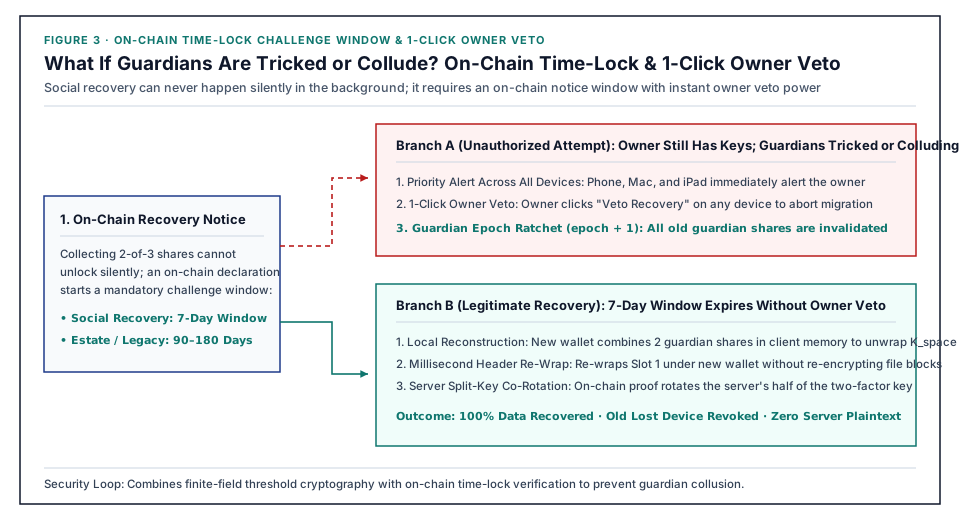
As illustrated above, completing a social recovery takeover on a cloud or self-hosted space requires passing through a strict three-step on-chain state machine:
1. On-Chain Recovery Declaration and Mandatory 7-Day Time-Lock Challenge Window
Collecting 2-of-3 guardian signatures never grants instant access to your cloud shards.
To activate social recovery, the new wallet must first submit the guardian threshold proof to ArcBlock Chain, publishing an auditable recovery declaration that automatically enters a mandatory 7-day Time-Lock Challenge Window (for long-term family estate and digital legacy handovers, the owner can configure a 90-day or 180-day inactivity window). Until that countdown expires cleanly on-chain, every storage gateway and server node strictly freezes read and key-rotation requests from the new wallet.
2. All-Channel Top-Priority Alert and Owner 1-Click Veto
The second a recovery declaration is recorded on-chain, every active device belonging to the original owner (phone DID Wallet, desktop app, and bound notification channels) receives a top-priority security alert.
- If the recovery request is unauthorized (your phone is still in your pocket, meaning guardian accounts were compromised or colluded): You simply pull out your phone or press Touch ID on your home Mac and tap "Veto Recovery" using your surviving Slot 1 (Primary Wallet) or Slot 2 (Trusted Hardware Device).
- Immediate Cancellation and Automatic Guardian Epoch Ratchet (
epoch + 1): Because Slot 1 and Slot 2 always hold higher cryptographic authority than Slot 4 social recovery, your on-chain veto immediately aborts the takeover attempt and automatically increments the Guardian Epoch (epoch + 1). Every 32-byte share held by the compromised or colluding guardians is permanently invalidated in a single stroke, preventing them from ever replaying the attack.
3. Zero-Knowledge Server Split-Key Co-Rotation After the Window Matures
Conversely, if you genuinely lost all of your devices, no veto is cast during the 7-day countdown, and the on-chain time-lock matures cleanly:
- Your new device reconstructs Slot 4's emergency recovery key locally via Lagrange interpolation, unwraps the Space Master Key, and re-wraps Slot 1 under your new DID Wallet;
- The new wallet presents the matured, un-vetoed on-chain recovery proof to the ArcSpace server;
- After verifying the on-chain proof against the blockchain ledger, the server officially switches the space owner binding to your new DID, co-rotates the Server Half of the two-factor split key with your new wallet, and revokes all session leases belonging to the lost wallet.
Notice that throughout the entire recovery and key-rotation lifecycle, the cloud server still never sees a single byte of your unencrypted Space Master Key or file plaintext, yet cleanly and verifiably transfers custody from your lost device to your new wallet.
5. Putting All Five Pieces of the ArcSpace Architecture Together
With anti-self-lockout and social recovery in place, all five core architectural pillars of ArcSpace come together as a complete system:
| Series Article | Core Problem Solved | Key Architectural Mechanisms |
|---|---|---|
| 1. Cryptographic Unification & Anti-Dump Foundation | What if the cloud database and storage bucket are dumped by hackers, or inspected by backend admins? | Cryptographic homology across DID Wallet, Chain, and ArcSpace; two-factor split keys; blinded shard pool; 100% native plaintext on home NAS |
| 2. Zero Compromise Against Hackers, Forgiving When You Forget (This Article) | With zero server backdoors, what happens if I forget my vault password or lose my phone and recovery phrase? | Progressive Hybrid Volume (don't over-lock daily files); 4-slot key envelope with < 1 ms O(1) header re-wrap; 3-second Touch ID self-rescue; 2-of-3 Shamir guardians + printable Emergency Kit; on-chain 7-day challenge window & 1-click veto |
| 3. Universal Storage Control Plane | My files are scattered across laptops, home NAS, cloud drives, and S3 buckets. Do I have to migrate hundreds of GBs to manage them? | Decoupling Control Plane from Storage Providers; zero-copy virtual view projections; 0-byte cloud placeholder hydrate guard |
| 4. Peace-of-Mind Backup & Decommission Visa | My desk drawer is full of old hard drives and Time Machine backups that waste space, yet I'm afraid to format them. | Cross-drive content-hash folding; lossless Time Capsule harvesting; actuarial-grade Decommission Visa & automated 3-2-1 backup |
| 5. Local-First AI Thread Organizer & Compliance Audit | Folder trees break down past tens of thousands of files. How can AI uncover cross-file storylines and contract/insurance blind spots without leaking privacy? | Local small-model indexing first; 4-layer privacy redaction gateway; corporate governance & family insurance gap scanner; verifiable crypto-shredding |
Good personal data architecture never punishes its rightful owner with brittle cryptography. Instead, it hides rigorous mathematics behind calm, intuitive everyday habits: standing like an impenetrable wall against external database dumps and backend snooping, while always keeping a gentle, mathematically verifiable spare key at home for the day you forget a password, replace a lost phone, or pass a lifetime of digital memories on to your family.