Stop Moving Hundreds of Gigabytes Just to Organize Files: Why ArcSpace Is a Unified Control Plane for All Your Storage

Anyone who has accumulated a decade of digital life knows the absurdity of modern file management. You might have a 20 TB Synology NAS humming in your living room holding family photos and raw video footage, iCloud Drive syncing your Apple devices, Google Drive, Dropbox, or OneDrive holding work documents, and two external SSDs plugged into your desk. You have plenty of raw storage space. Yet the moment you want to organize a cross-cutting project, or place a single 132 GB 4K event recording into three folders at once ("2025 Year in Review", "Product Keynote Assets", and "Family Highlights"), traditional file systems force a painful choice: either duplicate that 132 GB video three times and burn nearly 400 GB of disk space, or bury it inside one single folder and forget it exists everywhere else.
When we designed ArcSpace (personal data spaces) across its three deployment modes (Official Cloud Hosted, Cloud Server Self-Host, and Local / Home Self-Host), we started from a clear strategic premise: the world does not need another storage vendor fighting a race-to-the-bottom price war per gigabyte against AWS, Google, Apple, or Synology. ArcSpace is not a raw storage provider. It is the unified Control Plane for all of your personal and team data.
Traditional NAS appliances ask you to buy a box to manage files; traditional cloud drives ask you to hand your files over to a vendor's silo. ArcSpace flips that relationship upside down: you own a persistent logical data space first, and your home NAS, Mac, external drives, iCloud, Google Drive, Dropbox, OneDrive, and S3 buckets are simply interchangeable physical storage substrates underneath it. Once you invert that order, how you organize files, how you unify scattered drives, and how AI understands your context change completely.
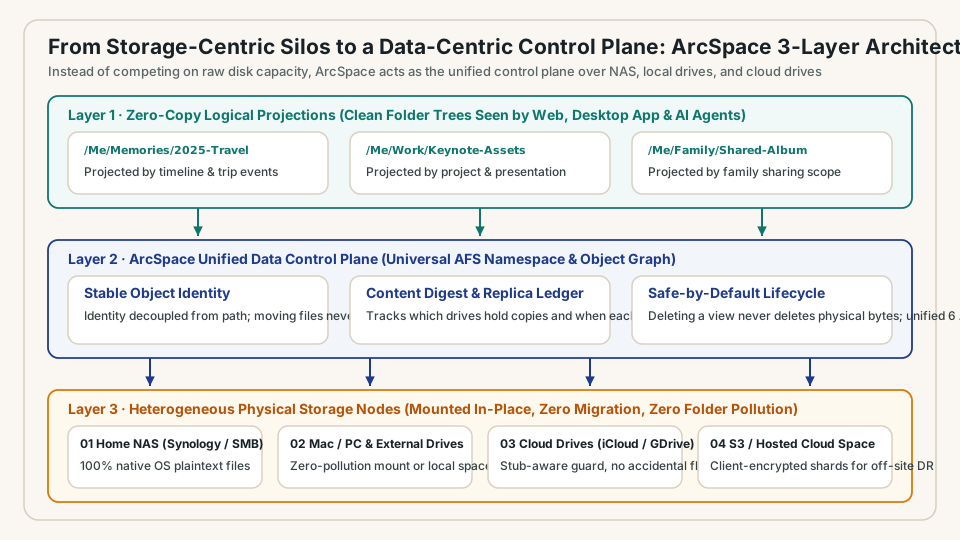
1. From Storage-Centric to Data-Centric: Why Folders Should Be Projections, Not Physical Cages
For the past forty years, operating system file systems have been storage-centric. A file's identity is fused to its physical path: Which disk is it on? Which directory holds it? Which cloud account synced it? If you move a file from Folder A to Folder B, every link pointing to it breaks. If you want to organize the same asset by time, by project, and by person, you have to physically copy bytes across folders.
At the core of ArcSpace is AFS (Agentic File System), which shifts the paradigm from storage locations to data-centric objects. In the ArcSpace control plane, every file has a stable logical identity and a SHA-256 content fingerprint, decoupling physical storage from logical organization into two distinct layers:
- The Physical Storage Substrate (Untouched In-Place, 100% Native): Your photos, videos, and documents stay right where they are on your home NAS, local hard drive, or chosen cloud drive. For everyday spaces self-hosted locally at home or on your NAS, ArcSpace preserves your native operating system directory tree in 100% readable plaintext. It never turns your local family drive into an opaque database of hashed blobs, and it never litters your folders with hidden thumbnail or metadata files;
- The Zero-Copy Logical Projection Layer: The folder structures you browse in the ArcSpace web workbench, desktop app, or AI workspace are lightweight logical projections over those physical files.
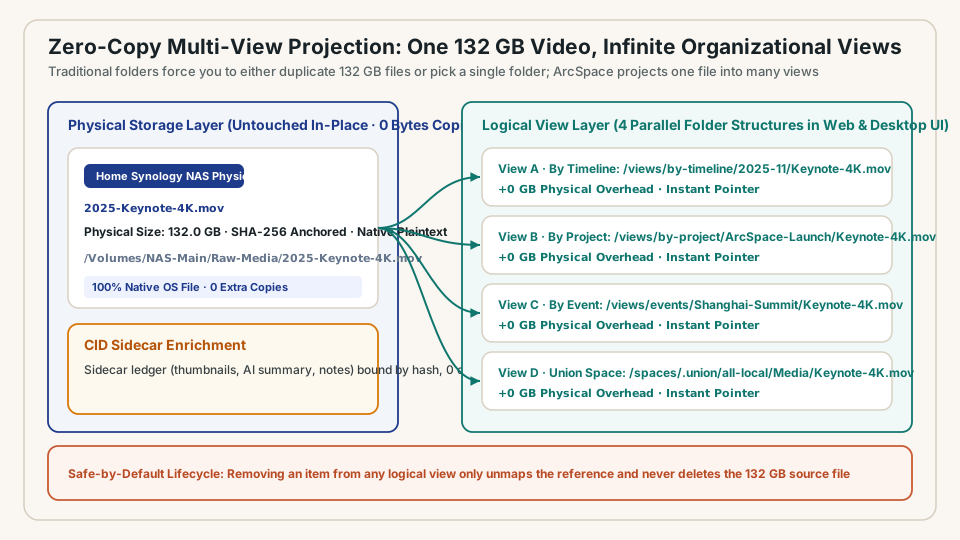
Take that 132 GB 4K video example. While the raw file sits untouched on your home NAS, a few clicks in the ArcSpace graphical workbench project it simultaneously into four independent directory structures: a timeline view (/views/by-timeline/2025-11), a project view (/views/by-project), an event view (/views/events), and a unified cross-space view. In the browser and desktop UI, each view behaves just like a standard folder where you can browse, preview, and stream the video immediately. Underneath, there is still only one 132 GB physical file on disk, and the extra storage overhead across all four views is zero bytes.
Separating logical views from physical storage also gives you a Safe-by-Default Lifecycle: removing a video from a project view, or deleting a temporary view altogether, only unmaps the logical reference and never deletes the underlying 132 GB source file. Furthermore, any personal notes, tags, thumbnails, or AI summaries you attach to that file are anchored to its content fingerprint in ArcSpace's non-intrusive sidecar ledger. Even if you rename the file or move it to another folder later, as long as its content is unchanged, your notes, summaries, and projections follow it automatically.
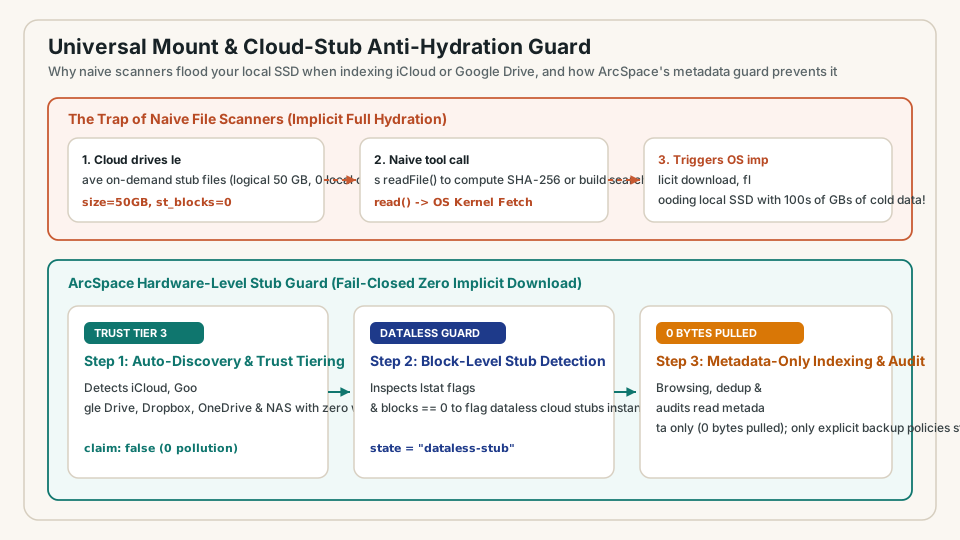
2. Universal Mount and the Cloud-Stub Guard: Unifying Local Drives, Home NAS, and Four Cloud Drives Without Flooding Your SSD
Managing a single directory is only the starting line. Real-world data is spread across multiple machines, a home Synology NAS over LAN, external USB drives, and cloud drives like iCloud Drive, Google Drive, Dropbox, OneDrive, and S3.
ArcSpace brings all of these together through Universal Mount. Directly from the graphical workbench, without touching a command line, ArcSpace automatically discovers and mounts your local spaces, LAN NAS volumes, and major cloud storage folders in zero-pollution mode (writing zero intrusive files into external directories). It merges them into a single unified namespace while showing each file's physical origin, storage trust tier, and replica health in the inspector panel.
However, anyone who has tried to run a cross-drive indexer across modern cloud drives knows there is a nasty trap waiting in the operating system: accidental hydration of dataless cloud stubs.
On macOS and modern desktops, iCloud Drive, Google Drive, Dropbox, and OneDrive save local disk space by replacing hundreds of gigabytes of older files with on-demand "dataless stubs" (such as .icloud placeholders or files whose logical size reads as 50 GB in Finder while occupying 0 physical blocks on the local SSD). If a naive file manager or deduplication tool scans those directories and calls a standard file-read API to compute hashes or build an index, the OS kernel assumes the user is opening every single file. Within minutes, it triggers a massive implicit download storm that pulls hundreds of gigabytes of cold cloud data over your home Wi-Fi and completely fills up your local SSD.
ArcSpace prevents this at the hardware metadata level with a deterministic Cloud-Stub Anti-Hydration Guard:
- Block-Level Stub Detection: Before reading a single byte, ArcSpace inspects low-level file system metadata (
lstatflags and allocated physical disk blocks). Any file inside a cloud mount with a positive logical size but zero allocated local blocks (or an.icloudstub marker) is immediately classified as adataless-stub; - Zero Implicit Downloads During Indexing and Audits: When browsing unified directories, auditing cross-space duplicates, or computing space telemetry, ArcSpace reads metadata, logical sizes, and cloud checksums only, hard-blocking any implicit network byte hydration (
0bytes downloaded); - Controlled Streaming Only When Requested: Physical bytes are only streamed down when you explicitly open a file for preview or assign that folder to an active backup policy that requires a full physical replica on your home NAS.
3. Why AFS Makes Cross-Storage Composition Feel Like Snapping Lego Bricks Together
Why can ArcSpace unify capabilities that previously required stitching together four or five incompatible tools (NAS management suites, cloud sync clients, virtual filesystem kernel drivers, and digital asset managers)?
The answer lies in AFS (Agentic File System). Traditional operating system file systems (POSIX) were designed in the 1970s for a single computer attached to a single local disk. Extending them requires brittle kernel extensions, and their stat() metadata only knows basic integers like byte size, modification time, and Unix permissions. There is nowhere in POSIX to express "which drives hold verified copies of this file?", "is this a dataless cloud stub?", or "what are the AI summary and provenance of this document?", forcing developers to bolt on separate databases that quickly drift out of sync with the disk.
AFS solves this at the protocol level with three architectural choices:
- A Narrow 6-Verb Hourglass Interface: Whether the underlying substrate is a local SSD, a Synology NAS, an S3 bucket, or a cloud drive, AFS normalizes everything into six standard user-space operations (
list,read,write,stat,exec, andexplain). Because every layer speaks the exact same interface, providers stack like Lego bricks: physical storage nodes under encrypted sharding, under cross-space union mounts, under zero-copy logical views, under session permission overlays; - First-Class Semantic Metadata and Provenance: Every AFS entry carries rich, structured metadata and provenance natively on the path itself. Clicking a file in the ArcSpace workbench immediately reveals its physical locations, content digest, replica count, cloud residency state, and sidecar annotations without querying a separate system;
- Control Plane Actions Mounted Directly on the Tree: Instead of splitting file reads/writes from a separate management RPC service, AFS mounts control actions (creating spaces, mapping logical paths, merging union views, and running audits) directly on the namespace tree. When you click a button in the ArcSpace graphical workbench or ARC Desktop, or when an AI Agent orchestrates your storage in the background, both invoke the exact same deterministic path actions.
Turning your storage into a unified control plane gives you true freedom of movement: you can swap out a hard drive, upgrade your NAS, or switch cloud storage providers tomorrow, and your logical folder structures, multi-view projections, personal annotations, and long-term memory remain completely intact.
Once all of your active cloud drives and home storage are unified under one control plane, the next big headache surfaces immediately: what about the dozen old hard drives, retired Macs and PCs, and Apple Time Capsules sitting in your closet full of scattered, overlapping backups from the last fifteen years? In the next article of this series, we will look at how ArcSpace turns that mountain of legacy backups into verifiable peace of mind.