A Retirement Visa for Decade-Old Hard Drives and Time Capsules: How ArcSpace Brings True Peace of Mind to Backups
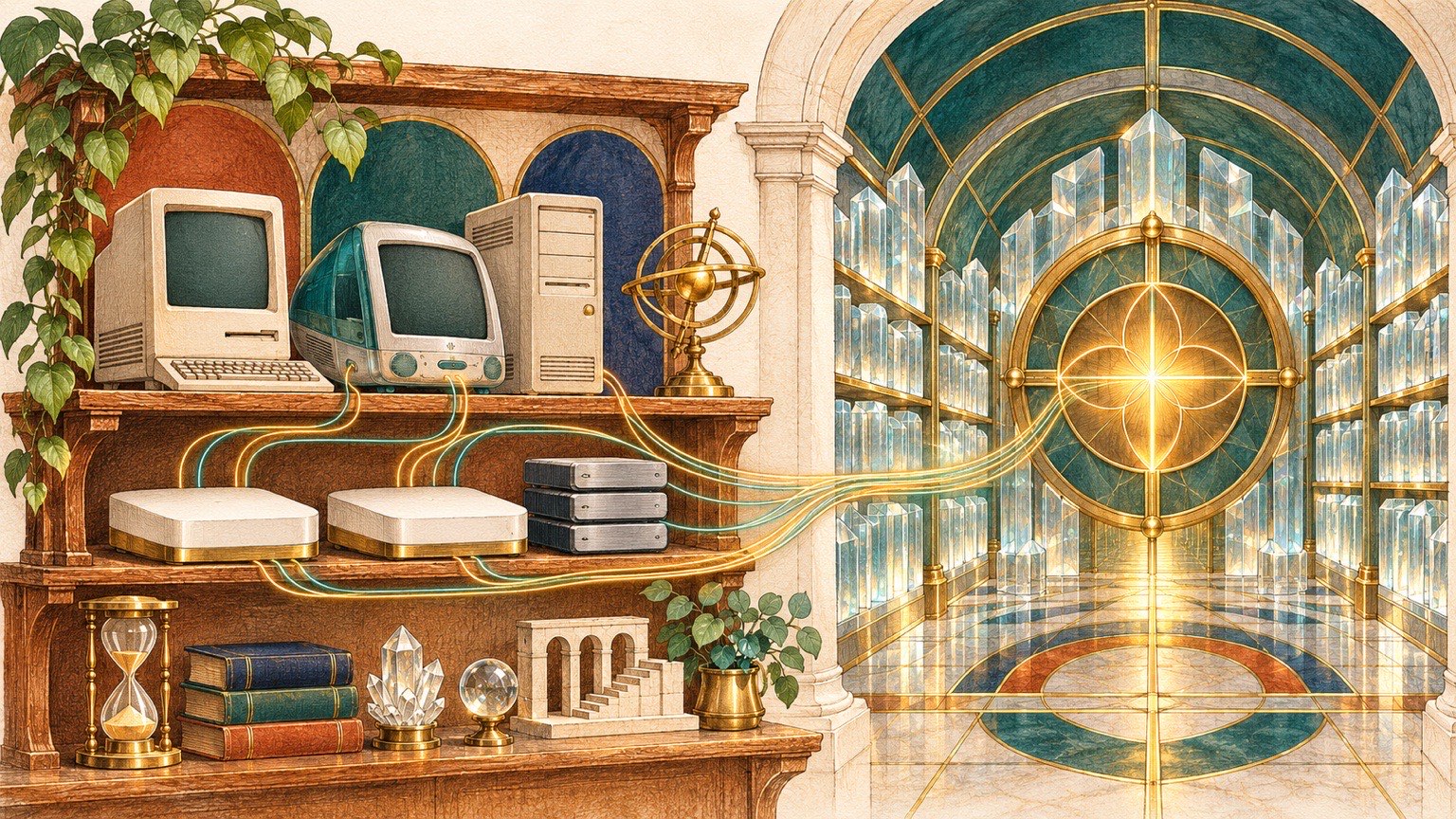
Almost every longtime computer user has a shelf or desk drawer holding a few pieces of hardware they neither use nor dare to throw away: two or three aging USB external drives, an old MacBook or PC with a loose hinge, or a humming Apple Time Capsule that was discontinued years ago.
These devices stay unplugged most of the year. Yet every time you think about cleaning out the closet, recycling the old laptop, or formatting an old drive for a new project, a nagging hesitation stops you: what if the original high-resolution photos from a family trip ten years ago, or a signed early contract, happen to live only in some forgotten subfolder on that drive?
Making matters worse, over the past decade you have probably copied folders back and forth across multiple drives "just to be safe," leaving behind deeply nested Russian-doll directories like 2018-Old-Mac-Backup/, Desktop-Backup-2/, and To-Sort-Final/. Nobody remembers which copy holds the latest edits and which ones are pure duplicates wasting hundreds of gigabytes. Even if you try writing a bash script with cp or rsync to merge them, you risk overwriting newer files or corrupting live SQLite databases mid-write (breaking WAL journal consistency). And when the script finishes, you still have zero mathematical proof to answer the ultimate question: do I actually have a complete, healthy, restorable backup right now?
The true deliverable of a backup system is not "another four terabytes of occupied disk space." It is Peace of Mind. In ArcSpace, we engineered cross-drive consolidation, legacy device harvesting, version lineage, and deterministic 3-2-1 resilience into a single verifiable loop.
1. Cross-Drive Content Folding and Automatic Version Lineage: Ending Russian-Doll Backup Folders
When you mount two external USB drives, a home NAS, and an old laptop backup directory into ArcSpace at the same time, simply displaying four separate folder trees side by side in a sidebar does nothing to reduce your cognitive load. The same project directory might appear across three different drives, mixing thousands of identical files with a handful of modified files from different years.
ArcSpace's first step is to construct a Canonical Universal Merged View in the control plane without altering a single byte on your underlying physical drives.
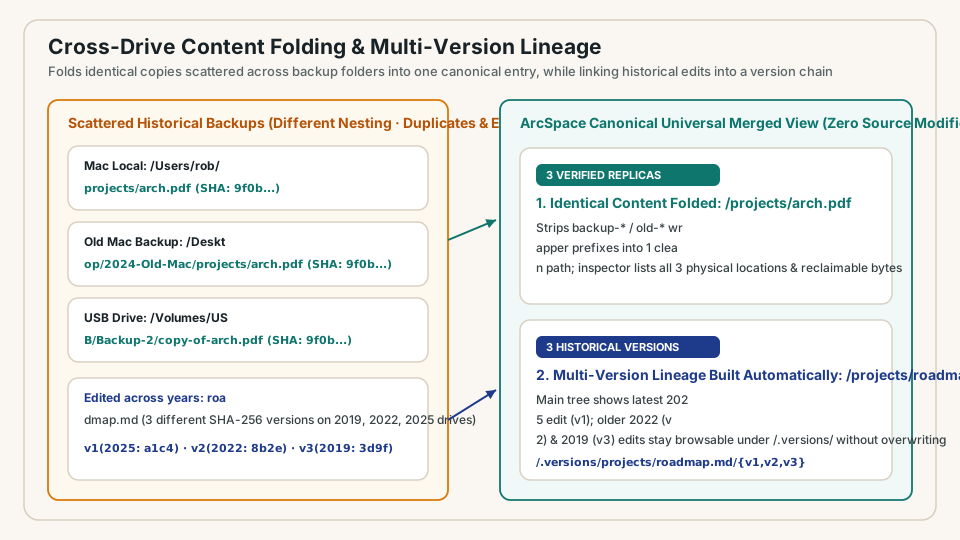
As the engine indexes multiple mounts, it automatically performs two tasks that used to take weeks of manual comparison:
- Stripping Backup Wrappers and Folding Identical Replicas by Content Hash: ArcSpace automatically recognizes and strips historical backup wrapper prefixes such as
backup-2024/,old-mac/, orBackups.backupdb/..., extracting each file's canonical logical path alongside its full-fileSHA-256cryptographic fingerprint. IfMaster-Service-Agreement.pdfexists on your local SSD, your living-room NAS, and an old USB drive with the exact sameSHA-256hash, it appears as one clean entry in the canonical view, annotated with a3 replicashealth badge showing every physical device holding a copy. - Linking Edited Files Across Years into a
.versions/Lineage: What ifArchitecture-Spec.docxexists at the same logical path across three drives with three differentSHA-256hashes? ArcSpace never blindly overwrites older files with newer ones, nor does it clutter your folder with_conflict_1duplicates. Instead, it surfaces the latest version (v1) cleanly at the top of the main view while automatically threading the older historical edits (v2,v3) into an attached.versions/timeline. You get a spotless workspace on the surface while preserving every historical milestone underneath.
2. Non-Destructive Time Capsule and Legacy PC Harvester: Issuing a Verifiable "Retirement Visa"
Among all legacy storage devices, Apple Time Capsules and decade-old computer drives are the toughest to rescue safely.
Consider how an Apple Time Capsule works under the hood: it exposes an SMB network share containing a .sparsebundle disk image formatted with Apple's legacy HFS+ filesystem. To create point-in-time snapshots, Time Machine relies heavily on HFS+ directory hardlinks. If your Time Capsule holds 70 to 80 historical backups, a naive file scanner or copy tool sees millions of files totaling dozens of terabytes. It will read and hash the exact same unchanged file 80 separate times, taking days to finish and risking mechanical failure by thrashing an aging spinning hard drive.
ArcSpace includes a purpose-built, read-only Legacy Archive Harvester:
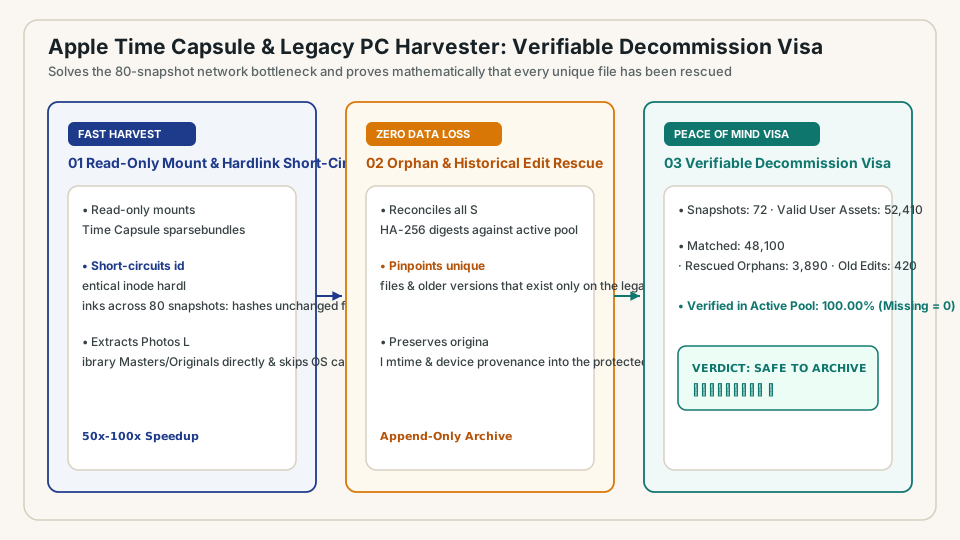
- HFS+ Inode Hardlink Short-Circuiting (50x to 100x Speedup): The harvester mounts
.sparsebundlevolumes strictly read-only and tracks physical HFS+inodenumbers at the block metadata layer. A file that remained unchanged across 80 Time Machine snapshots is read from disk and hashed withSHA-256exactly once, eliminating over 98% of redundant disk I/O, protecting fragile drive heads, and turning multi-day scans into minutes. - Direct Original Photo Extraction and OS Noise Filtering: Old Macs often hold monolithic
iPhoto LibraryorPhotos Librarypackages. Blindly copying the package pulls gigabytes of obsolete face-recognition caches, thumbnails, and database temp files, while leaving your actual photos locked inside an opaque bundle. ArcSpace automatically skips OS runtime caches and derivative clutter, reaching directly intoMasters/andOriginals/inside legacy photo libraries to extract full-resolution original photos and videos with their capture metadata intact. - Issuing a Cryptographic Decommission Certificate (
SAFE TO ARCHIVE): As the harvester scans the legacy device, it classifies every valid user file: files whose exactSHA-256already exists in your active storage pool are marked verified; orphan files (files that exist on the old drive but nowhere in your active pool) and unique historical versions are automatically rescued into your active pool and.versions/lineage.
The most important moment happens when harvesting completes. Once, and only once, 100.00% of the valid user files on that legacy device have been verified byte-for-byte via SHA-256 inside your active storage pool and the count of unrescued files reaches Missing in Active Pool = 0, ArcSpace issues a signed Decommission Certificate (Verdict: SAFE TO ARCHIVE / RETIRE).
With that mathematical proof in hand, the decade-old anxiety is gone. You can finally unplug the Time Capsule, format the old drive, or put it into cold deep storage with complete confidence.
3. Deterministic 3-2-1 Loop and Pre-Egress Privacy Gate: Never Relying on Human Memory
Once your historical data is consolidated, how do you ensure you never fall back into manual folder-copying chaos tomorrow?
In the era of AI agents, it is tempting to ask an LLM agent to periodically run shell scripts to back up your files. From an systems engineering standpoint, backup integrity and zero data loss are non-negotiable guarantees that must never depend on human memory, an AI agent's finite context window, or ad-hoc bash copy scripts. Copying a live SQLite database with a naive file copy command during an active WAL transaction produces a silently corrupted backup that fails just when you need to restore it.
In ArcSpace, the classic 3-2-1 backup rule (3 copies of data, 2 different media types, 1 offsite replica) is enforced continuously by deterministic state machines in the storage engine:
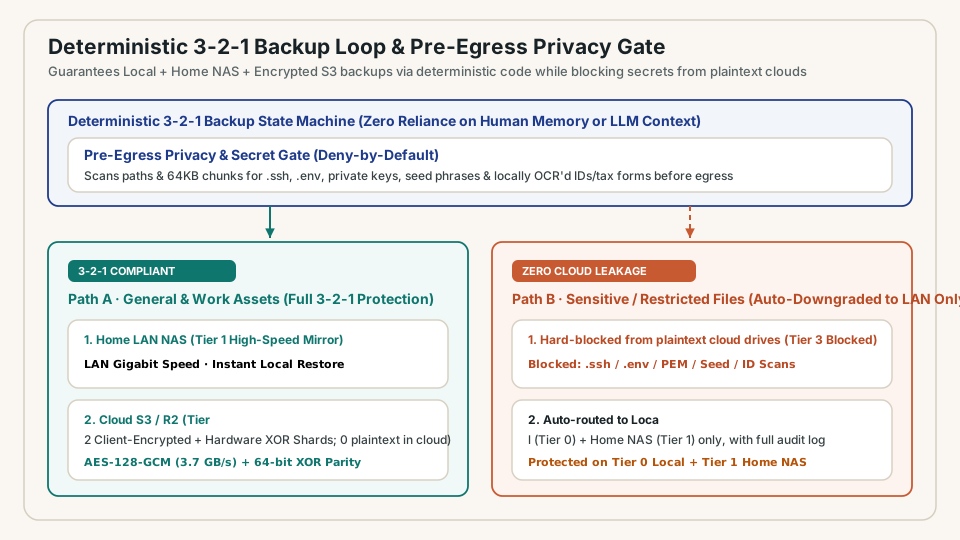
- Three-Tier Media Orchestration and Self-Healing Parity:
- Tier 0 (Local High-Speed SSD Workspace): Serves low-latency daily reads and writes, using atomic snapshot hooks for stateful ledgers so backups never capture half-written transactions.
- Tier 1 (Home LAN NAS / Mini-Server): Maintains a continuous, high-throughput hot replica over your local network.
- Tier 2 (Client-Encrypted Offsite S3 + Parity Shards): Uses hardware-accelerated
AES-128-GCMencryption at3.7 GB/son your device before upload, paired with native 64-bitXORparity shards. Even if a remote object suffers silent bit-rot, periodic background scrubbing detects the checksum mismatch and reconstructs the damaged shard automatically.
- Pre-Egress Privacy Gate: Not every file belongs on a third-party cloud drive, especially plaintext or semi-managed consumer cloud folders (Tier 3). Before a single byte leaves your local network, ArcSpace's deterministic Pre-Egress Privacy Gate inspects both file paths and local content signatures:
- Files matching credential patterns (such as
.ssh/,.env, private keys, or recovery seed files) or identified via on-device offline OCR as sensitive identity or tax documents (passports, driver's licenses, tax returns) are automatically blocked from syncing to plaintext third-party cloud drives and routed strictly toLocal + Home LAN NAS(or zero-knowledge client-encrypted vaults).
- Files matching credential patterns (such as
- Answering "Am I Safe?" with Deterministic Metrics: You never have to dig through terminal logs to guess whether last night's backup worked. ArcSpace surfaces clear, verifiable numbers: total protected files, exact percentage meeting 3-2-1 redundancy, timestamp of the latest byte-level scrub, and zero silent drift.
Summary: Leave Memories to Life, Leave Determinism to the System
We hold onto drawers full of old hard drives not because we love aging electronics, but because we care deeply about the life milestones, family memories, and years of work stored inside them.
By eliminating duplicate backup clutter with cross-drive content folding and .versions/ lineage, retiring decade-old Macs and Time Capsules safely with a verifiable Decommission Certificate, and protecting every new file through a deterministic 3-2-1 loop and pre-egress privacy gate, ArcSpace turns backup from a recurring chore into lasting peace of mind.