PaymentKit offers a flexible discount system using Coupons and Promotion Codes. This allows you to provide various types of discounts to your customers, such as percentage-off, fixed amount-off, and limited-time offers.
- Coupons: Define the core discount rules, such as the discount percentage or amount, duration (e.g., once, forever, repeating), and maximum total redemptions.
- Promotion Codes: These are the customer-facing codes that are linked to a coupon. They can have their own set of rules, such as individual redemption limits, expiration dates, and restrictions (e.g., for first-time customers only).
You can think of a Coupon as a template for a discount, and Promotion Codes as specific instances of that discount that customers can use.
For a detailed breakdown of all available API operations, see the Coupons API Reference and Promotion Codes API Reference.
How Discounts Work
The following diagram illustrates the relationship between Coupons, Promotion Codes, and their application during a transaction.
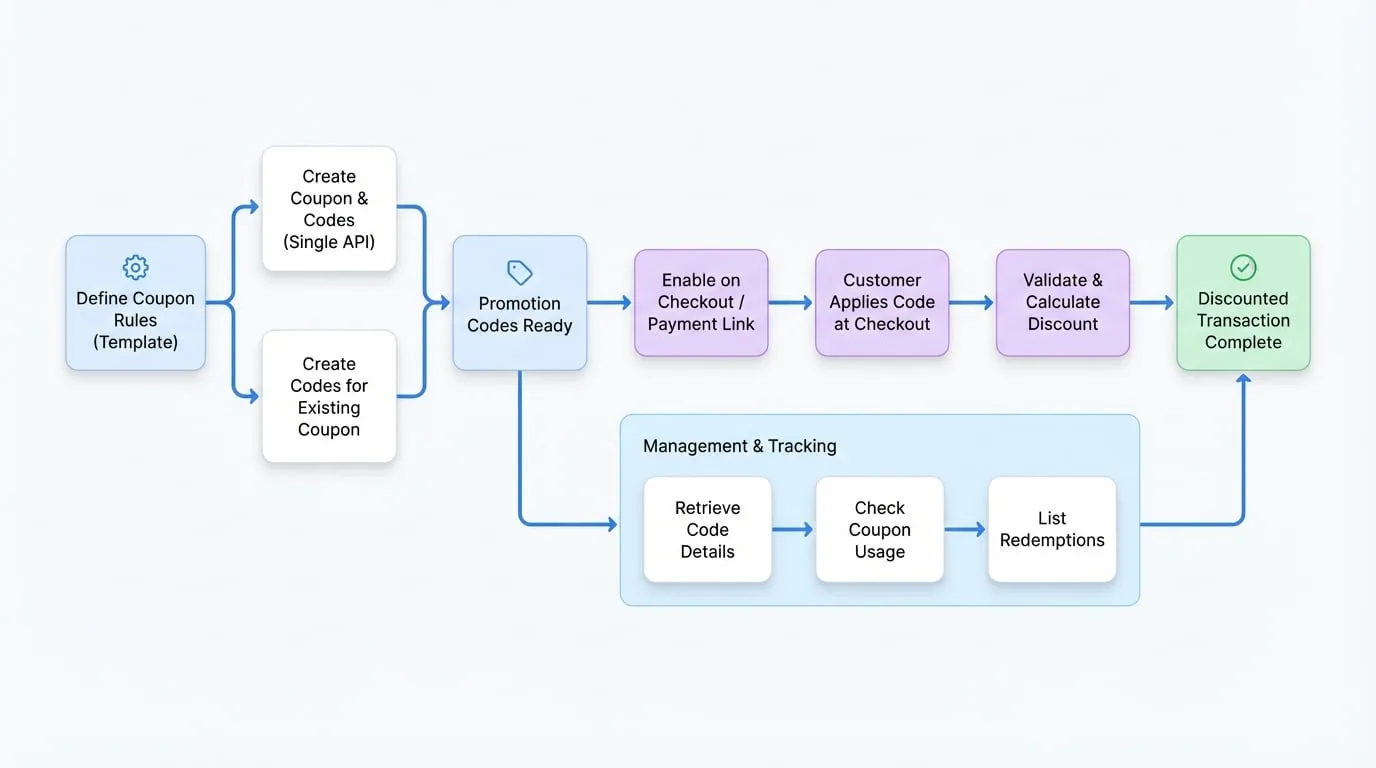
Creating Coupons
A Coupon object contains information about a discount, such as whether it's a percentage or a fixed amount. You can create coupons and then attach promotion codes to them.
Create a Coupon with Promotion Codes
You can create a coupon and one or more associated promotion codes in a single API call. This is useful for setting up a new campaign quickly.
Create Coupon with Promo Code
import payment from '@blocklet/payment-js';

async function createDiscountCampaign() {
  try {
    const result = await payment.coupons.create({
      name: 'New User Discount',
      percent_off: 20,
      duration: 'once',
      max_redemptions: 1000, // Max redemptions for the coupon itself
      promotion_codes: [
        {
          code: 'WELCOME20',
          description: 'Welcome discount for new users',
          max_redemptions: 100, // Max redemptions for this specific code
          expires_at: Math.floor(Date.now() / 1000) + (30 * 24 * 60 * 60) // 30 days from now
        }
      ]
    });

    console.log('Coupon created:', result.coupon);
    console.log('Promotion codes created:', result.promotion_codes);
  } catch (error) {
    console.error('Error creating coupon:', error.message);
  }
}

createDiscountCampaign();
Parameters
- name
string(required) — The name of the coupon, for internal display. - percent_off
number— A percentage (0-100) that will be taken off the subtotal. Must not be provided ifamount_offis set. - amount_off
string— A fixed amount to be taken off the subtotal. Must not be provided ifpercent_offis set. - currency_id
string— Required if amount_off is set. The ID of the currency for the fixed amount discount. - duration
string(required) — Describes how long the discount will be applied. Can be once, forever, or repeating. - duration_in_months
number— If duration is repeating, the number of months the coupon applies. - max_redemptions
number— The maximum number of times the coupon can be redeemed. - redeem_by
number— A Unix timestamp specifying the expiration date for the coupon. - promotion_codes
array— An array of promotion code objects to create and attach to this coupon.- code
string— The customer-facing code. If omitted, a random code will be generated. - max_redemptions
number— Maximum number of times this specific promotion code can be used. - expires_at
number— Unix timestamp for when this promotion code expires. - description
string— An optional description for the promotion code.
- code
- metadata
object— A set of key-value pairs to store additional information.
Creating Promotion Codes
While you can create promotion codes along with a coupon, you can also create them separately and attach them to an existing coupon. This is useful for generating multiple unique codes for a single campaign.
Create a Standalone Promotion Code
Create Promotion Code
import payment from '@blocklet/payment-js';

async function createPromoCode(couponId) {
  try {
    const promotionCode = await payment.promotionCodes.create({
      coupon_id: couponId, // ID of an existing coupon
      code: 'SAVE15NOW',
      description: 'Save 15% on your next purchase',
      max_redemptions: 500,
      restrictions: {
        first_time_transaction: true, // Only for new customers
      }
    });
    console.log('Promotion code created:', promotionCode);
  } catch (error) {
    console.error('Error creating promotion code:', error.message);
  }
}

createPromoCode('coupon_xxx'); // Replace with your actual coupon ID
Parameters
- coupon_id
string(required) — The ID of the coupon this promotion code should be attached to. - code
string— The customer-facing code. If omitted, a random code will be generated. - active
boolean(default:true) — Whether the promotion code is currently active. - max_redemptions
number— Maximum number of times this specific promotion code can be used. - expires_at
number— Unix timestamp for when this promotion code expires. - restrictions
object— Applies restrictions to this promotion code.- first_time_transaction
boolean— If true, the promotion code can only be redeemed by customers with no prior payments. - minimum_amount
number— The minimum transaction amount required to use the code. - minimum_amount_currency
string— The currency for the minimum amount.
- first_time_transaction
- metadata
object— A set of key-value pairs to store additional information.
Applying Discounts at Checkout
To allow customers to enter a promotion code on the checkout page, you must explicitly enable this option when creating a Checkout Session or a Payment Link.
Enable on a Checkout Session
Set the allow_promotion_codes parameter to true when creating a Checkout Session. This will add a field to the payment page for customers to enter their code.
Enable Promotion Codes
import payment from '@blocklet/payment-js';

async function createCheckoutWithDiscounts() {
  try {
    const session = await payment.checkout.sessions.create({
      success_url: 'https://example.com/success',
      cancel_url: 'https://example.com/cancel',
      mode: 'payment',
      line_items: [
        { price_id: 'price_xxx', quantity: 1 }
      ],
      allow_promotion_codes: true // This enables the promo code field
    });
    console.log('Checkout session created with promotion codes enabled:', session.url);
  } catch (error) {
    console.error('Error creating checkout session:', error.message);
  }
}

createCheckoutWithDiscounts();
Enable on a Payment Link
The same logic applies to reusable Payment Links. Setting allow_promotion_codes to true ensures that anyone using the link can apply a valid promotion code.
Enable on Payment Link
import payment from '@blocklet/payment-js';

async function createPaymentLinkWithDiscounts() {
  try {
    const paymentLink = await payment.paymentLinks.create({
      line_items: [{
        price_id: 'price_xxx',
        quantity: 1,
      }],
      allow_promotion_codes: true,
    });
    console.log('Payment link created with promotion codes enabled:', paymentLink.url);
  } catch (error) {
    console.error('Error creating payment link:', error.message);
  }
}

createPaymentLinkWithDiscounts();
Managing Discounts
The SDK provides various methods to manage and track your discounts.
Retrieve a Promotion Code by its Code
You can fetch a promotion code's details directly using the customer-facing code string.
Get Promotion Code by Code
import payment from '@blocklet/payment-js';

async function getPromoDetails(code) {
  try {
    const promoByCode = await payment.promotionCodes.byCode(code);
    console.log('Found promotion code:', promoByCode);
    // You can now access the associated coupon details
    console.log('Discount:', promoByCode.coupon);
  } catch (error) {
    console.error(`Promotion code '${code}' not found or an error occurred:`, error.message);
  }
}

getPromoDetails('WELCOME20');
Check Coupon Usage
Determine if a coupon has been redeemed at least once. This is useful for deciding whether a coupon's rules can still be edited.
Check Coupon Usage
import payment from '@blocklet/payment-js';

async function checkCouponUsage(couponId) {
  try {
    const { used } = await payment.coupons.used(couponId);
    if (used) {
      console.log(`Coupon ${couponId} has been used and its rules are now locked.`);
    } else {
      console.log(`Coupon ${couponId} has not been used yet.`);
    }
  } catch (error) {
    console.error('Error checking coupon usage:', error.message);
  }
}

checkCouponUsage('coupon_xxx'); // Replace with a valid coupon ID
List Redemptions
You can retrieve a paginated list of customers or subscriptions that have redeemed a specific coupon or promotion code.
List Coupon Redemptions
import payment from '@blocklet/payment-js';

async function getCouponRedemptions(couponId) {
  try {
    const redemptions = await payment.coupons.redemptions(couponId, {
      type: 'customer', // or 'subscription'
      page: 1,
      pageSize: 10
    });
    console.log(`Found ${redemptions.count} customer redemptions for coupon ${couponId}:`);
    redemptions.customers.forEach(customer => {
      console.log(`- Customer ID: ${customer.id}`);
    });
  } catch (error) {
    console.error('Error getting redemptions:', error.message);
  }
}

getCouponRedemptions('coupon_xxx'); // Replace with a valid coupon ID