The Agreement Claim is a powerful tool for obtaining explicit user consent for documents like Terms of Service, Privacy Policies, or any other formal agreement. Instead of a simple checkbox, this claim requires the user to cryptographically sign a hash (digest) of the document, creating a verifiable and non-repudiable record of their consent.
This process ensures that the user agrees to the exact version of the document you presented, as the DID Wallet independently verifies the document's integrity before requesting the user's signature.
How It Works
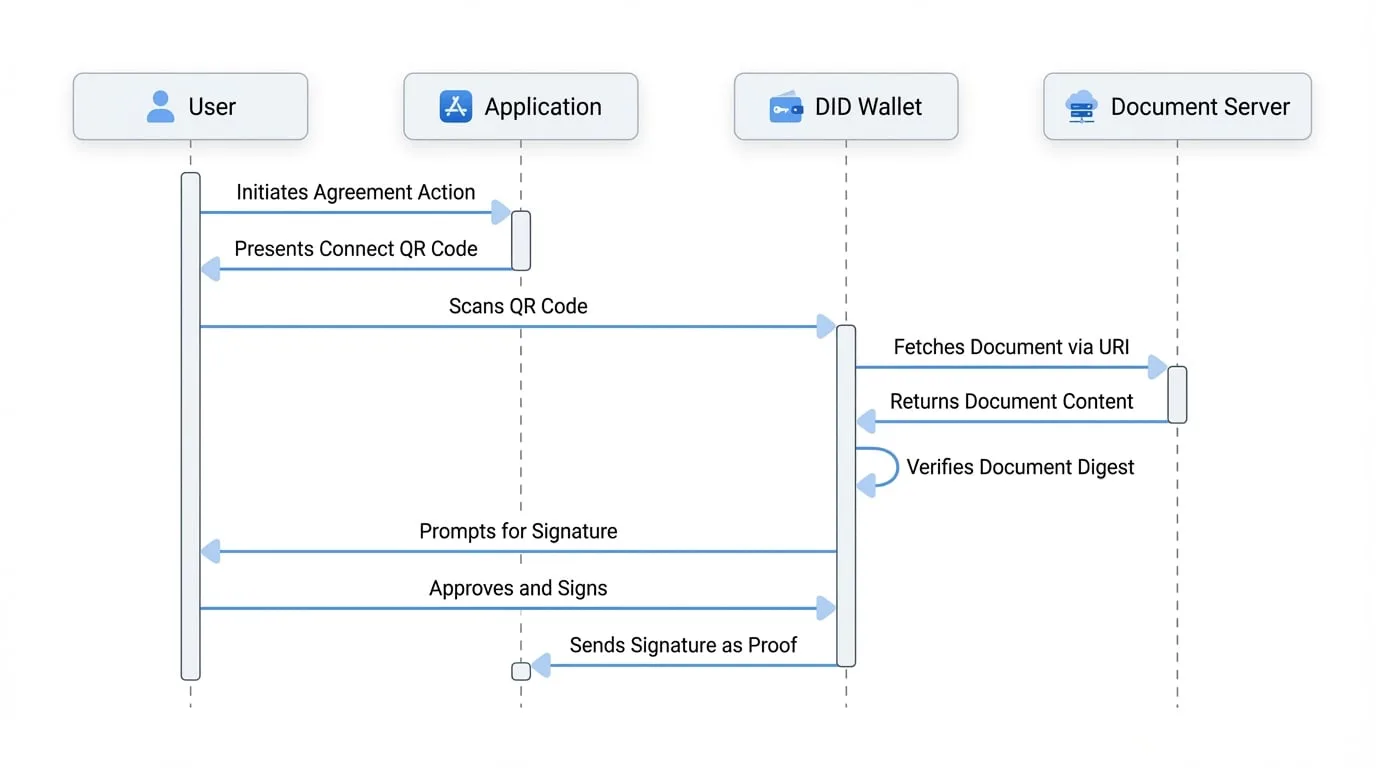
The workflow for an Agreement Claim is designed for security and transparency:
Application Side
Your application provides the wallet with a URL (
uri) where the document is hosted and a pre-calculated cryptographic hash (digest) of that document's content.Wallet Side
The user's DID Wallet receives the request.
Verification
The wallet fetches the document from the provided
uri, calculates its hash using the samemethod(e.g., SHA256), and compares it to thedigestsent by your application.User Consent
If the hashes match, the wallet displays the document and a confirmation prompt to the user. If they don't match, the wallet warns the user of a potential discrepancy, protecting them from bait-and-switch attacks.
Signature
Upon user approval, the wallet signs the verified digest with the user's private key.
Response
The resulting signature is sent back to your application as proof of agreement.
Parameters
The agreement claim object accepts the following parameters:
| Parameter | Type | Description |
|---|---|---|
uri | string | Required. The URL of the document (e.g., Terms of Service) that the user needs to review and agree to. Must be an http or https URL. |
digest | string | Required. The cryptographic hash (digest) of the document's content. The wallet will verify this digest against the document at the uri before asking for a signature. |
method | string | Optional. The hashing algorithm used to create the digest. Defaults to sha2. Supported methods include sha2, sha3, and keccak. |
description | string | Optional. A custom message displayed to the user in the wallet, explaining what they are agreeing to. Defaults to "Confirm your agreement to continue.". |
Example: Requesting Agreement to Terms of Service
Here's how you can configure WalletHandlers to request a user's agreement to a Terms of Service document. You would first need to generate a SHA256 hash of your terms.txt file.
Requesting User Agreement
const { WalletHandlers } = require('@arcblock/did-connect');

// You can generate this digest using a command like:
// shasum -a 256 path/to/your/terms.txt
const termsDigest = 'f2ca1bb6c7e907d06dafe4687e579fce76b37e4e93b7605022da52e6ccc26fd2';

const handlers = new WalletHandlers({
  chainInfo: { host: 'https://beta.abtnetwork.io/api' },
  appInfo: {
    name: 'My App',
    description: 'My App Description',
    icon: 'https://arcblock.oss-cn-beijing.aliyuncs.com/images/wallet-round.png',
    link: 'https://my-app.com',
  },
  claims: {
    agreement: {
      description: 'Please read and agree to our new Terms of Service to proceed.',
      uri: 'https://my-app.com/terms.txt',
      method: 'sha2',
      digest: termsDigest,
    },
  },
  onAuth: async ({ claims, userDid }) => {
    // The claims array will contain the agreement claim response
    const agreementClaim = claims.find(c => c.type === 'agreement');
    console.log(`${userDid} agreed and signed with digest:`, agreementClaim.sig);

    // You can now verify the signature against the user's DID and the original digest
  },
});
In the onAuth callback, you receive the sig field, which is the user's signature over the document digest. You can store this signature along with the user's DID as a durable, verifiable record of their consent.
Next Steps
After securing user agreement, you might need to verify specific attributes or qualifications they possess. Learn how to do this by requesting a Verifiable Credential.
Verifiable Credential Claim
Request the user to present a Verifiable Credential (VC) to prove an attribute or qualification.
Read More