The UserSessions component renders a comprehensive data table for displaying and managing a user's login sessions. It provides a clear overview of all active, expired, and offline sessions across various devices, giving users control over their account security.
The component is designed to be a plug-and-play solution for developers needing to implement session management features. It handles data fetching, pagination, UI rendering, and actions like logging out of specific sessions.
Features
- Session Filtering: Users can easily filter sessions by their status:
online,expired, oroffline. - Detailed Information: Each session entry displays parsed user-agent data, including the operating system, device type (browser), and wallet OS.
- IP Geolocation: Automatically resolves and displays the geographical region based on the last login IP address.
- Session Termination: Allows users to terminate any session except the current one.
- Bulk Actions: Includes a "Logout All" feature to terminate all sessions of a specific status.
- Responsive Design: Adapts to different screen sizes, ensuring a consistent user experience on both desktop and mobile devices.
How It Works
The UserSessions component operates by requesting session data from a developer-provided function. This design decouples the component from any specific backend implementation, offering greater flexibility.
The following diagram illustrates the interaction between the user, the component, and the application backend:
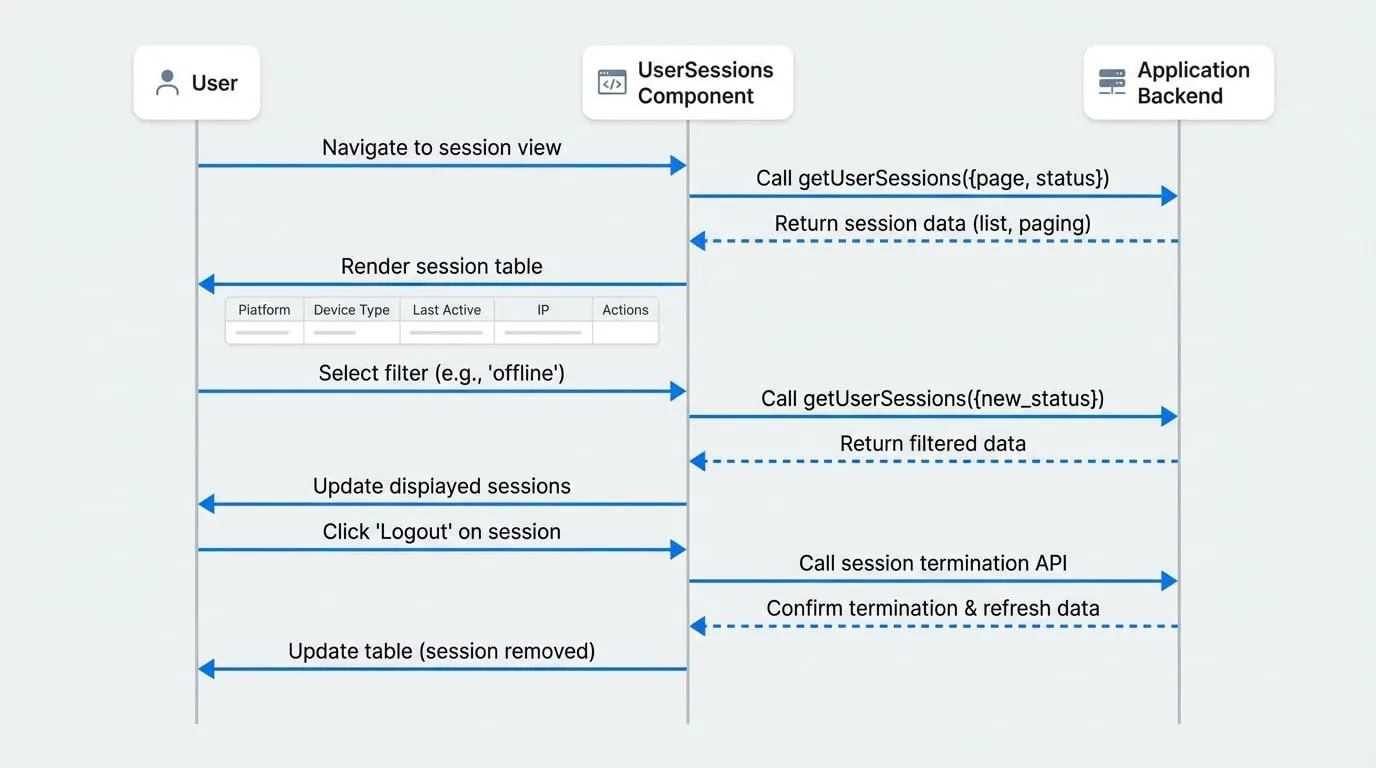
Usage
To use the UserSessions component, you must provide a user object and a getUserSessions function. The getUserSessions function is responsible for fetching the session data from your backend service.
Integration Example
import { UserSessions } from '@arcblock/blocklet-ui-react';
import { client } from './libs/client'; // Your API client instance

// The user object for whom sessions are being displayed.
const currentUser = {
  did: 'z1...',
  name: 'Alice',
  // other user properties
};

/**
 * This function fetches session data from your backend.
 * The UserSessions component will call this function whenever it needs new data.
 *
 * @param {object} params - The query parameters.
 * @param {number} params.page - The current page number.
 * @param {number} params.pageSize - The number of items per page.
 * @param {string} params.status - The session status to filter by ('online', 'expired', 'offline').
 * @returns {Promise<{ list: UserSession[], paging: { total: number } }>} A promise that resolves to the session data.
 */
const fetchUserSessions = async ({ page, pageSize, status }) => {
  const response = await client.user.getSessions({
    page,
    pageSize,
    status,
  });

  // Ensure the return format matches the component's requirements
  return {
    list: response?.list || [],
    paging: {
      total: response?.paging?.total || 0,
    },
  };
};

export default function MyAccountSessionsPage() {
  return (
    <div>
      <h2>Manage Your Login Sessions</h2>
      <UserSessions
        user={currentUser}
        getUserSessions={fetchUserSessions}
      />
    </div>
  );
}
Props
The UserSessions component accepts the following props to customize its behavior and appearance.
- user
User(required) — The user object for whom the sessions are being displayed. The component requires this to provide context for the session list. - getUserSessions
function(required) — An asynchronous function responsible for fetching paginated session data from your backend. It receives an object with page, pageSize, and status and must return a Promise that resolves to an object with the shape { list: UserSession[], paging: { total: number } }. - showAction
boolean(default:true) — Controls the visibility of the "Actions" column, which contains the logout buttons. Set to false to create a read-only view. - showUser
boolean(default:true) — Controls the visibility of the "User" column. This is useful in multi-user or administrative contexts where identifying the user for each session is necessary. - showOffline
boolean(default:false) — Determines whether the "Offline" filter option is available in the UI. Offline sessions typically represent long-lived sessions that are not currently active. - showAppPid
boolean(default:false) — Controls the visibility of the "App Pid" column, which can display a Blocklet's Program ID associated with the session.
Displayed Information
The component renders the following information for each session in the data table:
| Column | Description |
|---|---|
| Platform | The operating system and version derived from the session's user-agent string (e.g., Windows/10). |
| Device Type | The browser or application used for the session (e.g., Chrome/108.0.0). |
| Wallet OS | The operating system of the connected DID wallet, if available. |
| App Pid | The Program ID of the Blocklet that created the session. (Visible if showAppPid is true). |
| User | The user associated with the session. (Visible if showUser is true). |
| Created At | The timestamp when the session was initially created. |
| Last Active | The timestamp of the last activity. For expired sessions, this column shows "Expired". |
| Last Login IP | The last known IP address for the session, along with its resolved geographical region. |
| Actions | Provides a button to log out of the session. (Visible if showAction is true). |
For a complete user management interface, consider using the UserSessions component within the UserCenter component.