The FederatedService provides an API for interacting with Federated Login Group settings. It allows you to retrieve information about the "master" application that controls the login session and the "current" application the user is interacting with. This is essential for creating features like a unified application switcher or for understanding the context of the user's session within a group of connected Blocklets.
A Federated Login Group (统一登录站点群) allows multiple Blocklets to share a single user session, providing a seamless experience as users navigate between them. One Blocklet acts as the master, handling authentication, while others are members.
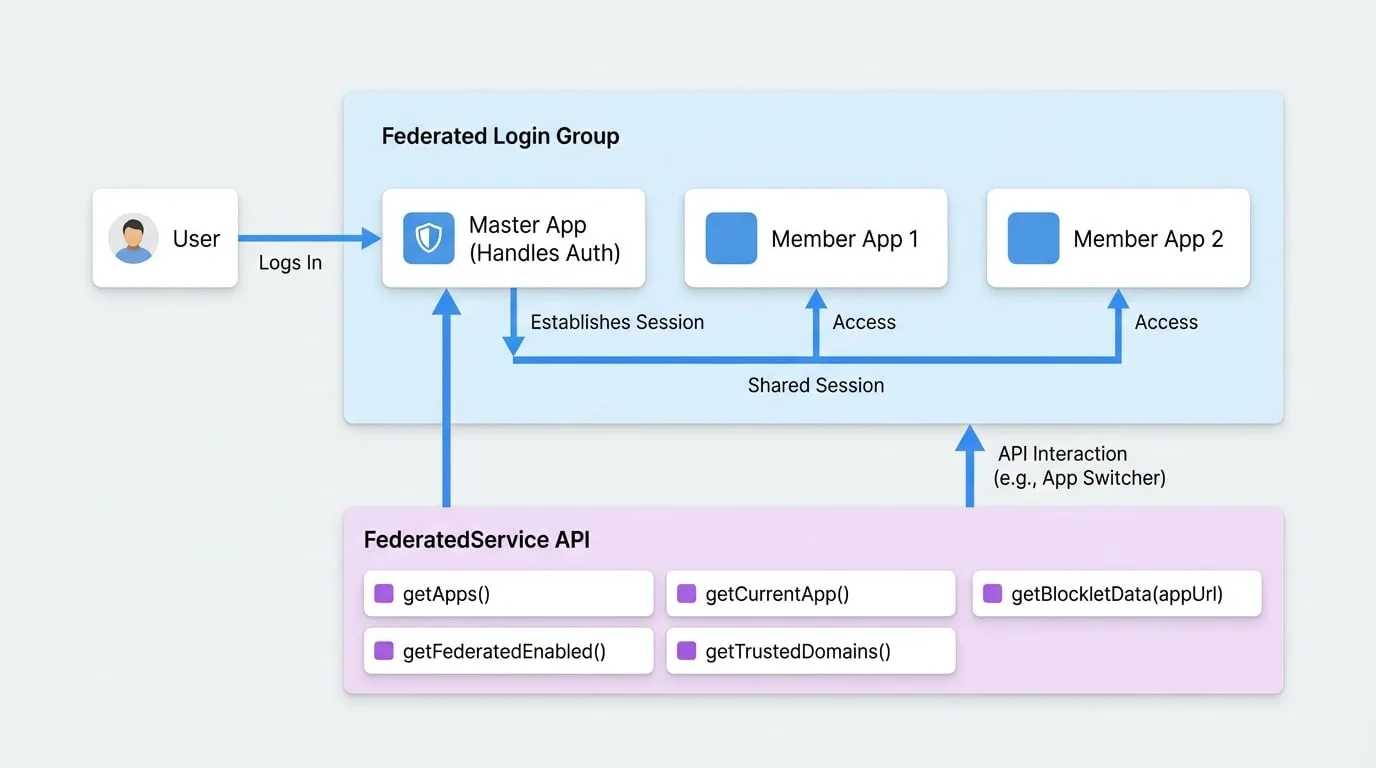
Common Use Case: Building an App Switcher
The most common use case for FederatedService is to build a UI component that lists all applications in the group, allowing the user to easily switch between them. The getApps() method is designed specifically for this purpose.
Example: Fetching Apps for a UI Component
import { getBlockletSDK } from '@blocklet/js-sdk';

const sdk = getBlockletSDK();

// Get the list of all apps in the federated group
// The master app will always be the first in the list.
const apps = sdk.federated.getApps();

console.log('Available apps:', apps);

// You can then use this 'apps' array to render a dropdown menu,
// a sidebar, or any other navigation component.
apps.forEach(app => {
  console.log(`App Name: ${app.appName}, URL: ${app.appUrl}`);
});
API Reference
getApps()
Retrieves a list of applications relevant to the current federated context. It intelligently combines the master application and the current application, ensuring the master application is always listed first if federation is enabled.
Returns
- ****
Array<AppInfo | ServerInfo>— An array of application info objects. The master app is always the first element if federation is enabled.
Example
const appList = sdk.federated.getApps();
console.log(appList);
Example Response
[
  {
    "appId": "z1masterAppDid",
    "appName": "Master App",
    "appDescription": "The main application for the group.",
    "appLogo": "/assets/logo.png",
    "appPid": "z8tmasterAppPid",
    "appUrl": "https://master.example.com",
    "version": "1.2.0",
    "sourceAppPid": "z8tmasterAppPid",
    "provider": "wallet"
  },
  {
    "appId": "z1currentAppDid",
    "appName": "Current Member App",
    "appDescription": "The application you are currently using.",
    "appLogo": "/assets/logo.png",
    "appPid": "z8tcurrentAppPid",
    "appUrl": "https://member.example.com",
    "version": "1.0.0",
    "sourceAppPid": null,
    "provider": "wallet"
  }
]
getCurrentApp()
Gets the information for the application that is currently running. This can be either a standard Blocklet or the Blocklet Server itself.
Returns
- ****
AppInfo | ServerInfo | null— An object containing the current application's details, or null if it cannot be determined.
Example
const currentApp = sdk.federated.getCurrentApp();
if (currentApp) {
  console.log(`You are currently on: ${currentApp.appName}`);
}
getFederatedApp()
Gets the information for the master application in the Federated Login Group. If the current application is not part of a federated group, this method will return null.
Returns
- ****
AppInfo | null— An object containing the master application's details, or null if not in federated mode.
Example
const masterApp = sdk.federated.getFederatedApp();
if (masterApp) {
  console.log(`The master app is: ${masterApp.appName}`);
}
getFederatedEnabled()
Checks if the Federated Login Group feature is enabled and has been approved by the user.
Returns
- ****
boolean— Returns true if federation is configured and the status is 'approved', otherwise false.
Example
const isFederated = sdk.federated.getFederatedEnabled();
if (isFederated) {
  console.log('Federated login is active.');
} else {
  console.log('This is a standalone application.');
}
getTrustedDomains()
Asynchronously fetches a list of trusted domains configured for the Federated Login Group.
Returns
- ****
Promise<Array<string>>— A promise that resolves to an array of trusted domain strings.
Example
async function logTrustedDomains() {
  try {
    const domains = await sdk.federated.getTrustedDomains();
    console.log('Trusted domains:', domains);
  } catch (error) {
    console.error('Failed to get trusted domains:', error);
  }
}

logTrustedDomains();
getBlockletData()
Asynchronously fetches and parses the __blocklet__.js metadata file from a given application URL. This method includes caching to avoid redundant network requests.
Parameters
- appUrl
string(required) — The base URL of the Blocklet whose data you want to fetch. - force
boolean(default:false) — If true, bypasses the cache and fetches fresh data.
Returns
- ****
Promise<any | null>— A promise that resolves to the parsed JSON data from blocklet.js, or null on failure.
Example
async function fetchMetadata(url) {
  const metadata = await sdk.federated.getBlockletData(url);
  if (metadata) {
    console.log(`Metadata for ${url}:`, metadata.name, metadata.version);
  }
}

fetchMetadata('https://some-blocklet.example.com');
Types
These are the primary data structures returned by the FederatedService methods.
AppInfo
Represents a standard Blocklet application.
AppInfo Type
type AppInfo = {
  appId: string;
  appName: string;
  appDescription: string;
  appLogo: string;
  appPid: string;
  appUrl: string;
  version: string;
  sourceAppPid: string;
  provider: string;
};
ServerInfo
Represents the Blocklet Server instance.
ServerInfo Type
type ServerInfo = {
  appId: string;
  appName: string;
  appDescription: string;
  appUrl: string;
  sourceAppPid: string;
  provider: string;
  type: 'server';
};
Now that you understand how to work with federated applications, you may want to manage the user's login sessions across different devices. Proceed to the UserSessionService documentation to learn more.