The SDK Client provides the primary entry points for interacting with the @blocklet/js-sdk. It offers a main BlockletSDK class that bundles all available services, along with several factory functions (getBlockletSDK, createAxios, createFetch) for convenient access and instantiation.
This section provides a detailed reference for these core components. For practical examples, see the Making API Requests guide.
The following diagram illustrates the relationship between your application, the SDK exports, and the instances they create:
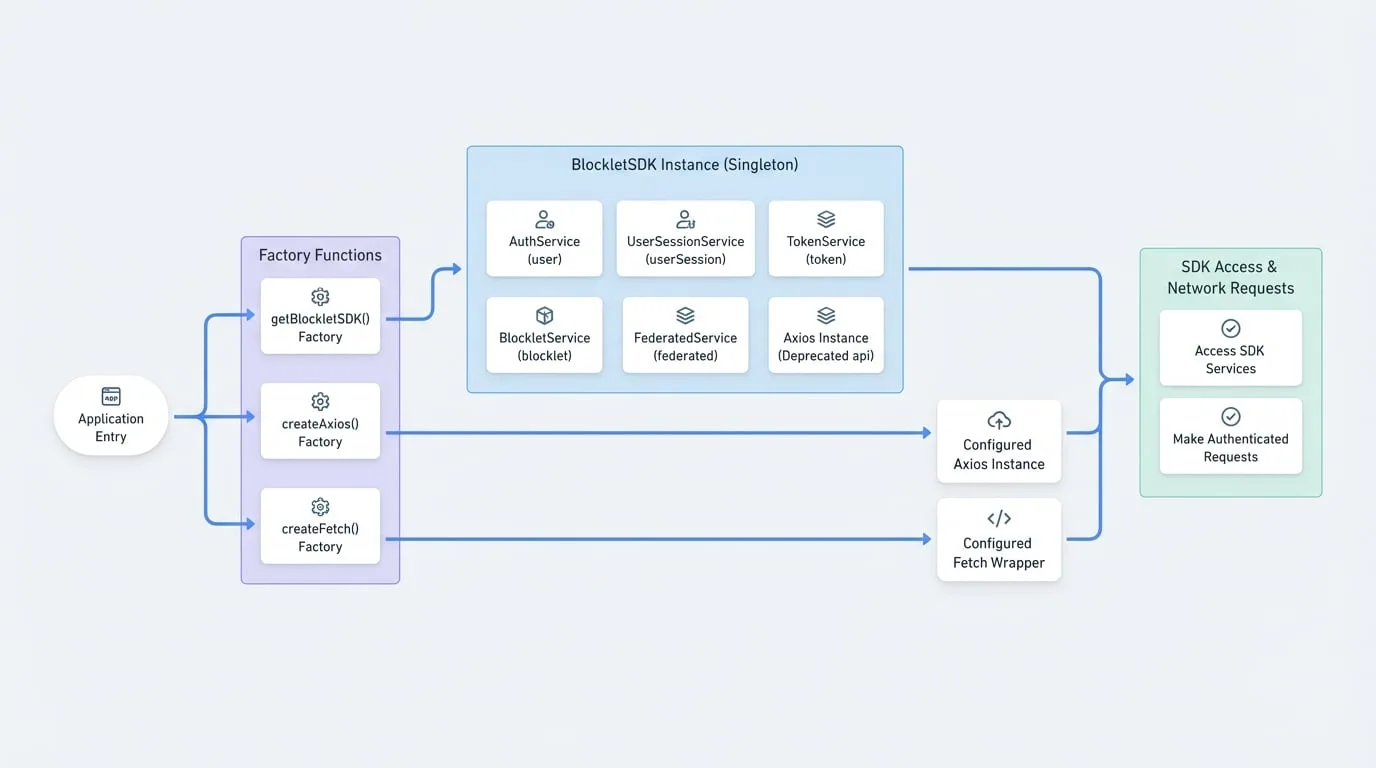
BlockletSDK Class
The BlockletSDK class is a container that holds instances of all the different services, providing a single point of access to the SDK's functionality.
While you can instantiate it directly, the recommended way to get an instance is through the getBlockletSDK() factory function, which ensures a single, shared instance throughout your application.
Properties
The following services are available as properties on a BlockletSDK instance:
| Property | Service | Description |
|---|---|---|
user | AuthService | Manages user profiles, settings, and authentication actions. |
userSession | UserSessionService | Fetches and manages user login sessions across devices. |
token | TokenService | Low-level service for managing session and refresh tokens. |
blocklet | BlockletService | Fetches and loads blocklet metadata. |
federated | FederatedService | Interacts with Federated Login Group settings. |
api | Axios | Deprecated. An Axios instance. Use createAxios() instead. |
Factory Functions
These helper functions provide convenient ways to create SDK clients and HTTP request handlers.
getBlockletSDK()
getBlockletSDK()
This function returns a singleton instance of the BlockletSDK class. Using a singleton ensures that all parts of your application share the same SDK state, including token information and service configurations.
Returns
A singleton BlockletSDK instance.
Using getBlockletSDK
import { getBlockletSDK } from '@blocklet/js-sdk';

const sdk = getBlockletSDK();

async function fetchUserProfile() {
  try {
    const profile = await sdk.user.getProfile();
    console.log('User Profile:', profile);
  } catch (error) {
    console.error('Failed to fetch profile:', error);
  }
}

fetchUserProfile();
createAxios()
createAxios(config, requestParams)
This is the recommended factory function for creating a pre-configured Axios instance. The instance automatically handles adding the authorization header to outgoing requests and refreshing the session token if it expires.
Parameters
- config
AxiosRequestConfig— Optional. A standard Axios configuration object. Any valid Axios option can be passed here. - requestParams
RequestParams— Optional. Additional parameters for SDK-specific request handling.
Returns
An Axios instance with interceptors configured for automatic token management.
Creating an Axios Client
import { createAxios } from '@blocklet/js-sdk';

// Create an API client with a base URL
const apiClient = createAxios({
  baseURL: '/api/v1',
});

async function getItems() {
  try {
    // The Authorization header is automatically added
    const response = await apiClient.get('/items');
    return response.data;
  } catch (error) {
    console.error('Error fetching items:', error);
    throw error;
  }
}
createFetch()
createFetch(options, requestParams)
For developers who prefer the native Fetch API, this function returns a wrapped fetch function that provides the same automatic token management as createAxios.
Parameters
- options
RequestInit— Optional. Default options for the Fetch API, such as headers, as defined in the standard RequestInit type. - requestParams
RequestParams— Optional. Additional parameters for SDK-specific request handling.
Returns
A fetch-compatible function that automatically handles authentication.
Creating a Fetch Client
import { createFetch } from '@blocklet/js-sdk';

// Create a fetcher with default JSON headers
const apiFetcher = createFetch({
  headers: {
    'Content-Type': 'application/json',
  },
});

async function postItem(item) {
  try {
    const response = await apiFetcher('/api/v1/items', {
      method: 'POST',
      body: JSON.stringify(item),
    });

    if (!response.ok) {
      throw new Error(`HTTP error! status: ${response.status}`);
    }

    return await response.json();
  } catch (error) {
    console.error('Error posting item:', error);
    throw error;
  }
}
With the SDK client initialized, you can now explore the various services it provides to interact with the Blocklet ecosystem.