Webhooks
Webhooks are a vital mechanism for building reliable and scalable integrations with PaymentKit. Instead of constantly polling the API for status changes, you can configure a webhook endpoint, and PaymentKit will send real-time HTTP POST notifications to your specified URL whenever certain events occur in your account.
This is the recommended way to handle asynchronous events like successful payments, subscription updates, or completed checkouts. By using webhooks, you can automate backend processes such as fulfilling orders, granting access to services, or updating customer records.
For a detailed list of all webhook management methods, see the Webhook Endpoints API Reference.
How Webhooks Work#
The process is straightforward:
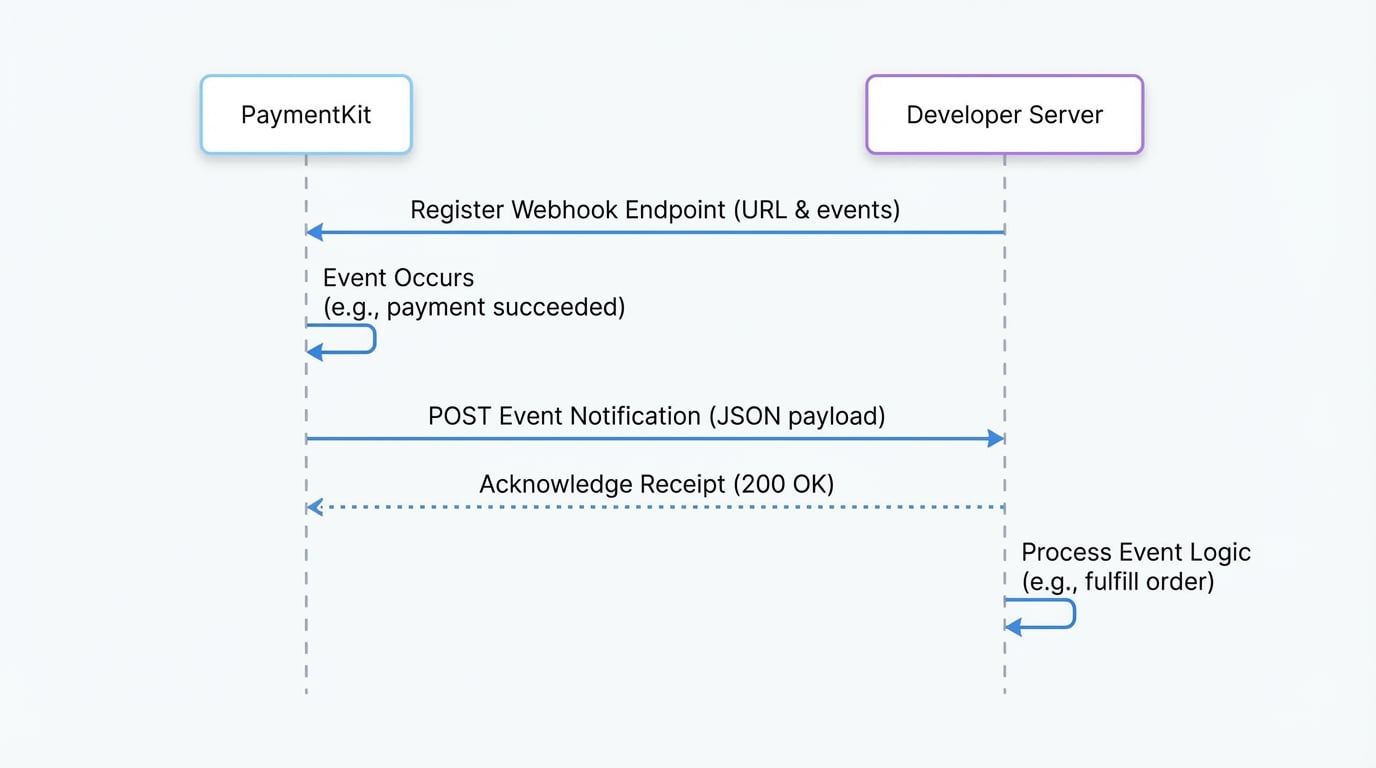
- Event Occurs: An action takes place in your PaymentKit account, such as a subscription being created or a payment succeeding. This generates an event object.
- Notification Sent: PaymentKit sends a
POSTrequest containing the event object in JSON format to the webhook endpoint URL you've registered. - Your Server Responds: Your server receives the request and should return a
200 OKstatus code immediately to acknowledge receipt. Any other status code indicates a failure, and PaymentKit may attempt to resend the event. - Process the Event: After sending the success response, your server can safely process the event's payload to perform business logic, like updating your database or sending an email to the customer.
The following diagram illustrates this workflow:
Create a Webhook Endpoint#
To start receiving events, you must register a webhook endpoint. This involves providing your server's URL and specifying which event types you want to subscribe to.
Create a Webhook Endpoint
import payment from '@blocklet/payment-js';

async function setupWebhook() {
  try {
    const webhookEndpoint = await payment.webhookEndpoints.create({
      url: 'https://example.com/webhook',
      enabled_events: [
        'checkout.session.completed',
        'customer.subscription.created',
        'customer.subscription.updated',
        'customer.subscription.deleted',
        'payment_intent.succeeded',
      ],
    });
    console.log('Webhook endpoint created:', webhookEndpoint.id);
    return webhookEndpoint;
  } catch (error) {
    console.error('Error creating webhook endpoint:', error.message);
  }
}

setupWebhook();
Parameters
Name | Type | Description |
|---|---|---|
|
| The URL of the endpoint on your server that will receive the webhook |
|
| An array of event type strings you want to subscribe to. Use |
Example Response
{
  "id": "wh_xxxxxxxxxxxxxx",
  "url": "https://example.com/webhook",
  "enabled_events": [
    "checkout.session.completed",
    "customer.subscription.created"
  ],
  "created_at": "2023-10-27T10:00:00.000Z",
  "updated_at": "2023-10-27T10:00:00.000Z"
}
Handling Incoming Events#
Your webhook handler should be prepared to receive a POST request with a JSON body. Below is a basic example using Express.js to illustrate how to parse and handle an incoming event.
Express.js Webhook Handler
const express = require('express');
const app = express();

// It's important to use a raw body parser to verify signatures
app.post('/webhook', express.json({ type: 'application/json' }), (request, response) => {
  const event = request.body;

  // Handle the event based on its type
  switch (event.type) {
    case 'payment_intent.succeeded':
      const paymentIntent = event.data.object;
      console.log('Payment was successful for:', paymentIntent.amount);
      // TODO: Fulfill the purchase
      break;
    case 'customer.subscription.created':
      const subscription = event.data.object;
      console.log('New subscription started:', subscription.id);
      // TODO: Provision the service for the customer
      break;
    default:
      console.log(`Unhandled event type: ${event.type}`);
  }

  // Acknowledge receipt of the event
  response.status(200).send();
See all 3 lines
Best Practices#
- Respond Quickly: Acknowledge the event by returning a
2xxstatus code as soon as possible. Perform complex logic in a background job to avoid timeouts. - Handle Idempotency: Webhooks may be delivered more than once. Design your event processing logic to be idempotent to prevent duplicate actions (e.g., check if an order has already been fulfilled before processing it again).
- Verify Signatures: For security, it's crucial to verify that incoming webhook requests originate from PaymentKit. Each webhook event includes a signature in its headers that you can verify using your endpoint's secret.
Managing Webhook Endpoints#
You can also programmatically manage your endpoints using the SDK.
- Retrieve an Endpoint: Fetch the details of a specific endpoint.
const webhook = await payment.webhookEndpoints.retrieve('wh_xxx'); - Update an Endpoint: Change the URL or the list of enabled events.
const updatedWebhook = await payment.webhookEndpoints.update('wh_xxx', { url: 'https://new.example.com/webhook', enabled_events: ['checkout.session.completed'], }); - List Endpoints: Retrieve a paginated list of all your webhook endpoints.
const webhookList = await payment.webhookEndpoints.list({ pageSize: 10 }); - Delete an Endpoint: Permanently remove a webhook endpoint.
await payment.webhookEndpoints.del('wh_xxx');