Credit Top-Up
PaymentKit's credit-based billing system allows customers to replenish their credit balance through top-ups. You can configure a credit currency to be rechargeable, enabling both manual one-time top-ups and automatic recharges when the balance falls below a set threshold.
This guide will walk you through the process of programmatically setting up a credit currency for top-ups. The actual auto-recharge settings for a customer (e.g., the low-balance threshold and recharge amount) are managed directly by the customer through the Payment Kit billing portal, ensuring a seamless user experience.
Top-Up Workflow Overview#
Before diving into the implementation, it's helpful to understand the entire top-up process from the user's perspective. When a credit currency is configured for recharge, a checkout link is generated. Your application redirects the user to this link to complete the payment, and PaymentKit automatically handles granting the credits upon success.
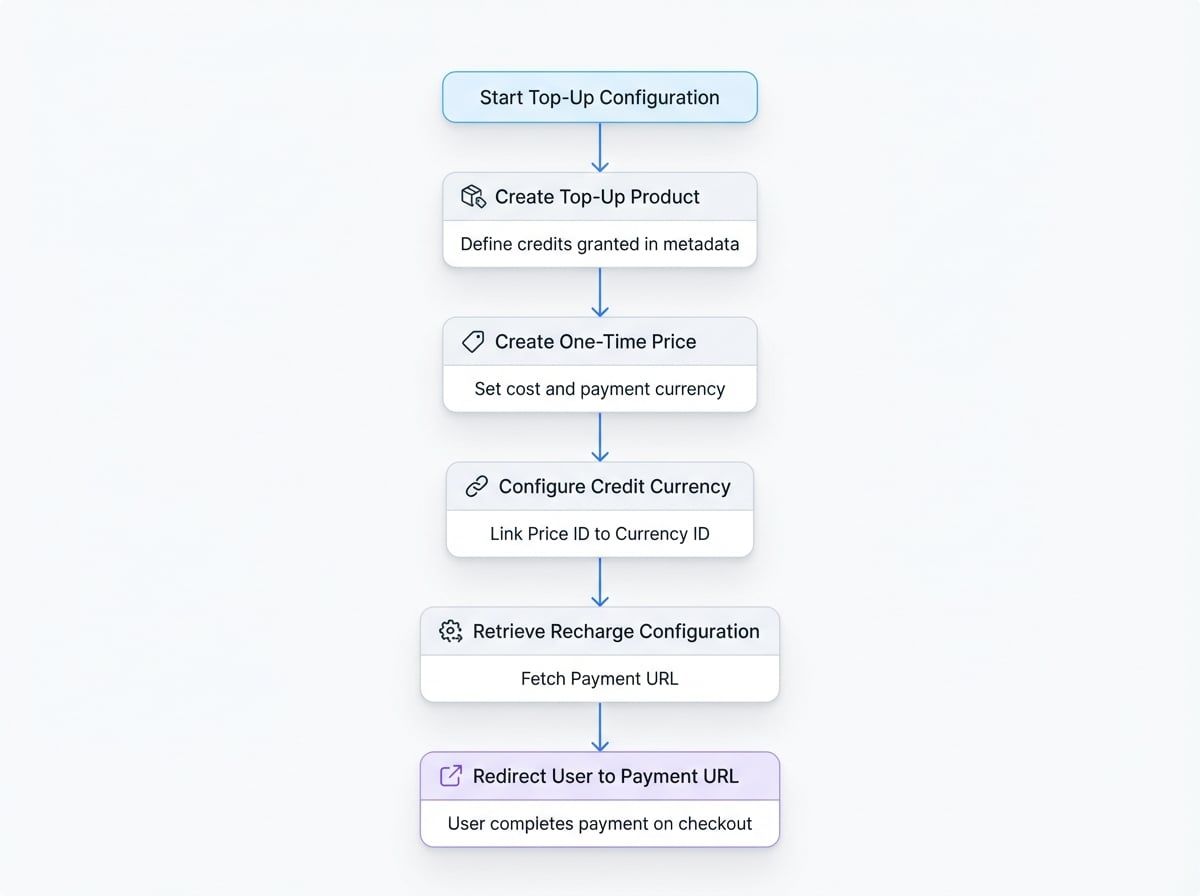
Step 1: Create a Top-Up Package#
A top-up package is a standard Product and Price that defines how many credits a customer receives and how much they pay. The key is to embed a credit_config object in the product's metadata.
First, create a product that represents the credit pack. The metadata should specify which credit currency this product replenishes and the amount of credits granted upon purchase.
Create a Product for the Top-Up Package
const topUpProduct = await payment.products.create({
  name: '1000 Credits Pack',
  description: 'Top up your account with 1000 credits.',
  type: 'service',
  metadata: {
    // This product grants credits when purchased
    credit_config: {
      currency_id: 'pc_credit_xxxxxx', // The ID of your credit currency
      amount: '1000', // Amount of credits to grant
    },
  },
});
Next, create a one-time price for this product. This price will determine the cost and the payment currency (e.g., USDT, ETH) for the top-up.
Create a Price for the Top-Up Package
const topUpPrice = await payment.prices.create({
  product_id: topUpProduct.id,
  type: 'one_time',
  unit_amount: '10', // e.g., 10 USDT
  currency_id: 'pc_usdt_xxxxxx', // The currency used to pay for the credits
});
Step 2: Configure the Credit Currency#
Once you have a price for your top-up package, you need to link it to your credit currency. This is done using the updateRechargeConfig method, which designates your new price as the base package for recharges.
updateRechargeConfig(id, data)#
This method associates a base_price_id with a credit currency, enabling it for top-ups.
Parameters
Name | Type | Description |
|---|---|---|
|
| Required. The ID of the credit currency to configure (e.g., |
|
| Required. The ID of the |
Example
Configure a Credit Currency for Recharge
import payment from '@blocklet/payment-js';

async function configureRecharge() {
  try {
    const creditCurrencyId = 'pc_credit_xxxxxx'; // Your credit currency ID
    const topUpPriceId = 'price_yyyyyyyy'; // The price ID from Step 1

    const updatedCurrency = await payment.paymentCurrencies.updateRechargeConfig(
      creditCurrencyId,
      {
        base_price_id: topUpPriceId,
      }
    );

    console.log('Recharge config updated:', updatedCurrency.recharge_config);
  } catch (error) {
    console.error('Error configuring recharge:', error.message);
  }
}

configureRecharge();
Example Response
{
  "currency_id": "pc_credit_xxxxxx",
  "recharge_config": {
    "base_price_id": "price_yyyyyyyy"
  },
  "message": "Recharge config updated successfully"
}
Step 3: Retrieve the Recharge Configuration#
To initiate a top-up, your application needs to fetch the payment_url. Use the getRechargeConfig method to retrieve the full recharge configuration, including the checkout URL and details about the base price.
getRechargeConfig(id)#
Fetches the recharge configuration for a specified credit currency.
Parameters
Name | Type | Description |
|---|---|---|
|
| Required. The ID of the credit currency. |
Returns
Returns an object containing the currency information and its recharge_config. The payment_url within the configuration is the link you'll use to direct users to the checkout page.
Example
Get the Top-Up URL
import payment from '@blocklet/payment-js';

async function getTopUpLink(creditCurrencyId) {
  try {
    const config = await payment.paymentCurrencies.getRechargeConfig(creditCurrencyId);

    if (config.recharge_config && config.recharge_config.payment_url) {
      console.log('Redirect user to this URL:', config.recharge_config.payment_url);
      return config.recharge_config.payment_url;
    } else {
      console.log('Recharge is not configured for this currency.');
      return null;
    }
  } catch (error) {
    console.error('Error fetching recharge config:', error.message);
  }
}

getTopUpLink('pc_credit_xxxxxx');
Example Response
{
  "currency_id": "pc_credit_xxxxxx",
  "currency_info": {
    "id": "pc_credit_xxxxxx",
    "name": "App Credits",
    "symbol": "CRD",
    "decimal": 2,
    "type": "credit"
  },
  "recharge_config": {
    "base_price_id": "price_yyyyyyyy",
    "basePrice": {
      "id": "price_yyyyyyyy",
      "unit_amount": "1000",
      "currency_id": "pc_usdt_xxxxxx",
      // ... other price details
      "product": {
        "id": "prod_zzzzzzzz",
        "name": "1000 Credits Pack",
        // ... other product details
      }
    },
    "payment_url": "https://payment.arcblock.io/checkout/pay/pl_xxxxxxxx"
  }
}
With these steps complete, your credit currency is now fully enabled for top-ups. Your application can fetch the payment URL and provide a seamless way for users to add more credits to their accounts. For more details on the broader credit system, see the Credit-Based Billing guide.