Subscriptions
Subscriptions are the cornerstone of recurring revenue, allowing you to charge customers on a repeating schedule for your products and services. In PaymentKit, a subscription is created when a customer purchases a product with a recurring price.
This guide will walk you through the entire subscription lifecycle, from creation via a Checkout Session to managing its status and handling usage-based billing. Before proceeding, ensure you have created your Products and Prices.
The Subscription Lifecycle#
A subscription progresses through various statuses depending on payment events, trial periods, and management actions. Understanding this lifecycle is key to managing your customers effectively.
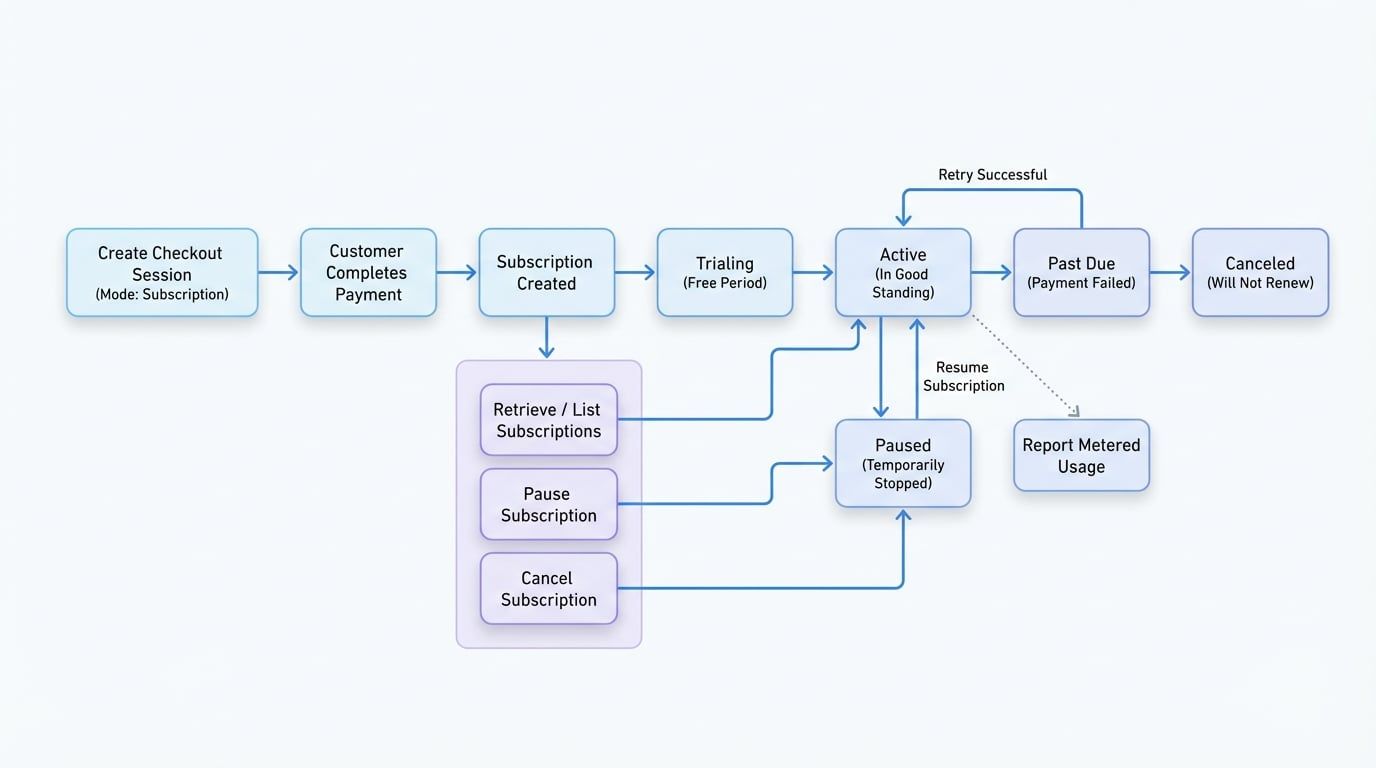
Here are the primary statuses a subscription can have:
active: The subscription is in good standing and payments are up-to-date.trialing: The customer is in a free trial period.past_due: The most recent payment attempt failed, and PaymentKit is retrying the charge.canceled: The subscription has been canceled and will not renew.incomplete: The initial payment for the subscription failed.incomplete_expired: The initial payment failed, and the retry period has expired.paused: The subscription is temporarily paused and will not generate invoices.
Creating a Subscription#
Subscriptions are not created directly. Instead, you create a Checkout Session with mode: 'subscription'. This session guides the customer through the payment process, and upon successful completion, a subscription is automatically created.
Create a Subscription via Checkout
import payment from '@blocklet/payment-js';

async function createSubscriptionCheckout() {
  try {
    const session = await payment.checkout.sessions.create({
      success_url: 'https://example.com/success?session_id={CHECKOUT_SESSION_ID}',
      cancel_url: 'https://example.com/cancel',
      mode: 'subscription',
      line_items: [
        { price_id: 'price_xxx', quantity: 1 } // Replace with your recurring price ID
      ],
      subscription_data: {
        trial_period_days: 14, // Optional: 14-day free trial
        metadata: {
          project_id: 'proj_123',
        },
      },
    });
    console.log('Checkout session created:', session.url);
    // Redirect your customer to session.url
  } catch (error) {
    console.error('Error creating checkout session:', error.message);
  }
}
See all 1 lines
In this example, a checkout session is created for a product with a recurring price. Once the customer completes the payment, a new subscription will be created in a trialing state for 14 days before the first charge occurs.
Managing an Existing Subscription#
Once a subscription is created, you can manage it using the payment.subscriptions resource.
Retrieve a Subscription#
Fetch the details of a specific subscription using its ID.
Retrieve a Subscription
async function getSubscription(subscriptionId) {
  try {
    const subscription = await payment.subscriptions.retrieve(subscriptionId);
    console.log(`Status of ${subscription.id}: ${subscription.status}`);
    console.log('Current period ends:', new Date(subscription.current_period_end * 1000));
  } catch (error) {
    console.error('Error retrieving subscription:', error.message);
  }
}

getSubscription('sub_xxx'); // Replace with a valid subscription ID
List Subscriptions#
You can list all subscriptions or filter them by properties like customer ID or status.
List Subscriptions
async function listActiveSubscriptionsForCustomer(customerId) {
  try {
    const subscriptions = await payment.subscriptions.list({
      customer_id: customerId,
      status: 'active',
      activeFirst: true,
      order: 'created_at:DESC',
    });

    console.log(`Found ${subscriptions.total} active subscriptions for customer ${customerId}:`);
    subscriptions.data.forEach(sub => {
      console.log(`- ID: ${sub.id}, Status: ${sub.status}`);
    });
  } catch (error) {
    console.error('Error listing subscriptions:', error.message);
  }
}

listActiveSubscriptionsForCustomer('cus_xxx'); // Replace with a valid customer ID
Cancel a Subscription#
Canceling a subscription is a common requirement. You can choose to cancel it immediately or at the end of the current billing period.
Cancel a Subscription
async function cancelSubscription(subscriptionId) {
  try {
    const subscription = await payment.subscriptions.cancel(subscriptionId, {
      at: 'current_period_end', // The subscription remains active until the billing cycle ends.
      // Use 'now' to cancel immediately.
      reason: 'cancellation_requested',
      feedback: 'User no longer needs the service.',
    });
    console.log(`Subscription ${subscription.id} scheduled for cancellation.`);
  } catch (error) {
    console.error('Error canceling subscription:', error.message);
  }
}

cancelSubscription('sub_xxx'); // Replace with a valid subscription ID
Pause and Resume a Subscription#
For temporary holds on service, you can pause and later resume a subscription.
Pause and Resume
async function manageSubscriptionPause(subscriptionId) {
  try {
    // Pause the subscription
    let subscription = await payment.subscriptions.pause(subscriptionId);
    console.log(`Subscription ${subscription.id} is now ${subscription.status}.`);

    // After some time, resume it
    subscription = await payment.subscriptions.resume(subscriptionId);
    console.log(`Subscription ${subscription.id} is now ${subscription.status}.`);

  } catch (error) {
    console.error('Error managing subscription pause state:', error.message);
  }
}

manageSubscriptionPause('sub_xxx'); // Replace with a valid subscription ID
Reporting Usage for Metered Billing#
If your subscription uses a price with usage_type: 'metered', you must report usage throughout the billing period. This is done by creating usage records for a specific subscription item.
Report Usage
async function reportApiUsage(subscriptionItemId) {
  try {
    const usageRecord = await payment.subscriptionItems.createUsageRecord({
      subscription_item_id: subscriptionItemId,
      quantity: 100, // The amount of usage to report
      action: 'increment', // 'increment' adds to existing usage, 'set' overwrites it.
      timestamp: Math.floor(Date.now() / 1000), // The time the usage occurred
    });
    console.log('Usage record created:', usageRecord.id);
  } catch (error) {
    console.error('Error reporting usage:', error.message);
  }
}

// You can find the subscription_item_id on the subscription object.
reportApiUsage('si_xxx'); // Replace with a valid subscription item ID
At the end of the billing period, PaymentKit will sum up all reported usage and bill the customer accordingly.
Next Steps#
You now have a solid understanding of how to manage subscriptions. To dive deeper, explore the detailed API documentation and learn how to listen for subscription-related events.