Credit-Based Billing
Credit-based billing is a flexible, pay-as-you-go model perfect for services where usage varies, such as API calls, data storage, or compute time. Instead of a fixed recurring fee, customers consume credits that they have either purchased or been granted.
This guide will walk you through the end-to-end process of setting up and managing a credit-based billing system using the PaymentKit SDK. The core components you'll work with are:
- Meters: Define and track the usage of a specific feature.
- Credit Grants: Issue credits to your customers.
- Meter Events: Report customer usage as it happens.
- Credit Transactions: A ledger of all credit activities, including grants and consumptions.
The Credit Billing Workflow#
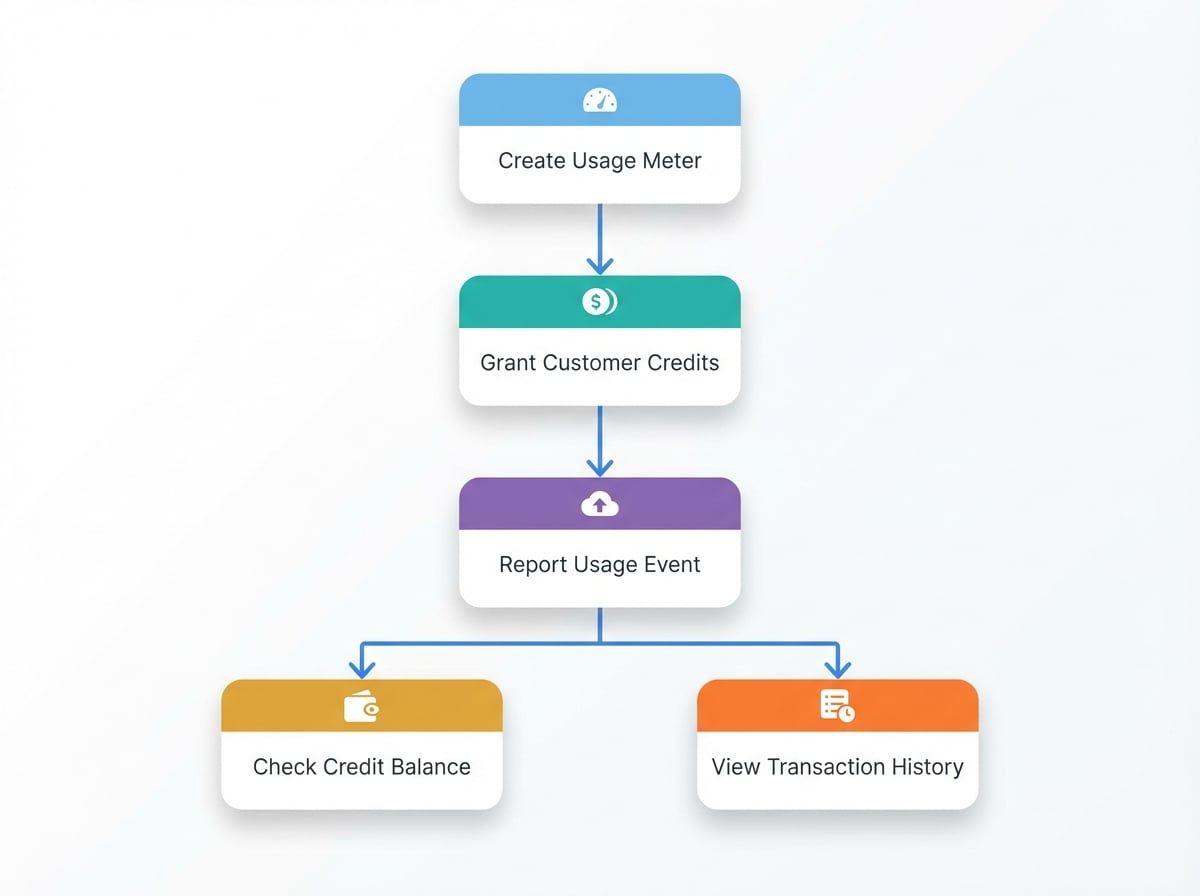
Step 1: Create a Meter to Track Usage#
A Meter is a resource that tracks the consumption of a specific feature. You define what event to track, how to aggregate the usage (e.g., sum of all values), and the unit of measurement.
Create a Meter
import payment from '@blocklet/payment-js';

async function setupMeter() {
  try {
    const meter = await payment.meters.create({
      name: 'API Calls',
      event_name: 'api.calls.v1',
      aggregation_method: 'sum',
      unit: 'calls',
      description: 'Tracks the number of API calls made by a customer.'
    });
    console.log('Meter created:', meter.id);
    return meter;
  } catch (error) {
    console.error('Error creating meter:', error.message);
  }
}

setupMeter();
In this example, we create a meter named 'API Calls' that listens for an event called api.calls.v1. The aggregation_method: 'sum' tells PaymentKit to add up the value from all reported events to calculate total usage.
Step 2: Grant Credits to a Customer#
Once you have a meter, you need to give customers credits to spend. You can grant credits as a promotional bonus or after they've made a purchase. Each credit grant specifies an amount, a currency, and the customer it belongs to.
Grant Promotional Credits
import payment from '@blocklet/payment-js';

async function grantNewUserBonus(customerId, currencyId) {
  try {
    const thirtyDaysFromNow = Math.floor(Date.now() / 1000) + (30 * 24 * 60 * 60);
    const creditGrant = await payment.creditGrants.create({
      customer_id: customerId, // e.g., 'cus_xxx'
      currency_id: currencyId, // e.g., 'pc_xxx'
      amount: '1000',
      name: 'New User Bonus',
      category: 'promotional', // Can be 'paid' or 'promotional'
      expires_at: thirtyDaysFromNow
    });
    console.log('Credit grant created:', creditGrant.id);
    return creditGrant;
  } catch (error) {
    console.error('Error creating credit grant:', error.message);
  }
}

// grantNewUserBonus('cus_xxx', 'pc_xxx');
This code grants 1,000 promotional credits to a customer, which will expire in 30 days. Credits categorized as paid are typically used before promotional ones.
Step 3: Report Usage with Meter Events#
When a customer uses a metered feature, your application must report it to PaymentKit by creating a Meter Event. This event should match the event_name of the meter you created.
To prevent duplicate usage reports from network issues or retries, always include a unique identifier for each event. PaymentKit will process only the first event received with a given identifier.
Report a Usage Event
import payment from '@blocklet/payment-js';

async function reportApiCall(customerId, subscriptionId) {
  try {
    const meterEvent = await payment.meterEvents.create({
      event_name: 'api.calls.v1', // Must match the meter's event_name
      payload: {
        customer_id: customerId, // 'cus_xxx'
        value: '10', // The amount of usage to report
        subscription_id: subscriptionId, // Optional: associate with a subscription
      },
      identifier: `unique_api_call_${Date.now()}` // Idempotency key
    });
    console.log('Meter event reported:', meterEvent.id);
    return meterEvent;
  } catch (error) {
    console.error('Error reporting meter event:', error.message);
  }
}

// reportApiCall('cus_xxx', 'sub_xxx');
When this event is processed, PaymentKit will automatically find the customer's active credit grants and deduct 10 credits from their balance.
Step 4: Check Credit Balances#
You can check a customer's remaining credit balance at any time using the summary method. This is useful for displaying the balance in your application's UI.
Check Credit Summary
import payment from '@blocklet/payment-js';

async function checkCreditBalance(customerId) {
  try {
    const creditSummary = await payment.creditGrants.summary({
      customer_id: customerId, // 'cus_xxx'
    });
    console.log('Credit Summary:', creditSummary);
    return creditSummary;
  } catch (error) {
    console.error('Error fetching credit summary:', error.message);
  }
}

// checkCreditBalance('cus_xxx');
Example Response
{
  "pc_xxx": { // currency_id
    "paymentCurrency": {
      "id": "pc_xxx",
      "name": "Credit",
      "symbol": "C",
      "decimal": 2,
      "type": "credit"
    },
    "totalAmount": "1000.00",
    "remainingAmount": "990.00",
    "grantCount": 1
  }
}
The response is grouped by currency, showing the total granted credits and the amount remaining for the specified customer.
Step 5: View Transaction History#
To see a detailed audit log of all credit activities for a customer—including grants, consumptions, and expirations—you can list their credit transactions.
List Credit Transactions
import payment from '@blocklet/payment-js';

async function getTransactionHistory(customerId) {
  try {
    const transactions = await payment.creditTransactions.list({
      customer_id: customerId, // 'cus_xxx'
      pageSize: 10
    });
    console.log(`Found ${transactions.total} transactions.`);
    transactions.data.forEach(tx => {
      console.log(`- ID: ${tx.id}, Type: ${tx.type}, Amount: ${tx.amount}, Balance: ${tx.running_balance}`);
    });
    return transactions;
  } catch (error) {
    console.error('Error listing credit transactions:', error.message);
  }
}

// getTransactionHistory('cus_xxx');
This provides a complete history, allowing you to trace every change to a customer's credit balance.
Next Steps#
You now have a complete overview of the credit-based billing workflow. For more detailed information on each component, including all available parameters and methods, please refer to the API reference documentation.
To learn how customers can purchase credits or set up automatic recharges, see the Credit Top-Up guide.