Composition (Components)
Blocklet composition is a powerful feature that allows you to build complex, modular applications by assembling smaller, independent blocklets. This approach promotes reusability, separation of concerns, and easier maintenance. The components property in the blocklet.yml file is the cornerstone of this feature, defining the dependencies a blocklet has on other blocklets.
Core Concept: Parent-Child Relationship#
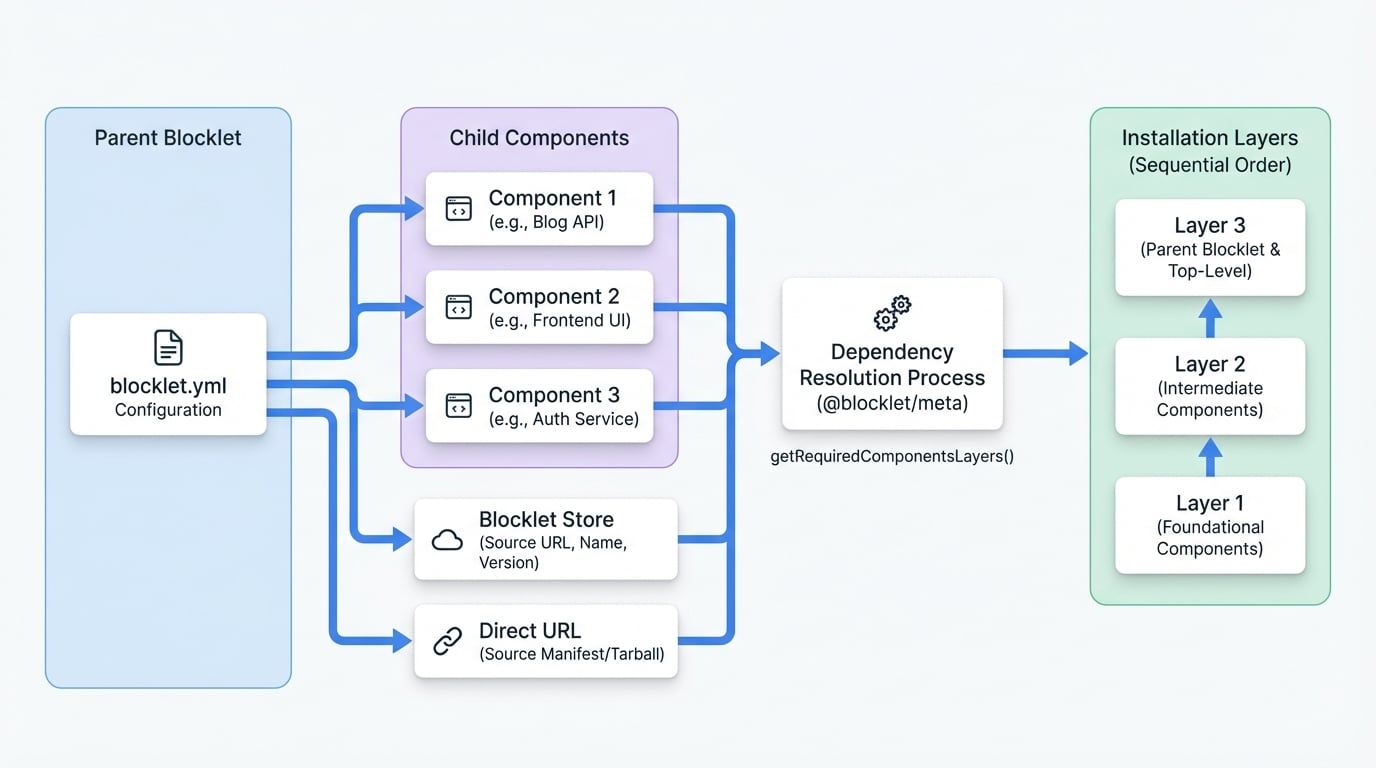
At its heart, composition establishes a parent-child relationship. A primary blocklet (the parent) can declare a list of other blocklets (the children or components) that it needs to function. When a user installs the parent blocklet, the Blocklet Server automatically resolves, fetches, and installs all its required components, creating a single, cohesive application from multiple parts.
The following diagram illustrates this parent-child relationship, showing how a parent blocklet defines its child components within its configuration:
The components Property Specification#
The components property is an array of objects, where each object defines a single child blocklet. Here are the key fields for each component object:
Specifies where to find the component. It contains either a url or a store and name.
If true, the parent blocklet cannot be installed or started without this component. Defaults to false.
A suggested display title for the component during the installation process. The user can override this value.
A suggested description for the component during installation.
A suggested URL path prefix where the component should be mounted. For example, /api for a backend service. The user can change this during setup.
A legacy field for backward compatibility. It's recommended to rely on the name within the source object.
Defining the Component source#
The source object is mandatory and tells the Blocklet Server how to locate and download the component. It has two primary forms:
- From a Blocklet Store (Recommended): This is the standard method. You specify the store's URL, the component's name, and a version range.storestringrequiredThe URL of the Blocklet Store API.namestringrequiredThe unique name of the component blocklet.versionstringdefault:latest
A semantic version range (e.g.,
^1.2.3,~2.0.0,latest). - From a direct URL: This allows you to link directly to a component's manifest (
blocklet.ymlorblocklet.json) or its tarball package.urlstring | string[]requiredA single URL string or an array of URL strings for redundancy.versionstringA semantic version range to validate against the version specified in the linked manifest.
Example blocklet.yml Configuration#
Here is a snippet demonstrating how to declare components in your blocklet.yml file.
blocklet.yml
name: 'my-composite-blog'
did: 'z8iZexampleDidForCompositeBlog'
version: '1.0.0'
title: 'My Composite Blog'
description: 'A blog application built from several smaller blocklets.'

# ... other properties

components:
  # Component fetched from a Blocklet Store (recommended)
  - name: 'blog-api-service' # backward compatible name
    required: true
    title: 'Blog API Service'
    description: 'Handles all backend logic and database interactions.'
    mountPoint: '/api/blog'
    source:
      store: 'https://store.blocklet.dev/api/blocklets'
      name: 'blog-api-service'
      version: '^1.0.0'

  # Component fetched from a direct URL
  - name: 'blog-frontend-ui'
    required: true
    title: 'Blog User Interface'
    mountPoint: '/'
See all 3 lines
This configuration defines a blog application that depends on two other blocklets: a backend API service and a frontend UI. Both are marked as required.
Dependency Resolution#
Blocklet composition can be nested; a component can have its own components. To manage this complexity, the system needs to resolve the entire dependency tree to determine the correct installation order. The @blocklet/meta library provides a utility function for this purpose.
getRequiredComponentsLayers()#
This function traverses the dependency graph and returns a two-dimensional array representing the dependency layers. The arrays are ordered from the lowest-level dependency to the highest, ensuring that foundational components are installed before the components that depend on them.
Usage Example
Resolving Dependency Order
import { getRequiredComponentsLayers } from '@blocklet/meta';

// A simplified list of all available blocklets and their dependencies
const allBlocklets = [
  {
    meta: { did: 'did:app:parent' },
    dependencies: [{ did: 'did:app:child', required: true }],
  },
  {
    meta: { did: 'did:app:child' },
    dependencies: [{ did: 'did:app:grandchild', required: true }],
  },
  {
    meta: { did: 'did:app:grandchild' },
    dependencies: [],
  },
  {
    meta: { did: 'did:app:optional_component' },
    dependencies: [],
  },
];

const layers = getRequiredComponentsLayers({
  targetDid: 'did:app:parent',
  children: allBlocklets,
See all 5 lines
This utility is critical for ensuring a stable and predictable installation process for complex, multi-layered applications.