Execution & Environment
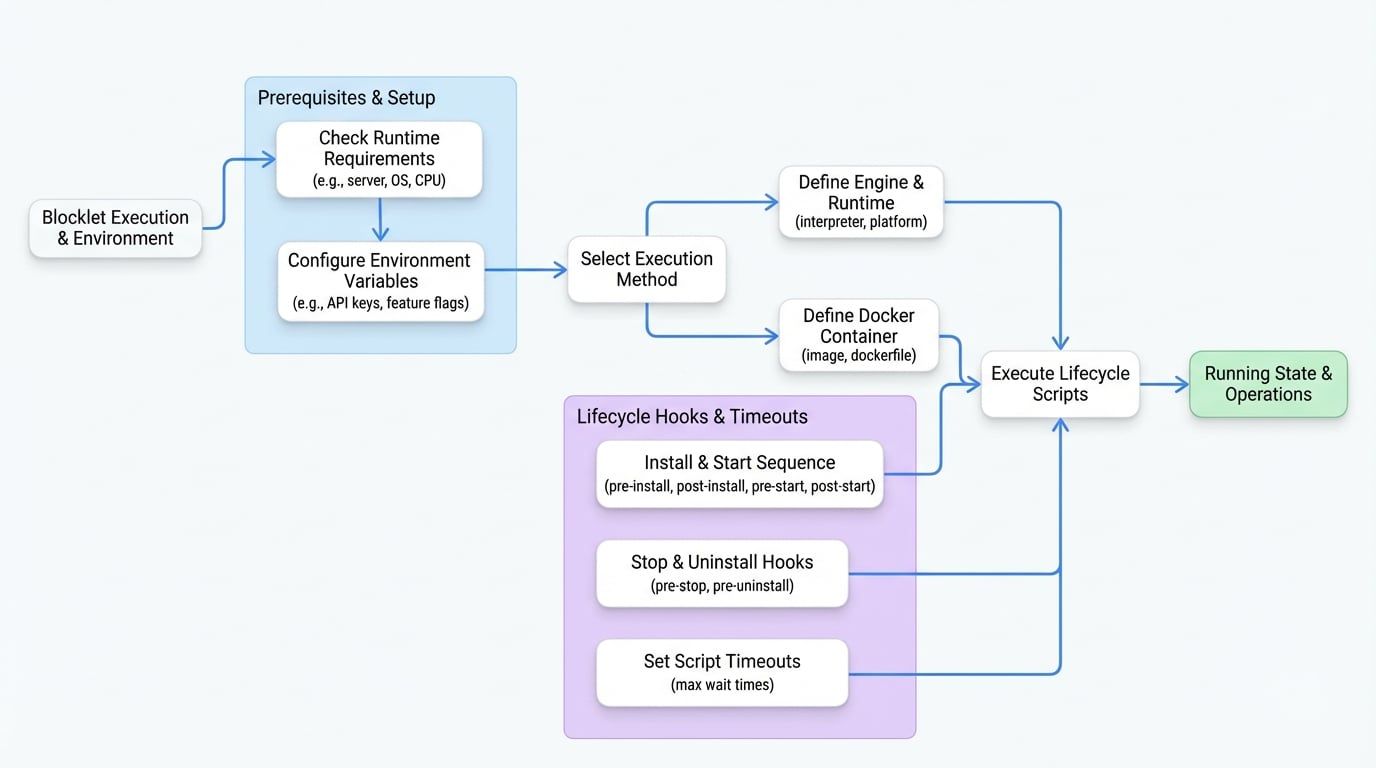
The execution and environment configuration within your blocklet.yml is the blueprint for how your Blocklet runs. It specifies the necessary runtime, defines system requirements, exposes configuration options to users, and hooks into the Blocklet's lifecycle. Getting this section right is crucial for creating a portable, robust, and user-friendly application.
This section covers five key areas: engine, docker, requirements, environments, scripts, and timeout.
Engine (engine)#
This property specifies the execution engine for your blocklet, defining the runtime and how it should be started. For most JavaScript-based blocklets, you'll specify node as the interpreter, and the main property (defined at the root of blocklet.yml) will serve as the entry point.
A Simple Node.js Engine
name: my-node-blocklet
main: build/index.js
engine:
  interpreter: node
You can also provide an array of engine configurations to support multiple platforms, which is ideal for binary distributions.
Multi-Platform Engine Configuration
# ... other properties
engine:
  - platform: linux
    interpreter: binary
    source: ./bin/server-linux
  - platform: darwin
    interpreter: binary
    source: ./bin/server-macos
  - platform: win32
    interpreter: binary
    source: ./bin/server-win.exe
Engine Properties#
The runtime to execute the blocklet. Valid values: node, blocklet, binary, bun.
Optional OS platform. Used when engine is an array to specify configurations for different OSs (e.g., linux, darwin, win32).
The source of the engine if the interpreter is blocklet. Can be a URL string, or an object referencing a URL or the Blocklet Store.
An array of command-line arguments to pass to the executable.
Docker (docker)#
As an alternative to the engine property, you can use docker to run your blocklet in a containerized environment. This is ideal for applications with complex dependencies or non-JavaScript runtimes. You must provide either an image or a dockerfile.
Using a Pre-built Docker Image
docker:
  image: 'nginx:latest'
  egress: true
When using a dockerfile, you must also include its path in the root files array.
Building from a Dockerfile
docker:
  dockerfile: 'Dockerfile.prod'
files:
  - 'Dockerfile.prod'
Docker Properties#
The name of the Docker image to use.
The path to the Dockerfile to build the image. You cannot use image and dockerfile at the same time.
Whether the blocklet can access the external network.
Runtime Requirements (requirements)#
This object defines the environment constraints necessary for the blocklet to run correctly. The system will check these requirements before installation to ensure compatibility.
Example Requirements
requirements:
  server: '>=1.16.0'
  os: '*'
  cpu: 'x64'
  nodejs: '>=18.0.0'
Requirement Properties#
A valid SemVer range for the required Blocklet Server version. Defaults to the latest stable version.
The compatible operating system(s). Use * for any. Can be a single string or an array (e.g., ['linux', 'darwin']). Valid platforms include aix, darwin, freebsd, linux, openbsd, sunos, win32.
The compatible CPU architecture(s). Use * for any. Can be a single string or an array (e.g., ['x64', 'arm64']). Valid architectures include arm, arm64, ia32, mips, mipsel, ppc, ppc64, s390, s390x, x32, x64.
A valid SemVer range for the required Node.js version.
Specifies a list of required assets (tokens) in a connected wallet for certain operations.
If true, indicates the blocklet requires an AI Engine to be available.
Environment Variables (environments)#
The environments array allows you to define custom configuration variables. These are presented to the user during installation or on the blocklet's configuration page, allowing them to securely input API keys, set feature flags, or customize behavior.
Environment Variable Definitions
environments:
  - name: 'API_KEY'
    description: 'Your secret API key for the external service.'
    required: true
    secure: true
  - name: 'FEATURE_FLAG_BETA'
    description: 'Enable the beta feature for this blocklet.'
    required: false
    default: 'false'
    validation: '^(true|false)$'
Key Naming Rules:
- Names must not start with the reserved prefixes
BLOCKLET_,COMPONENT_, orABTNODE_. - Names can only contain letters, numbers, and underscores (
_).
Environment Properties#
The name of the environment variable.
A user-friendly description of what this variable is for.
An optional default value. Cannot be used if secure is true.
Whether the user must provide a value for this variable.
If true, the value is treated as sensitive data (e.g., passwords, API keys), stored encrypted, and hidden in the UI.
An optional regex string to validate the user's input.
If true, this variable can be shared among components. Defaults to false if secure is true.
Lifecycle Scripts (scripts)#
Scripts are shell commands that hook into the blocklet's lifecycle, allowing you to perform automated tasks at specific stages like installation, startup, or uninstallation. The following diagram illustrates when the installation and startup hooks are executed:
Script Hook Examples
scripts:
  pre-install: 'npm install --production'
  post-start: 'node ./scripts/post-start.js'
  pre-stop: 'echo "Shutting down..."'
Available Hooks#
Hook ( | When It Runs |
|---|---|
| The command to run the blocklet in development mode. |
| The command to run for end-to-end testing in a development environment. |
| Before the installation process begins, for initial checks. |
| Before the blocklet files are copied to their final destination. |
| After the blocklet has been successfully installed. |
| Before the blocklet's main process is started. |
| After the blocklet has successfully started. |
| Before the blocklet is stopped. |
| Before the blocklet is uninstalled. |
| Before the configuration user interface is displayed to the user. |
Timeouts (timeout)#
This object allows you to configure maximum wait times for critical lifecycle operations to prevent processes from hanging indefinitely.
Timeout Configuration
timeout:
  start: 120  # Wait up to 120 seconds for the blocklet to start
  script: 600 # Allow scripts to run for up to 10 minutes
Timeout Properties#
The maximum time in seconds to wait for the blocklet to start. Must be between 10 and 600.
The maximum time in seconds for any lifecycle script to run. Must be between 1 and 1800.
With the execution environment configured, the next step is to define how your blocklet communicates with the outside world. Proceed to the Interfaces & Services section to learn how to expose web pages and API endpoints.