Parsing & Validation
This section provides a detailed reference for the functions used to read, parse, and validate blocklet.yml files. These utilities are the programmatic interface for working with the Blocklet Specification, ensuring that your blocklet's metadata is correct, complete, and ready for use by Blocklet Server and other tooling.
These functions are essential for building tools that interact with blocklets, validating configurations in CI/CD pipelines, or programmatically reading blocklet metadata.
parse#
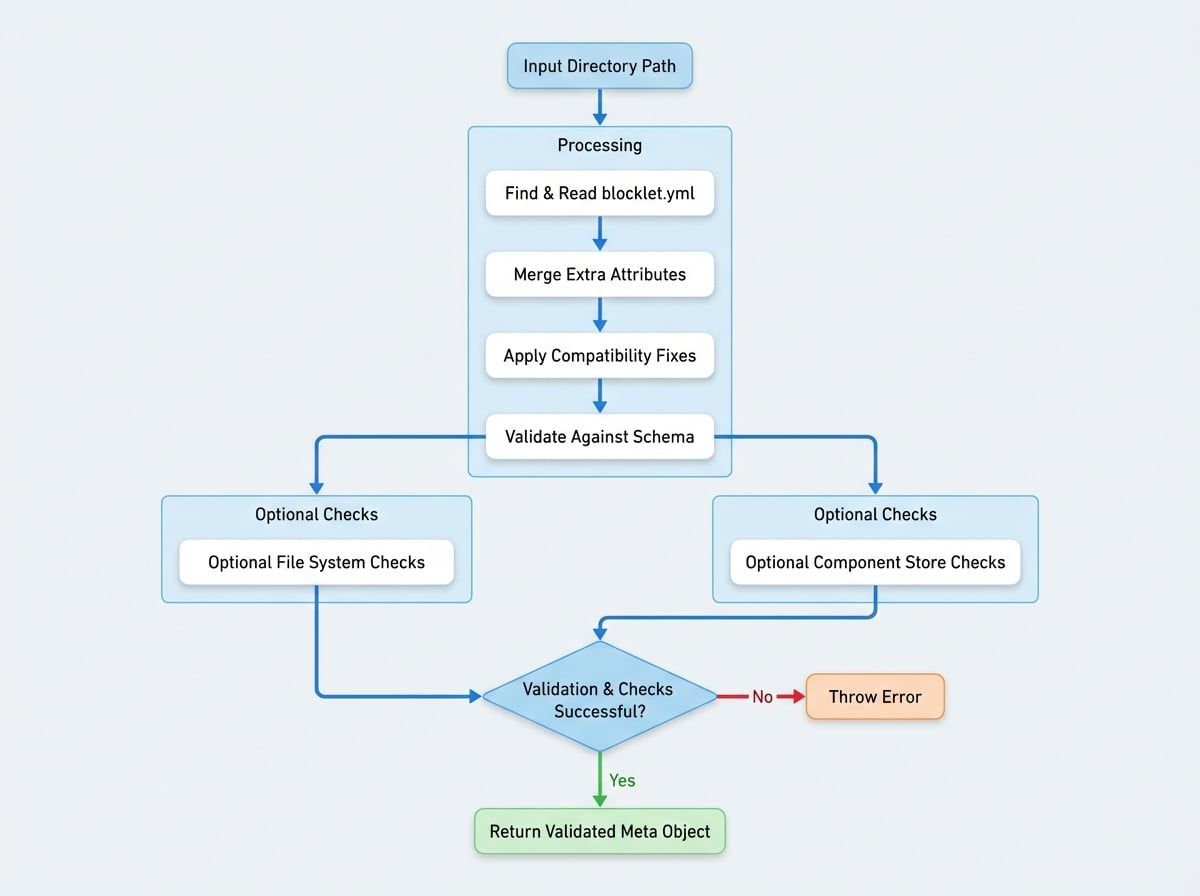
The parse function is the primary utility for reading a blocklet's metadata from the filesystem. It locates the blocklet.yml (or blocklet.yaml) file in a given directory, reads its content, applies a series of compatibility fixes, and validates the final object against the official schema.
Workflow#
The parsing process follows several key steps to ensure a valid and consistent metadata object is produced. The following diagram illustrates this workflow:
Signature#
function parse(
  dir: string,
  options?: {
    ensureFiles?: boolean;
    ensureDist?: boolean;
    ensureComponentStore?: boolean;
    extraRawAttrs?: any;
    schemaOptions?: any;
    defaultStoreUrl?: string | ((component: TComponent) => string);
    fix?: boolean;
  }
): TBlockletMeta;Parameters#
Returns#
Returns a validated TBlockletMeta object. If the blocklet.yml file is not found, is invalid YAML, or fails schema validation, the function will throw an Error with a descriptive message.
Example Usage#
parse-example.js
import path from 'path';
import parse from '@blocklet/meta/lib/parse';

const blockletDir = path.join(__dirname, 'my-blocklet');

try {
  const meta = parse(blockletDir, {
    ensureFiles: true, // Make sure the logo exists
  });
  console.log('Successfully parsed blocklet:', meta.name, meta.version);
} catch (error) {
  console.error('Failed to parse blocklet.yml:', error.message);
}validateMeta#
Use validateMeta when you already have a blocklet metadata object (e.g., from a database or an API response) and need to validate it against the blocklet schema without reading from the filesystem.
Signature#
function validateMeta(
  meta: any,
  options?: {
    ensureFiles?: boolean;
    ensureDist?: boolean;
    ensureComponentStore?: boolean;
    ensureName?: boolean;
    skipValidateDidName?: boolean;
    schemaOptions?: any;
  }
): TBlockletMeta;Parameters#
Returns#
Returns the validated and cleaned TBlockletMeta object. It throws an Error if the metadata object fails validation.
Example Usage#
validate-example.js
import validateMeta from '@blocklet/meta/lib/validate';

const rawMeta = {
  name: 'my-first-blocklet',
  version: '1.0.0',
  description: 'A simple blocklet.',
  did: 'z8iZpA529j4Jk1iA...',
  // ... other properties
};

try {
  const validatedMeta = validateMeta(rawMeta, { ensureName: true });
  console.log('Metadata is valid:', validatedMeta.title);
} catch (error) {
  console.error('Invalid blocklet meta:', error.message);
}fixAndValidateService#
This is a specialized helper function for validating the services configuration within each entry of the interfaces array in the metadata. The main parse and validateMeta functions call this internally, but it's exported for cases where you might need to process service configurations in isolation.
Signature#
function fixAndValidateService(meta: TBlockletMeta): TBlockletMeta;Parameters#
Returns#
Returns the input TBlockletMeta object with its service configurations validated and potentially modified with default values. It throws an Error if any service configuration is invalid.
Example Usage#
service-validate-example.js
import { fixAndValidateService } from '@blocklet/meta/lib/validate';

const meta = {
  // ... other meta properties
  interfaces: [
    {
      type: 'web',
      name: 'publicUrl',
      path: '/',
      services: [
        {
          name: '@blocklet/service-auth',
          config: {
            // auth service config
          },
        },
      ],
    },
  ],
};

try {
  const metaWithValidatedServices = fixAndValidateService(meta);
  console.log('Service configuration is valid.');
} catch (error) {
See all 2 lines
validateBlockletEntry#
This utility function validates a blocklet's entry point (main property) to ensure it's correctly configured for its group type (dapp or static). For dapps, it checks for the existence of required files or a valid engine configuration. For static blocklets, it ensures the main directory exists. This is a crucial check to perform after parsing to confirm a blocklet is executable.
Signature#
function validateBlockletEntry(dir: string, meta: TBlockletMeta): void;Parameters#
Returns#
This function does not return a value. It will throw an Error if the entry point validation fails, with a message explaining the issue.
Example Usage#
entry-validate-example.js
import path from 'path';
import parse from '@blocklet/meta/lib/parse';
import validateBlockletEntry from '@blocklet/meta/lib/entry';

const blockletDir = path.join(__dirname, 'my-dapp');

try {
  const meta = parse(blockletDir);
  validateBlockletEntry(blockletDir, meta);
  console.log('Blocklet entry point is valid.');
} catch (error) {
  console.error('Validation failed:', error.message);
}
Now that you understand how to parse and validate metadata, you may want to explore helpers for fetching metadata from remote sources. Proceed to the Metadata Helpers section to learn more.