Navigation Utilities
These functions are the engine behind building dynamic user interfaces in a Blocklet-based application. They parse and process the navigation property from a blocklet's metadata (blocklet.yml) and its current state, aggregating navigation items from the main blocklet and all its child components into a unified, ready-to-render structure.
The core challenge these utilities solve is complexity management. In a composite application, each component can declare its own navigation items. These utilities intelligently merge these declarations, resolve path prefixes based on each component's mount point, handle internationalization (i18n), filter out duplicates or inaccessible items, and organize everything into logical sections (like header, footer, userCenter).
Core Processing Flow#
The following diagram illustrates the high-level process of how raw navigation metadata from various sources is transformed into a final, structured list for the UI.
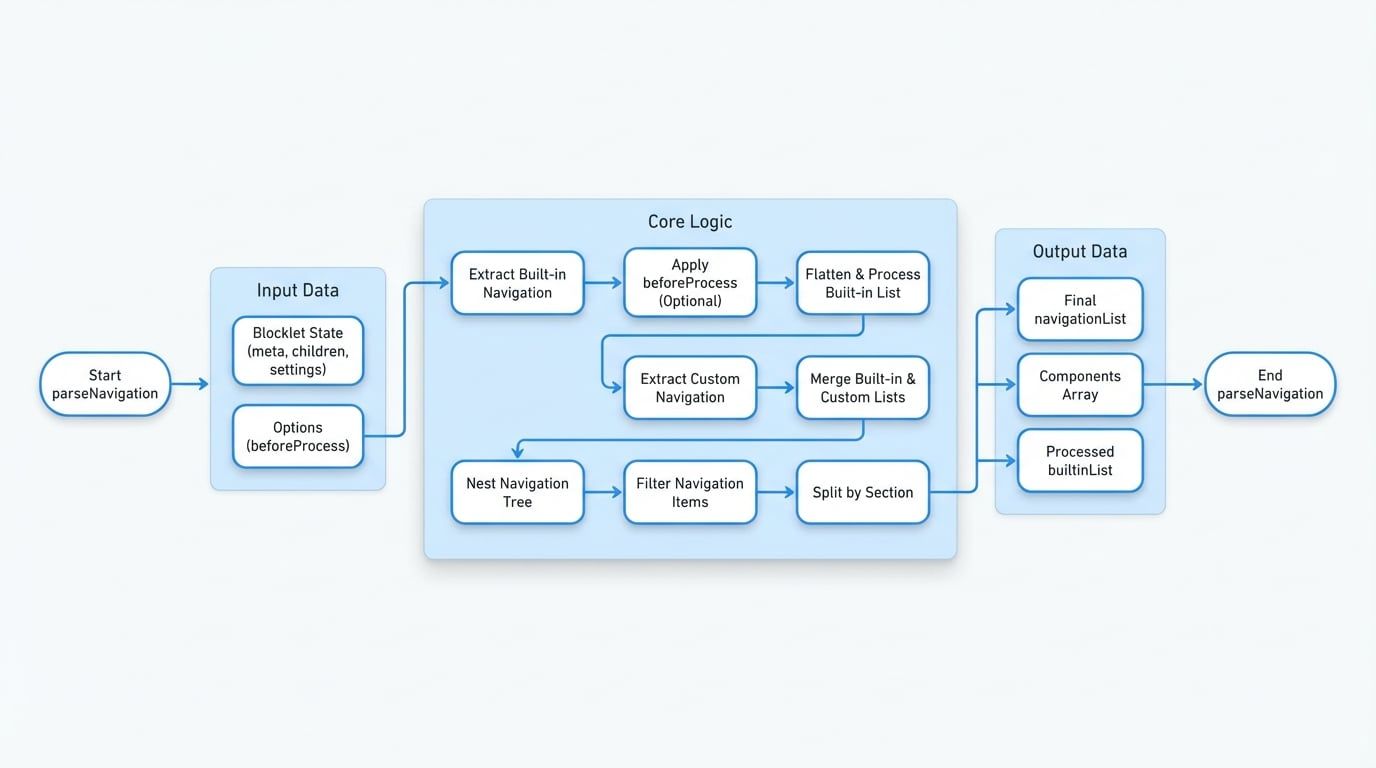
Main Function#
parseNavigation(blocklet, options)#
This is the primary function for processing navigation data. It orchestrates the entire workflow, from parsing built-in navigation from blocklet.yml files to merging them with user-defined customizations stored in the database.
Parameters
Returns
An object containing the processed navigation data:
Example Usage
Basic Usage
import { parseNavigation } from '@blocklet/meta/lib/navigation';

// A simplified blocklet state object
const blockletState = {
  did: 'z1...',
  meta: {
    name: 'my-app',
    title: 'My App',
    navigation: [
      { id: 'home', title: 'Home', link: '/' },
      { id: 'dashboard', title: 'Dashboard', component: 'dashboard-blocklet' },
    ],
  },
  children: [
    {
      did: 'z2...',
      mountPoint: '/dashboard',
      meta: {
        name: 'dashboard-blocklet',
        title: 'Dashboard',
        navigation: [
          { id: 'overview', title: 'Overview', link: '/overview' },
        ],
      },
    },
See all 46 lines
Helper Functions#
While parseNavigation is the all-in-one solution, the library also exports several underlying helper functions. These are useful for advanced use cases where you might need to perform custom manipulations on navigation data.
deepWalk
A generic utility for recursively traversing a tree-like object, applying a callback to each node.
flattenNavigation
Transforms a nested navigation tree into a flat array, optionally to a specified depth.
nestNavigationList
Reconstructs a nested navigation tree from a flat array where items have a `parent` ID property.
splitNavigationBySection
Deconstructs navigation items that belong to multiple sections into separate items for each section.
filterNavigation
Filters a navigation list by removing items marked as `visible: false` or those whose components are missing.
joinLink
Intelligently combines a parent's link with a child's link, correctly handling prefixes and absolute URLs.
flattenNavigation(list, options)#
This function takes a tree of navigation items and flattens it into a single-level array. It's particularly useful for preparing navigation data for display in menus that don't support deep nesting or for easier processing.
Parameters
Example
Flattening a Navigation Tree
const nestedNav = [
  {
    id: 'parent1',
    title: 'Parent 1',
    items: [
      { id: 'child1a', title: 'Child 1a' },
      { id: 'child1b', title: 'Child 1b' },
    ],
  },
];

const flatNav = flattenNavigation(nestedNav, { depth: 2 }); // Flatten up to 2 levels

console.log(flatNav);
/*
[
  { id: 'parent1', title: 'Parent 1' },
  { id: 'child1a', title: 'Child 1a' },
  { id: 'child1b', title: 'Child 1b' }
]
*/nestNavigationList(list)#
The inverse of flattenNavigation. This function takes a flat array of navigation items, where children reference their parent via a parent ID, and reconstructs the original tree structure.
Parameters
Example
Building a Tree from a Flat List
const flatNav = [
  { id: 'parent1', title: 'Parent 1', section: 'header' },
  { id: 'child1a', title: 'Child 1a', parent: 'parent1', section: 'header' },
  { id: 'root2', title: 'Root 2', section: 'header' },
];

const nestedNav = nestNavigationList(flatNav);

console.log(nestedNav);
/*
[
  {
    id: 'parent1',
    title: 'Parent 1',
    section: 'header',
    items: [ { id: 'child1a', title: 'Child 1a', ... } ],
  },
  { id: 'root2', title: 'Root 2', section: 'header' },
]
*/
These utilities provide a comprehensive toolkit for managing navigation in complex, component-based applications. To understand how to format the URLs and paths used within these navigation items, proceed to the URL & Path Utilities documentation.