Notification Service
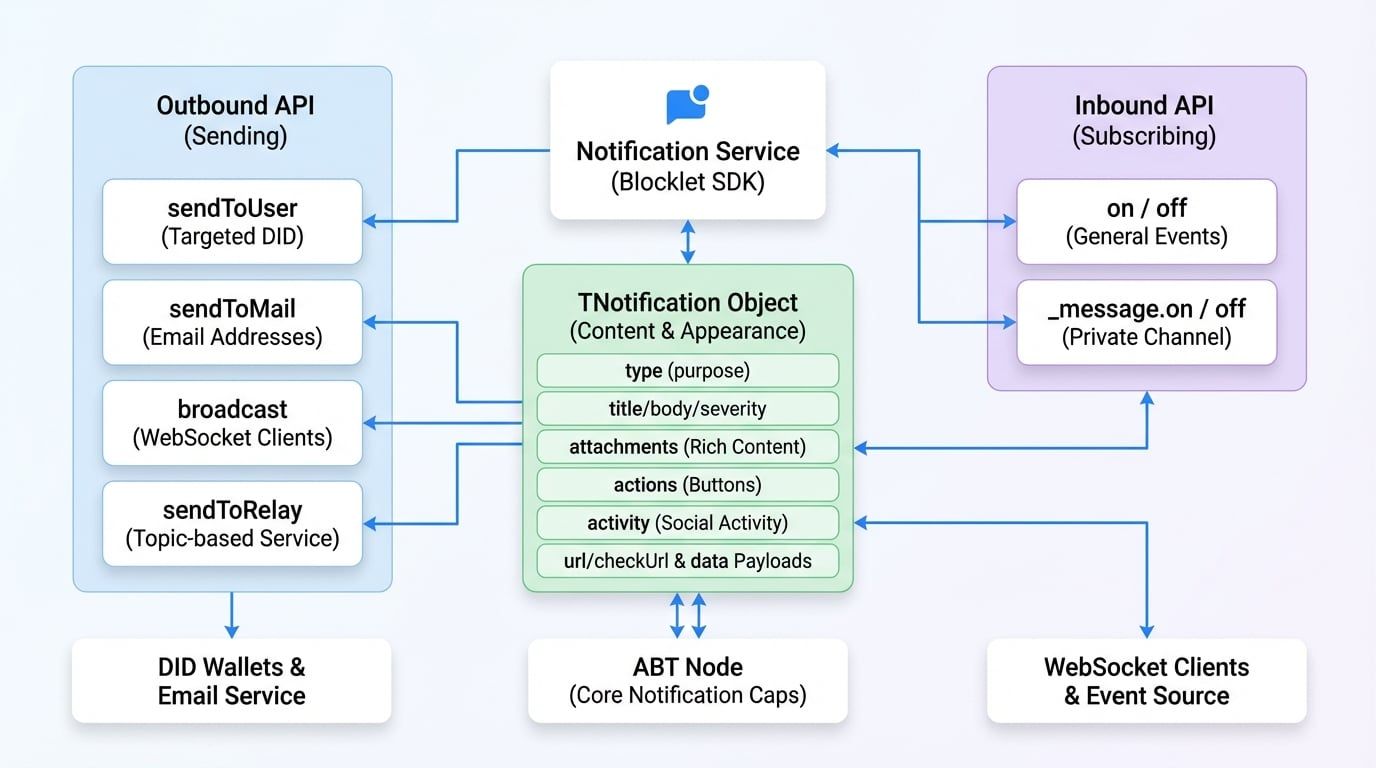
The Notification Service is a core component of the Blocklet SDK, enabling your application to send various types of notifications to users and subscribe to real-time events. This service acts as an interface to the underlying ABT Node notification capabilities, handling everything from simple user messages to rich, interactive notifications delivered to DID Wallets, email, and other channels.
Whether you need to alert a user about an important event, send a transactional email, or broadcast a message to all connected clients, the Notification Service provides a unified and straightforward API.
API Reference#
sendToUser#
Sends a notification directly to one or more users identified by their DIDs. This is the primary method for targeted user communication.
Parameters#
The DID of the recipient. Can be a single DID string, an array of DIDs, or * to send to all users of the blocklet.
Additional options for sending the notification.
Returns#
Example#
Send a simple notification
import notification from '@blocklet/sdk/service/notification';

async function notifyUser(userDid) {
  try {
    const result = await notification.sendToUser(userDid, {
      type: 'notification',
      title: 'Hello from SDK!',
      body: 'This is a test notification sent to a specific user.',
      severity: 'info',
    });
    console.log('Notification sent successfully:', result);
  } catch (error) {
    console.error('Failed to send notification:', error);
  }
}
Example Response#
{
  "status": "ok",
  "message": "Notification sent to 1 user(s)."
}sendToMail#
Sends a notification to one or more recipients via email. The notification object structure is the same as sendToUser.
Parameters#
Returns#
Example#
Send an email notification
import notification from '@blocklet/sdk/service/notification';

async function emailUser(userEmail) {
  try {
    const result = await notification.sendToMail(userEmail, {
      type: 'notification',
      title: 'Your Weekly Report is Ready',
      body: 'Please log in to your dashboard to view the report.',
    });
    console.log('Email sent successfully:', result);
  } catch (error) {
    console.error('Failed to send email:', error);
  }
}
Example Response#
{
  "status": "ok",
  "message": "Email sent successfully."
}broadcast#
Broadcasts a message to clients connected to a specific WebSocket channel. By default, it sends to the blocklet's public channel.
Parameters#
Options to control the broadcast.
Returns#
Example#
Broadcast a message
import notification from '@blocklet/sdk/service/notification';

function broadcastUpdate() {
  notification.broadcast(
    {
      type: 'passthrough',
      passthroughType: 'system_update',
      data: { message: 'A new version is available. Please refresh.' },
    },
    { event: 'system-update' }
  );
}
Example Response#
{
  "status": "ok",
  "message": "Broadcast sent."
}sendToRelay#
Sends a message through the relay service to a specific topic, enabling real-time, topic-based communication between different components or even different blocklets.
Parameters#
Returns#
Example#
Send a relay message
import notification from '@blocklet/sdk/service/notification';

async function publishNewArticle(article) {
  try {
    await notification.sendToRelay('articles', 'new-published', {
      id: article.id,
      title: article.title,
    });
    console.log('Relay message sent.');
  } catch (error) {
    console.error('Failed to send relay message:', error);
  }
}
Example Response#
{
  "status": "ok",
  "message": "Relay message sent."
}on#
Subscribes to general events, such as internal blocklet events or team-related events, pushed from the ABT Node. The Notification Service uses an EventEmitter interface for this functionality.
Parameters#
Example#
Listen for team member removal
import notification from '@blocklet/sdk/service/notification';
import { TeamEvents } from '@blocklet/constant';

function onMemberRemoved(data) {
  console.log('Team member removed:', data.user.did);
  // Add logic to update application state
}

// Subscribe to the event
notification.on(TeamEvents.MEMBER_REMOVED, onMemberRemoved);off#
Removes an event listener that was previously added with on.
Parameters#
Example#
// To unsubscribe from the previous example
// notification.off(TeamEvents.MEMBER_REMOVED, onMemberRemoved);_message.on#
This is a special-purpose listener specifically for messages sent directly to your blocklet's private message channel. It's useful for handling direct responses or commands intended for the blocklet itself.
Parameters#
Example#
Listen for direct messages
import notification from '@blocklet/sdk/service/notification';

function handleDirectMessage(response) {
  console.log('Received direct message:', response);
}

// The 'message' event from the messageChannel is emitted with the response.type as the event name
// e.g., if response.type is 'payment_confirmation', the event here is 'payment_confirmation'
notification._message.on('payment_confirmation', handleDirectMessage);_message.off#
Removes a direct message listener that was added with _message.on.
Parameters#
The Notification Object (TNotification)#
The notification object is a flexible data structure that defines the content and appearance of a notification. Its structure can be customized for different use cases.
The primary type of the notification, which determines its overall purpose and structure.
An array of rich content attachments. These are rendered as blocks in the DID Wallet.
An array of action buttons to be displayed with the notification.
An object describing a social activity, like a comment or a follow. This is a structured way to represent social interactions.