Configuration & Environment
The Blocklet SDK provides a robust and unified way to manage configuration and environment variables for your application. It aggregates settings from multiple sources into a single, easy-to-use interface, ensuring your blocklet has access to all the necessary information, from application metadata to component-specific settings.
This section will cover the two primary exports for accessing this information: the env object and the components store.
The env Object#
The env object is a centralized, read-only container for all configuration variables available to your component at runtime. The SDK automatically populates this object by merging configuration from several sources, including default values, application-level settings, and component-specific environment files.
You can access any configuration property by simply importing env from the SDK.
import { env } from '@blocklet/sdk';

console.log(`Running in app: ${env.appName}`);
console.log(`My data directory is at: ${env.dataDir}`);

// Access user-defined preferences from the blocklet's settings page
const userApiKey = env.preferences.apiKey;
Key Environment Properties#
While the env object contains many properties, here are some of the most commonly used ones:
The components Store#
The components store is an array that provides real-time information about all other components running within the same application instance. This is essential for inter-component communication, allowing one component to discover the endpoints and status of another.
import { components } from '@blocklet/sdk';

// Find a running API service component to make a request
const apiService = components.find(c => c.name === 'api-service' && c.status === 1);

if (apiService) {
  const apiUrl = apiService.webEndpoint;
  console.log(`Found API service at: ${apiUrl}`);
  // Now you can make a request to this URL
}
Component Properties#
Each object in the components array contains detailed information about a component:
Configuration Loading Flow#
The SDK builds the env object by layering configurations from different sources. Each subsequent source can override the values from the previous ones, providing a clear and predictable order of precedence.
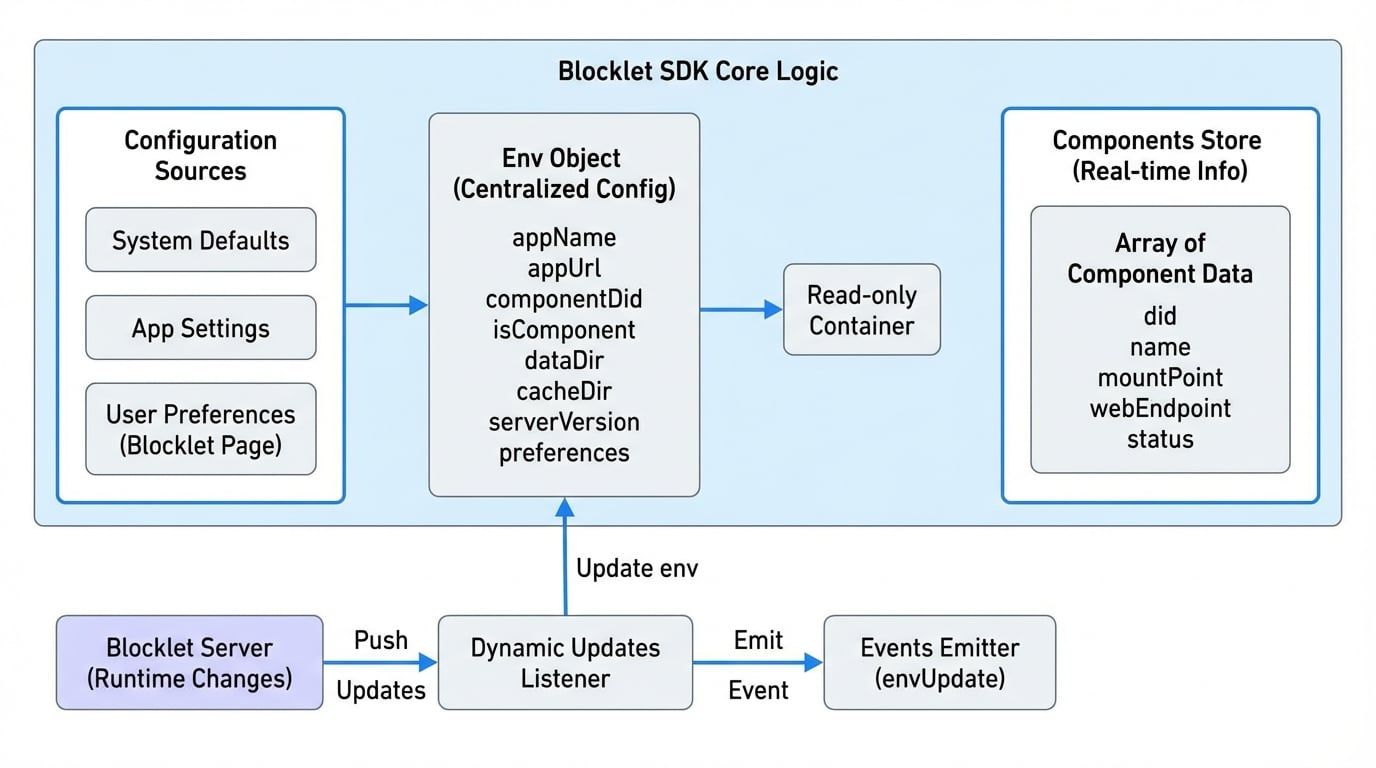
This layered approach provides flexibility, allowing developers and administrators to configure blocklets at different levels.
Dynamic Updates#
The configuration is not just static. The Blocklet SDK listens for runtime changes pushed by the Blocklet Server. For instance, if a user updates a setting on the blocklet's configuration page, the SDK will automatically update the env object and emit an event.
You can listen for these changes using the exported events emitter.
import { events, Events } from '@blocklet/sdk';

// Listen for any updates to the environment or preferences
events.on(Events.envUpdate, (updatedValues) => {
  console.log('Configuration was updated:', updatedValues);
  // You can now react to the change, e.g., re-initialize a service
});
This allows you to build applications that can react to configuration changes without requiring a restart.
Now that you understand how to access configuration and environment variables, you can explore how to use them for more specific tasks. A common use case is managing cryptographic keys and wallets, which is covered in the next section.