Authorization Middleware
The auth middleware is a powerful tool for adding a layer of authorization to your blocklet's routes. It works in conjunction with the session middleware to protect endpoints by verifying a user's role, specific permissions, Know Your Customer (KYC) status, and the authentication method used. This ensures that only authorized users can access sensitive or restricted resources.
Usage#
To use the auth middleware, you import it from @blocklet/sdk/middlewares and apply it to any Express.js route or router that requires protection. You can pass a configuration object to specify the authorization rules.
Here is a basic example of protecting an admin-only route:
routes/admin.js
const auth = require('@blocklet/sdk/middlewares/auth');
const router = require('express').Router();

// This route is only accessible to users with the 'admin' role.
router.get('/dashboard', auth({ roles: ['admin'] }), (req, res) => {
  res.json({
    message: 'Welcome to the admin dashboard!',
    user: req.user,
  });
});

module.exports = router;
If an unauthorized user attempts to access this route, the middleware will automatically respond with a 403 Forbidden error. If the user is not logged in at all, it will respond with a 401 Unauthorized error.
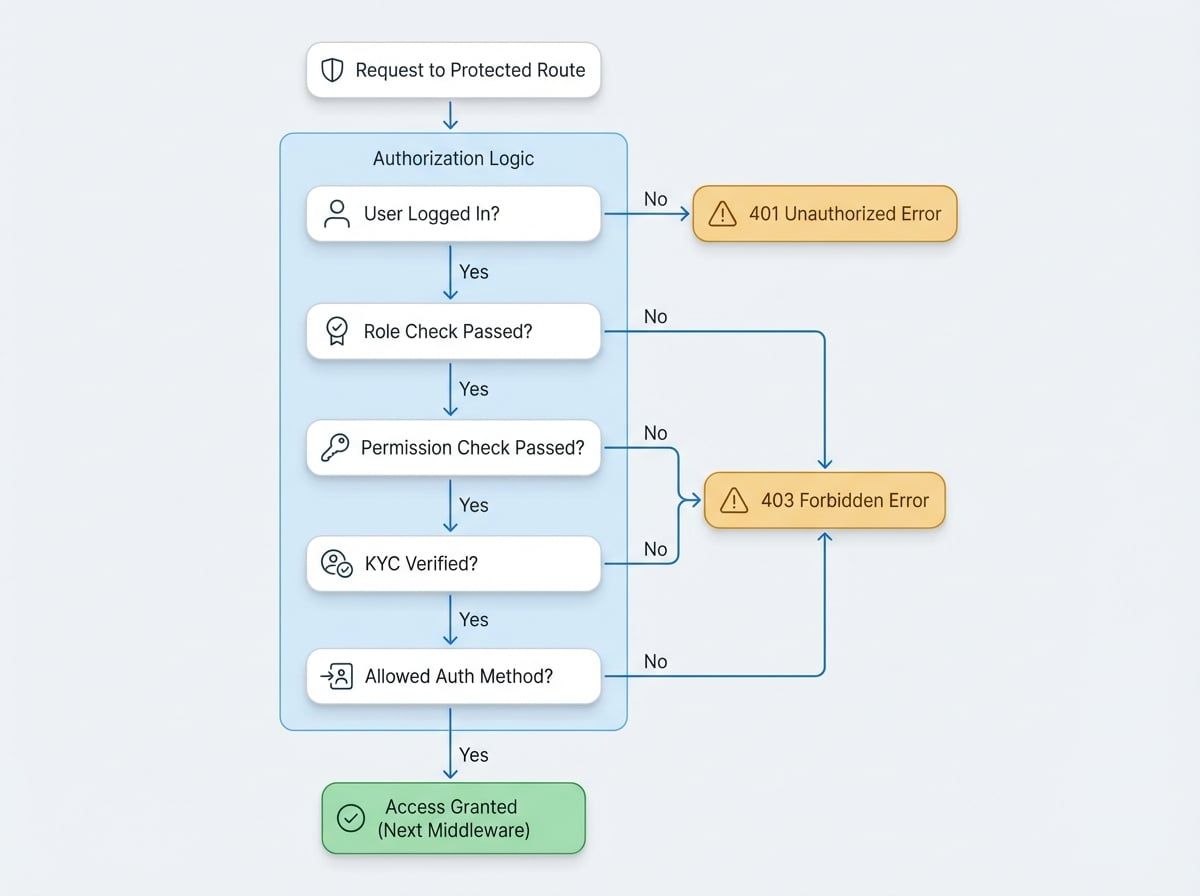
Authorization Flow#
The middleware evaluates authorization rules in a specific order. If a check fails at any point, it immediately rejects the request with the appropriate HTTP error code.
Configuration Options#
The auth middleware accepts a configuration object with the following properties to define fine-grained access control rules.
An array of role names. The user must have at least one of these roles to be granted access. If the user's role is not in this list, the middleware will return a 403 Forbidden error.
An array specifying required KYC (Know Your Customer) verification methods. You can require email verification, phone verification, or both. If the user has not completed the required verification steps, the middleware returns a 403 Forbidden error with the message "kyc required".
An array of allowed authentication methods. The SessionUser object includes a method property indicating how the session was established (e.g., loginToken, accessKey, componentCall). If the user's authentication method is not in this list, the middleware returns a 403 Forbidden error.
Example: Requiring Multiple Conditions#
You can combine these options to create complex authorization rules. For example, to protect a route that should only be accessible to paying subscribers who have verified their email and are not using a temporary access key:
routes/billing.js
const auth = require('@blocklet/sdk/middlewares/auth');
const router = require('express').Router();

router.post(
  '/update-subscription',
  auth({
    roles: ['subscriber'],
    kyc: ['email'],
    methods: ['loginToken', 'signedToken'], // Disallow access via accessKey
  }),
  (req, res) => {
    // Logic to update subscription
    res.json({ success: true, message: 'Subscription updated.' });
  }
);

module.exports = router;
In this example, a user must satisfy all three conditions:
- Have the
subscriberrole. - Have their email address verified.
- Have authenticated using a standard login token or a signed token, not a simple access key.
Summary#
The auth middleware is an essential utility for securing your blocklet's endpoints. By combining role, permission, KYC, and authentication method checks, you can implement robust and granular access control with minimal code.
For more information on managing users and sessions, please see the following sections:
- Session Middleware: Learn how to establish a user session, which is a prerequisite for this authorization middleware.
- Blocklet Service: Understand how to programmatically manage roles and permissions that this middleware relies on.