Event Bus
The Event Bus provides a powerful publish-subscribe mechanism that allows different components within your blocklet and even across different blocklets (within the same ABT Node instance) to communicate with each other in a decoupled manner. This is ideal for broadcasting system-wide state changes or events without components having direct dependencies on one another.
While the Notification Service is designed for sending targeted messages to users, the Event Bus is designed for internal, component-to-component communication.
How It Works#
The Event Bus facilitates an asynchronous communication flow:
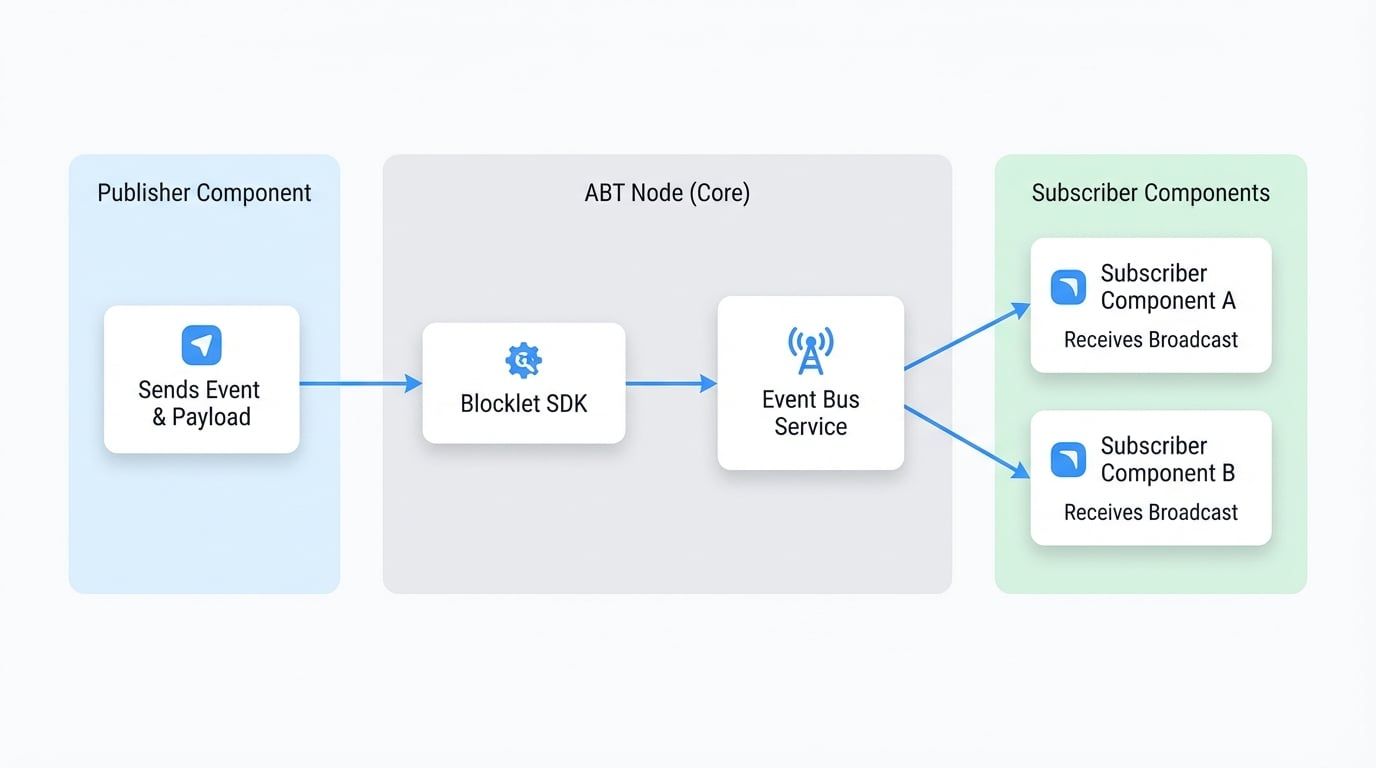
- A Publisher component sends an event with a specific name and payload.
- The Blocklet SDK sends this event to the central Event Bus service running in ABT Node.
- The Event Bus service then broadcasts this event to all Subscriber components that are listening for that event type.
This process is visualized in the diagram below:
API Reference#
publish#
Publishes an event to the event bus, making it available to all subscribed listeners. This is an asynchronous operation.
Parameters#
The name of the event, e.g., user.created or order.shipped.
An object containing the event details.
Example#
Publishing a user creation event
import eventbus from '@blocklet/sdk/service/eventbus';

async function createUser(userData) {
  // ... logic to create the user in the database
  const newUser = { id: 'user_123', name: 'John Doe' };

  try {
    await eventbus.publish('user.created', {
      data: {
        object_type: 'User',
        object_id: newUser.id,
        object: newUser,
        source_system: 'admin_panel',
      },
    });
    console.log('User creation event published successfully.');
  } catch (error) {
    console.error('Failed to publish event:', error);
  }

  return newUser;
}subscribe#
Registers a callback function to be executed whenever an event is received from the event bus. Note that a component will not receive events that it published itself.
Parameters#
A callback function that will be invoked with the event object when an event is received.
Event Object Structure (TEvent)#
The callback function receives a single argument: the event object. This object has a standardized structure based on the CloudEvents specification.
The DID of the component that published the event.
The name of the event (e.g., user.created).
ISO 8601 timestamp of when the event was created.
The type of the primary object in the event data (e.g., User).
The ID of the primary object in the event data.
The detailed payload of the event.
Example#
Subscribing to events
import eventbus from '@blocklet/sdk/service/eventbus';

const handleEvent = (event) => {
  console.log(`Received event of type: ${event.type}`);
  console.log('Event details:', event);

  if (event.type === 'user.created') {
    console.log(`A new user was created with ID: ${event.object_id}`);
    // Update UI or perform other actions
  }
};

eventbus.subscribe(handleEvent);

console.log('Listening for events from the event bus...');unsubscribe#
Removes a previously registered event listener. It's crucial to call this function when a component unmounts or no longer needs to listen for events to prevent memory leaks.
Parameters#
The exact same callback function reference that was passed to subscribe.
Example#
To properly unsubscribe, you must keep a reference to the original callback function.
Full subscription lifecycle
import eventbus from '@blocklet/sdk/service/eventbus';

// 1. Define the handler function
const onUserEvent = (event) => {
  console.log(`User event received: ${event.type}`);
};

// 2. Subscribe to the event bus
eventbus.subscribe(onUserEvent);
console.log('Subscribed to user events.');

// ... later in your application's lifecycle (e.g., component unmount)

// 3. Unsubscribe using the same function reference
eventbus.unsubscribe(onUserEvent);
console.log('Unsubscribed from user events.');