DID Connect
The Blocklet SDK provides a streamlined way to integrate decentralized identity into your application using DID Connect. This allows users to log in securely and manage their data using a DID Wallet, offering a passwordless and user-centric authentication experience. The core components for this functionality are WalletAuthenticator and WalletHandler.
These utilities are built upon the robust @arcblock/did-connect-js library, simplifying the setup process within the Blocklet environment.
How It Works#
The typical DID Connect login flow involves the user, your application's frontend and backend, and the user's DID Wallet.
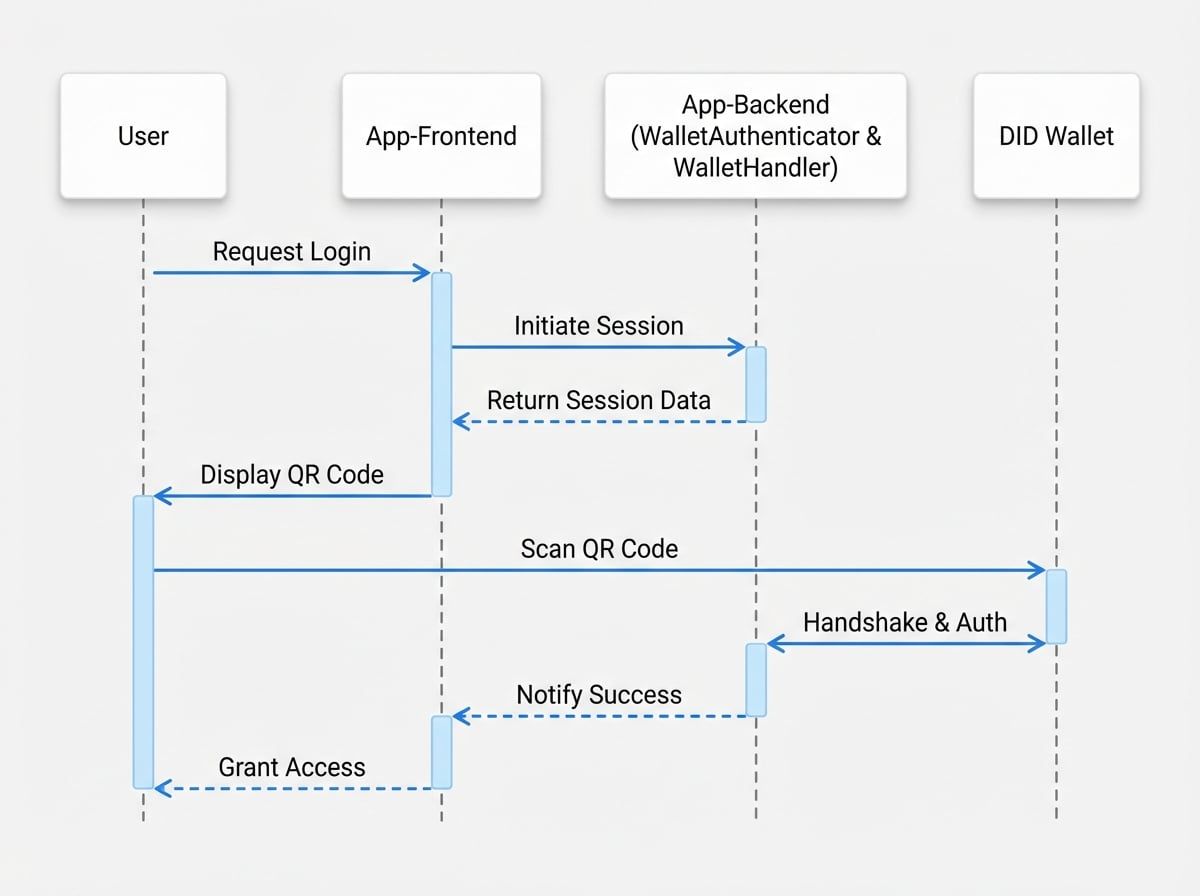
Basic Setup#
Setting up DID Connect in your Blocklet is straightforward. You need to instantiate the WalletAuthenticator and WalletHandler, providing a storage mechanism for session data.
Here is a typical setup in an Express.js application:
Basic DID Connect Setup
import path from 'path';
import AuthStorage from '@arcblock/did-connect-storage-nedb';
import WalletAuthenticator from '@blocklet/sdk/lib/wallet-authenticator';
import WalletHandler from '@blocklet/sdk/lib/wallet-handler';

// 1. Initialize the authenticator
export const authenticator = new WalletAuthenticator();

// 2. Initialize the handler with the authenticator and a storage solution
export const handlers = new WalletHandler({
  authenticator,
  tokenStorage: new AuthStorage({
    dbPath: path.join(process.env.BLOCKLET_DATA_DIR, 'auth.db'),
  }),
});

// 3. Mount the handlers to your Express app
// app.use('/api/did/auth', handlers);
Code Breakdown:
WalletAuthenticator: This class is responsible for creating and managing DID Connect sessions. It generates the data that will be encoded into the QR code displayed to the user.@arcblock/did-connect-storage-nedb: This is a file-based storage adapter for persisting session tokens. It's a convenient choice for Blocklets as it stores data within the blocklet's data directory (BLOCKLET_DATA_DIR).WalletHandler: This class handles the entire authentication lifecycle. It manages session creation, status updates (e.g., when a user scans the QR code), and the final authentication response from the wallet.
Configuration#
The WalletHandler constructor accepts an options object to customize its behavior. Here are some of the key parameters:
If true, returning users who have previously connected their wallet can log in automatically without needing to scan the QR code again. This is achieved by sending a push notification to their wallet.
If true, only the DID of the currently logged-in user (if any) can be used to connect. This is useful for scenarios where a user needs to link a wallet to an existing account.
Customizing App Information#
When a user scans the QR code, their DID Wallet displays information about your application, such as its name, description, and icon. The SDK automatically populates this using your blocklet's metadata. However, you can override this information by passing an appInfo function to the WalletAuthenticator constructor.
Customizing App Info
import WalletAuthenticator from '@blocklet/sdk/lib/wallet-authenticator';

const authenticator = new WalletAuthenticator({
  async appInfo() {
    // This function can return custom app info
    // The returned object will be merged with the default info
    return {
      name: 'My Custom App Name',
      description: 'A custom description for the DID Connect request.',
      icon: 'https://my-app.com/logo.png',
    };
  },
});
Further Reading#
The WalletAuthenticator and WalletHandler provided by the Blocklet SDK are convenient wrappers for the more comprehensive @arcblock/did-connect-js library. For advanced use cases, deeper customization, or a more thorough understanding of the underlying mechanics, please refer to the official DID Connect SDK documentation.
After a user successfully authenticates, the next step is to manage their session within your application. The Blocklet SDK provides a robust middleware for this purpose.
To learn how to verify user sessions and protect your routes, proceed to the next section on Session Middleware.