Bundle Blocklet
The blocklet bundle command is a crucial step in the development lifecycle. It packages your blocklet's source code, assets, and metadata into a standardized .blocklet directory, making it ready for deployment or distribution.
This process intelligently gathers all necessary files specified in your blocklet.yml, includes lifecycle scripts, and prepares a clean, optimized package.
Basic Usage#
To bundle your blocklet, simply navigate to your project's root directory and run the command:
Terminal
blocklet bundleThis command will create a .blocklet folder in your project directory containing the bundled application.
Bundling Process Overview#
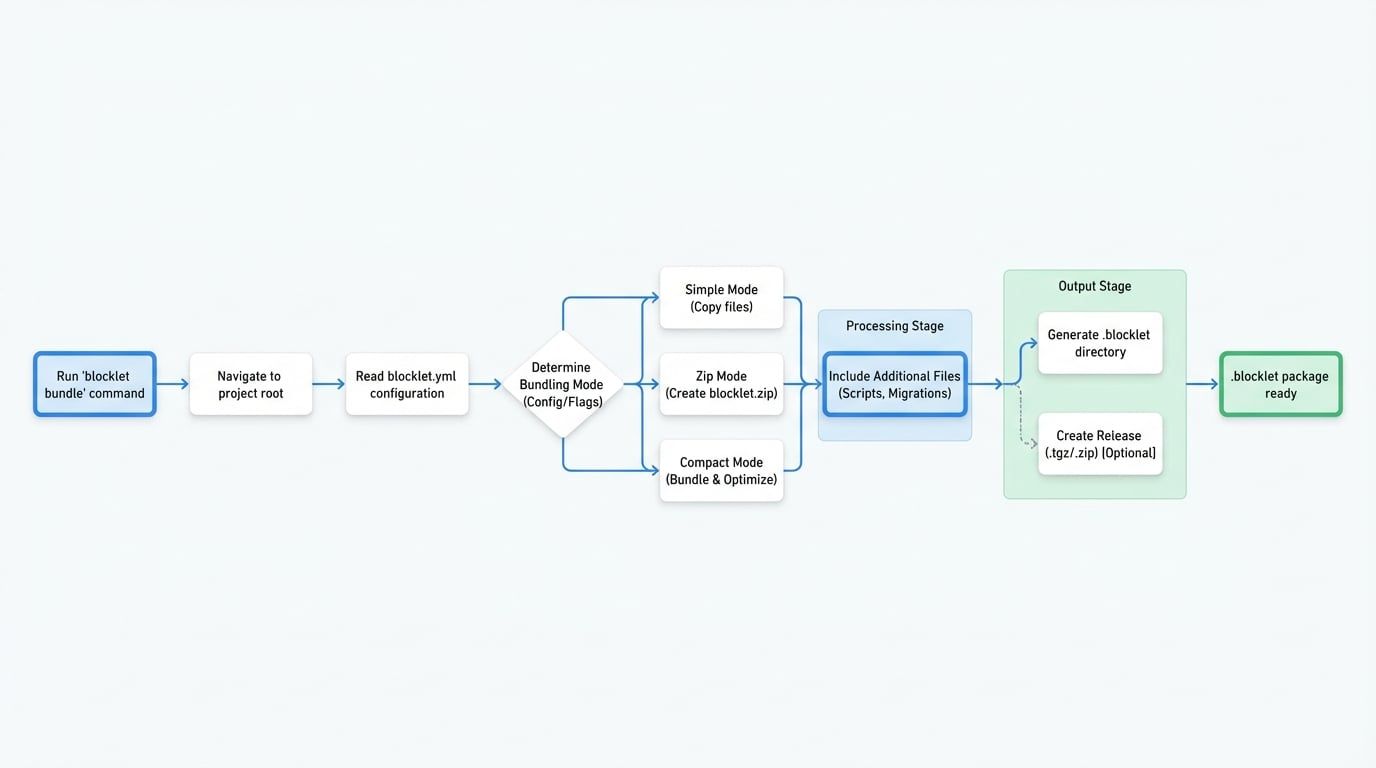
The bundling process involves several key steps to ensure a complete and valid package is created. The following diagram illustrates the interaction between the developer, the Blocklet CLI, and the project files to produce the final bundle output.
Bundling Modes#
The CLI automatically selects the best bundling mode based on your blocklet's configuration (e.g., group: 'static'). You can also override this behavior by explicitly setting a mode.
Simple Mode
The default mode for most Node.js blocklets (e.g., `group: 'dapp'` or `'gateway'`). It copies the necessary files into the `.blocklet` directory without significant transformation. Use `--simple` to force this mode.
Zip Mode
The default for static blocklets (`group: 'static'`). It bundles the main application code into a `blocklet.zip` archive within the `.blocklet` directory. This is efficient for distributing front-end assets. Use `--zip` to force this mode.
Compact Mode
An advanced mode that bundles the blocklet and its dependencies into a minimal set of files. This mode is ideal for optimizing performance and package size by creating a more self-contained build. Use `--compact` to force this mode.
Command Options#
You can customize the bundling process with the following options:
Option | Description |
|---|---|
| Forces the bundler to use zip mode. |
| Forces the bundler to use simple mode. |
| Forces the bundler to use compact mode for a minimal build. |
| After bundling, creates a distributable |
| When used with |
| Toggles the inclusion of changelog information in the bundle. Defaults to |
| Specifies that the blocklet is part of a monorepo, adjusting file resolution accordingly. |
| (Compact mode only) Generates source maps for the bundled code. |
| (Compact mode only) Generates source maps without embedding the original source code. |
| (Compact mode only) Toggles minification of the output code. Defaults to |
| Excludes a specified dependency from the bundle. The dependency is expected to be provided by the runtime environment. Can be used multiple times. |
| Specifies the package manager (e.g., |
| (Compact mode only) Sets the depth to scan for dependencies when parsing external modules. Defaults to |
Advanced Topics#
Handling External Dependencies#
In compact mode, the bundler attempts to include all necessary dependencies. However, some packages (like @blocklet/sdk or express) are provided by the Blocklet Server runtime. To prevent them from being included in your bundle and reduce its size, use the --external flag.
Terminal
# Exclude a single dependency
blocklet bundle --compact --external react

# Exclude multiple dependencies by using the flag again
blocklet bundle --compact --external react --external react-dom

# Exclude multiple dependencies with a comma-separated list
blocklet bundle --compact --external react,react-dom
Including Additional Files#
The bundler automatically includes files beyond your main source code based on your configuration:
filesinblocklet.yml: Any files or glob patterns listed in thefilesarray of yourblocklet.ymlwill be included.- Lifecycle Scripts: JavaScript files referenced in your
scriptshooks (e.g.,pre-start,post-stop) are automatically detected and bundled. - Migration Scripts: All scripts within the
migration/directory (e.g.,migration/*.js) are included to support database migrations.
After successfully bundling your blocklet, the next step is to version it and prepare for distribution. Continue to the next sections to learn more.