Client Architecture
The OCAP Client is designed with a modular architecture to cater to different JavaScript environments and specific use cases. Instead of a one-size-fits-all library, it offers several client implementations, each optimized for a particular context, such as a Node.js backend or a bundle-size-sensitive web application. This approach allows you to choose the most efficient client for your needs, ensuring better performance and a smaller footprint where necessary.
All client variations are built upon a common base, GraphQLClientBase, which provides the core functionality for interacting with the blockchain's GraphQL API.
Inheritance Diagram#
The following diagram illustrates the relationship between the different client implementations:
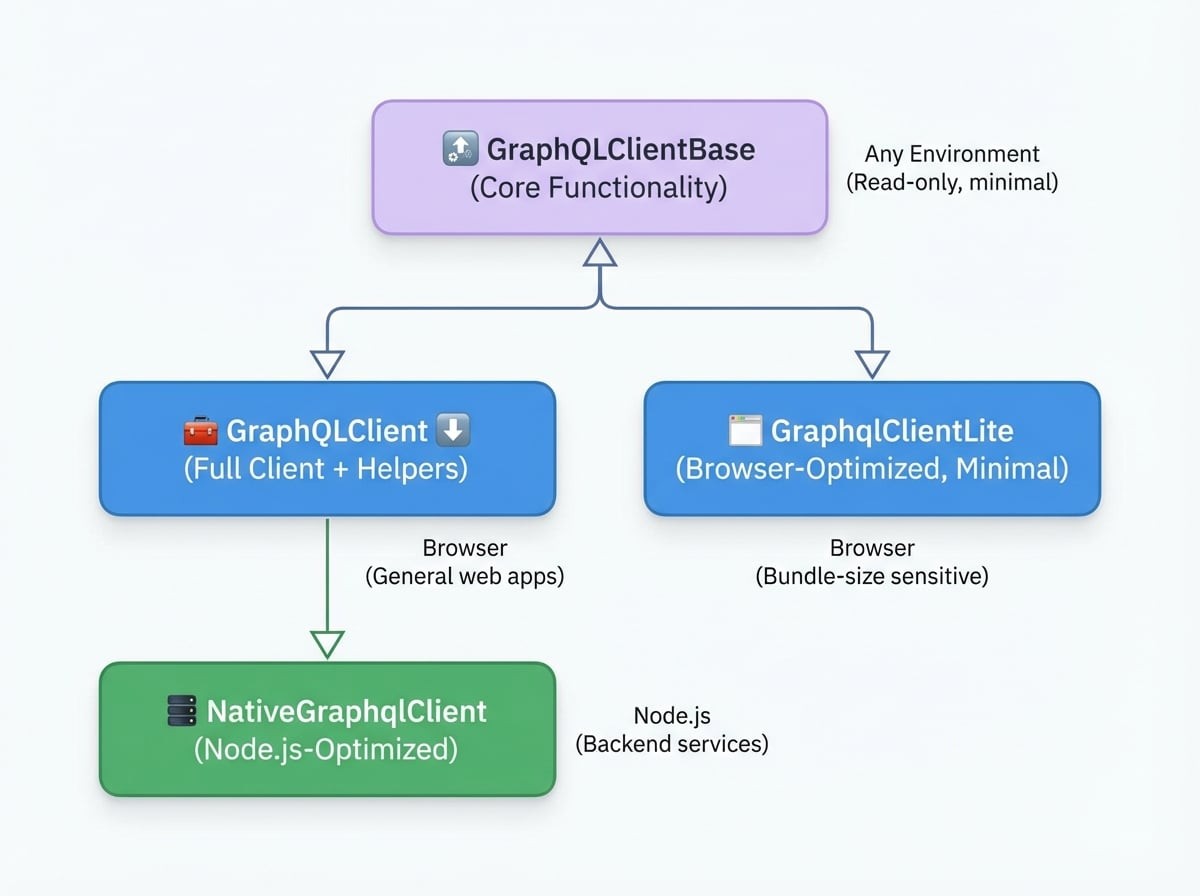
Client Implementations#
Here's a breakdown of each available client and its intended use case.
GraphQLClientBase (The Core)#
This is the foundational, lightweight client that all other clients extend. It provides the essential features for communicating with the blockchain:
- Sending GraphQL queries and mutations.
- Establishing WebSocket connections for real-time event subscriptions.
- Handling gas payment headers for sponsored transactions.
- It is environment-agnostic but requires you to provide compatible implementations for WebSockets and EventEmitters if you use subscriptions.
This client is ideal if you only need basic, read-only functionality and want to minimize dependencies.
GraphQLClient (The Full Client)#
This is the standard, general-purpose client and the one you'll likely use most often. It extends GraphQLClientBase and adds a rich set of high-level helper methods that simplify common on-chain operations. These helpers cover tasks like creating assets, transferring tokens, and managing stakes, abstracting away the complexity of raw GraphQL mutations.
By default, it also automatically initializes its context upon instantiation, making it ready to use immediately.
NativeGraphqlClient (For Node.js)#
This client is specifically optimized for the Node.js runtime. It extends the full GraphQLClient and configures it to use Node.js's native events module for its event handling. This makes it the most performant and reliable choice for any backend application, command-line tool, or script running on a server.
GraphqlClientLite (For Browsers)#
Designed for front-end web applications, the GraphqlClientLite extends GraphQLClientBase and is optimized for minimal bundle size. It swaps out Node.js-specific dependencies for browser-compatible alternatives like wolfy87-eventemitter. If you are building a web application where performance and load times are critical, this client provides the core OCAP functionality without the extra weight of the full helper method suite.
Which Client Should I Use?#
To help you decide, here is a summary of the recommended client for each scenario:
Environment | Use Case | Recommended Client | Import Path |
|---|---|---|---|
Node.js | Backend services, scripts, CLI tools |
|
|
Browser | General web applications (e.g., React, Vue) |
|
|
Browser | Bundle-size sensitive applications |
|
|
Any | Read-only, minimal functionality required |
|
|
Example Imports#
Here’s how you would import each client in your code:
Node.js Client
const NativeGraphqlClient = require('@ocap/client/node');
const client = new NativeGraphqlClient('https://beta.abtnetwork.io/api');
Full Browser Client
const GraphQLClient = require('@ocap/client');
const client = new GraphQLClient('https://beta.abtnetwork.io/api');
Lite Browser Client
const GraphqlClientLite = require('@ocap/client/lite');
const client = new GraphqlClientLite('https://beta.abtnetwork.io/api');Summary#
Understanding the different client implementations allows you to make an informed choice that best fits your application's environment and requirements. By selecting the appropriate client, you can optimize for performance, bundle size, and ease of use.
Now that you understand the client architecture, you can dive deeper into how transactions are constructed and processed. Learn more in the Transaction Lifecycle guide.